Making CUDA Checkpointing 15x and gVisor 2x Faster on a B300: A Worklog
GPU Checkpointing
GPU checkpointing lets an application save its GPU state and later pick up where it left off. This gives us more flexibility in how we run application on top of GPUs. An inference service can release them during quiet periods and resume when traffic returns Modal: Serverless GPU scaling
Doubleword: Faster SGLang cold starts
Cedana: GPU checkpointing and migration with CRIU .
We wanted to see how far we could push GPU checkpointing and restore out of curiousity and to learn a couple things along the way. We began with the cuda-checkpoint implementation on a B300 and spend some time understanding how it works and to understand where the bottlenecks lay. Then we’ll try different ideas to make it faster and see what did and didn’t work.
gVisor
cuda-checkpoint is often paired with another program such as CRIUCRIU: GPU checkpointing or gVisorgVisor: GPU checkpoint/restore
Modal: Memory snapshots with gVisor
Modal: GPU memory snapshots to fully serialize the gpu resource and the application itself to disk. Often, one will hear about sandboxing or snapshotting with these types of applications.
We observe a possible 2x speedup by running this version of cuda-checkpoint.
Takeaways/TLDR
- Tuning is difficult. There’s many types of hardware and system configurations.
- Hardware makes a difference for application performance where sometimes copies can be 3x faster on one platform.
- The configuration of the number of threads and buffers difficult as host copy speeds must match up to the PCIE copy speeds.
- It’s hard to predict performance without tools. Always have some benchmarks and traces to understand what is going o.
- NUMA affects performance (up to 2x the performance) due to memory being allocated on a different socket
- The two application specific bottlenecks of
cuda-checkpointare memory allocation and the number of buffers and threads used for copying data to and from the GPU. - Find opporunities in parallelize operations
How to use cuda-checkpoint
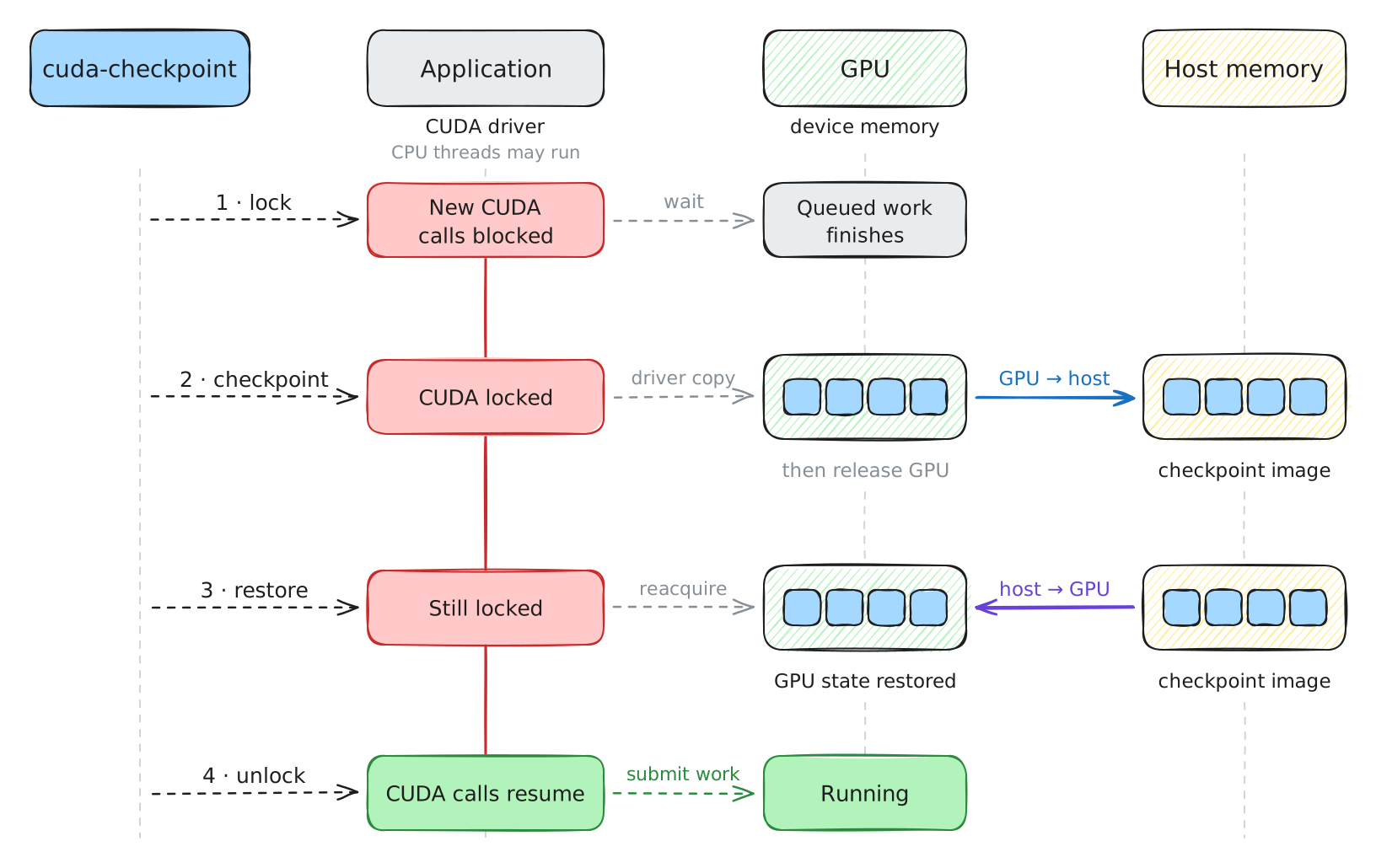
Checkpointing and restoring a CUDA process each take two steps:

To checkpoint, we first lock the process’s CUDA activity, preventing new work and waiting for existing work to finish. We then checkpoint its GPU state into host memory and release its GPU resourcesAlthough releasing the GPU resources is not necessary for checkpointing, it allows other resource-hungry applications to run on the GPU
In between, another GPU application can utilized the free’d up resources.
To bring it back, we restore the GPU resources and copy the saved data back to GPU memory. Finally, we unlock the process’s CUDA activity so it can submit work again.
NVIDIA’s cuda-checkpoint tool exposes these four operations through a simple command-line interfaceThis cli communicates using a custom protocol to a cuda process over a pipe. It is a thin wrapper, but impacts latency as shown later:
ps aux | grep (your gpu application)

cuda-checkpoint --action lock --pid $PID
cuda-checkpoint --action checkpoint --pid $PID
cuda-checkpoint --action restore --pid $PID
cuda-checkpoint --action unlock --pid $PID
And this is how it interacts in action:
The API is very similar:
pid_t pid = getpid();

CUcheckpointLockArgs lock_args{0};
cuCheckpointProcessLock(pid, &lock_args);

CUcheckpointCheckpointArgs ckpt_args{0};
cuCheckpointProcessCheckpoint(pid, &ckpt_args);

CUcheckpointRestoreArgs rest_args{0};
cuCheckpointProcessRestore(pid, &rest_args);

CUcheckpointUnlockArgs unlock_args{0};
cuCheckpointProcessUnlock(pid, &unlock_args);

CUprocessState st;
cuCheckpointProcessGetState(pid, &st);
if (st == CU_PROCESS_STATE_CHECKPOINTED) {
    // ...
}
This tool only stores the checkpoint image to CPU memory.
Existing work
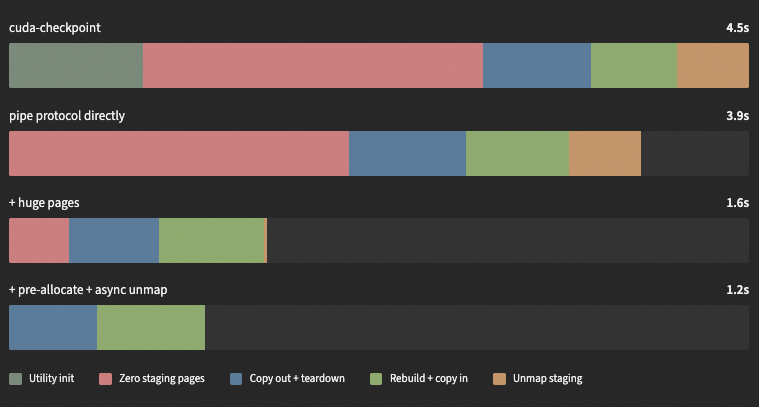
Fergus Finn at Doubleword made a ~9 GB checkpoint-and-restore benchmark on an RTX 4090 nearly 4× faster, cutting the time from 4.5 seconds to 1.2 seconds. The improvements came from avoiding repeated CLI initialization, enabling huge pages, preallocating the host buffer, and deferring its cleanupReverse-engineering NVIDIA’s cuda-checkpoint for faster cold starts. We’ll explore these techniques in more detail, tracing the driver’s internals to explain why they help and which bottlenecks they address. We’ll also apply some of them ourselves and see that the optimizations with CLI, huge pages and preallocating host buffers are useful.
What’s happening in cuda-checkpoint?
We’ll dig into libcudaNVIDIA’s user-space CUDA driver to see what’s happening underneath the hood during each step. We want to observe where the time goes through tracesEach perfetto trace shows a vLLM instance running on two B300s running GLM5-3 flash (~347GB in total). Each GPU instance holds around half the memory (~172GB) and we are checkpointing both gpus, each referred to as a rank.
Setup
| Setup | Component | Specification |
|---|---|---|
| Host | Number of nodes | 1 |
| GPU | 8 × NVIDIA B300 SXM6 AC | |
| PCIe | Gen6 x16; one link per GPU | |
| NUMA | GPUs 0–3 on node 0; GPUs 4–7 on node 1 | |
| CPU | 2 × Intel Xeon Platinum 8559C; 48 cores per socket | |
| Memory | 4 TB; 1 TiB container limit; no swap | |
| Driver | 580.95.05 | |
| Workload | Model | GLM-5.3-flash |
| Runtime | vLLM; tensor parallelism 2 | |
| GPUs | 0 and 1 for every run | |
| Checkpoint | Per rank | 172.74 GB through the capture ring |
| Driver image per rank | 173.85 GB including about 1.1 GB on the native driver path | |
| Restore | Per rank | 173.8 GB |
Note Every optimization arm ran as an untraced / traced, although it didn’t make much of a difference with tracing on.
We run GLM-5.3-flash with vLLM 0.30.0 on GPUs 0 and 1 of one B300 host. Tensor parallelism is 2, so each GPU has a worker process, called a rank. We use eager execution, an 8,192-token context limit, and an 8 GiB KV cache per GPU.
CUDA_VISIBLE_DEVICES=0,1 python -m vllm.entrypoints.openai.api_server \
  --model /path/to/GLM-5.3-flash \
  --tensor-parallel-size 2 \
  --enforce-eager \
  --max-model-len 8192 \
  --kv-cache-memory-bytes 8589934592

Generation settings go in each request:

{"temperature": 0, "seed": 1234, "max_tokens": 128}
We run some requests to see if vLLM is running. The benchmark controller waits until vLLM reports no running or queued requests. The controller starts cuda-checkpoint --action lock --pid <worker-pid> for both ranks in parallel and waits for both calls to finish. It does the same for checkpoint, restore, and unlock, in that order. After each cycle, it sends the same three requests and checks that their answers and token IDs match those recorded before checkpointing.
Our tracing tool uses Frida to attach function-entry and function-return hooks inside both vLLM workers. It also instruments each cuda-checkpoint process, so we can see the CLI’s setup and request alongside the work inside the target worker. The hooks record driver operations and CPU calls such as mmap and memcpy. We add GPU counters from NVML, sampled at a target interval of 100 ms, and CPU, memory, and page-fault counters from /proc.
These traces and counters get aggregated into a single perfetto trace output.
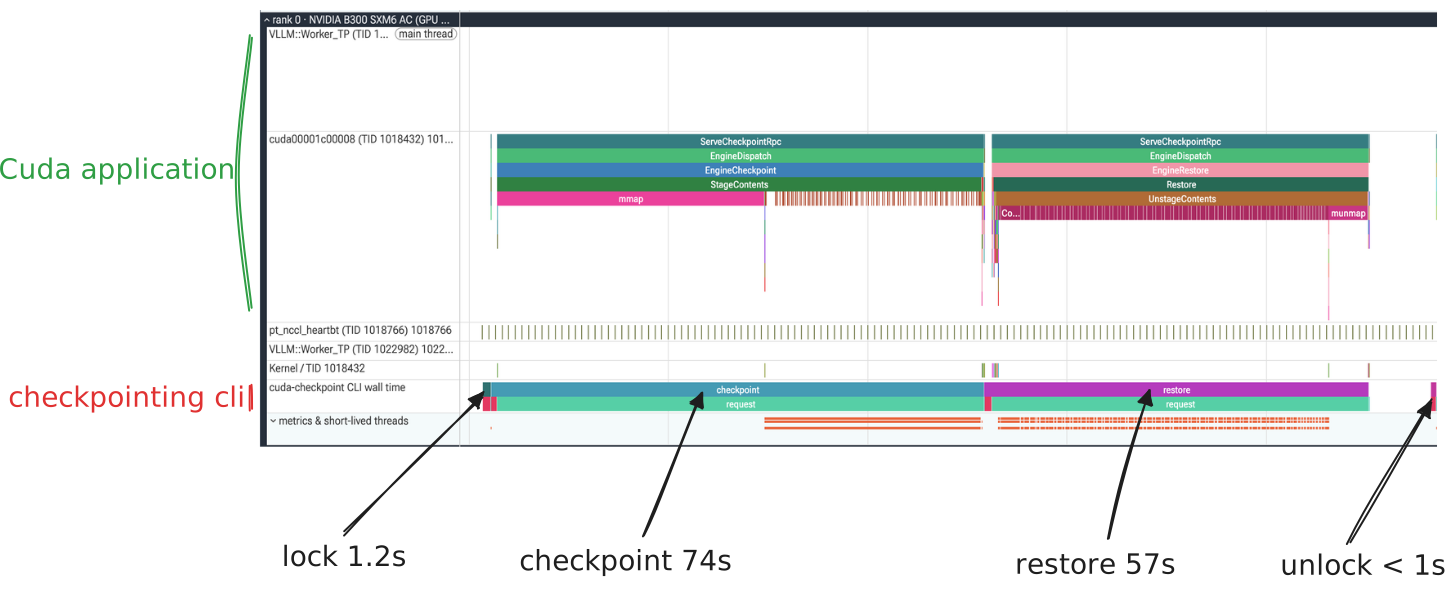
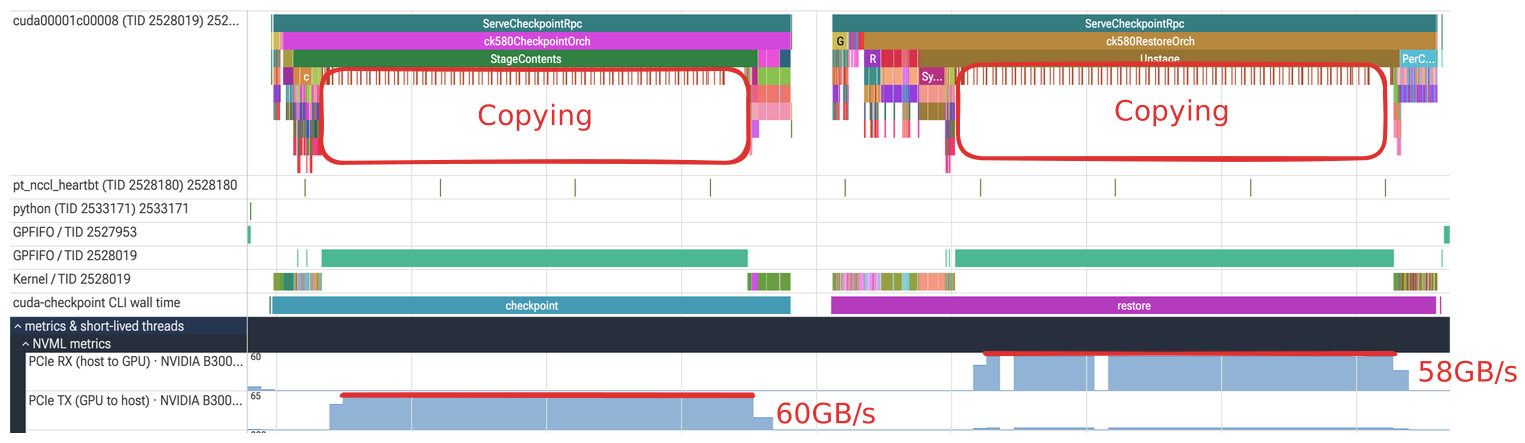
We can see how much time spent locking, checkpointing, restoring and unlocking. Clearly, checkpointing and restoring take up most of the time, so let’s zoom into checkpointing.
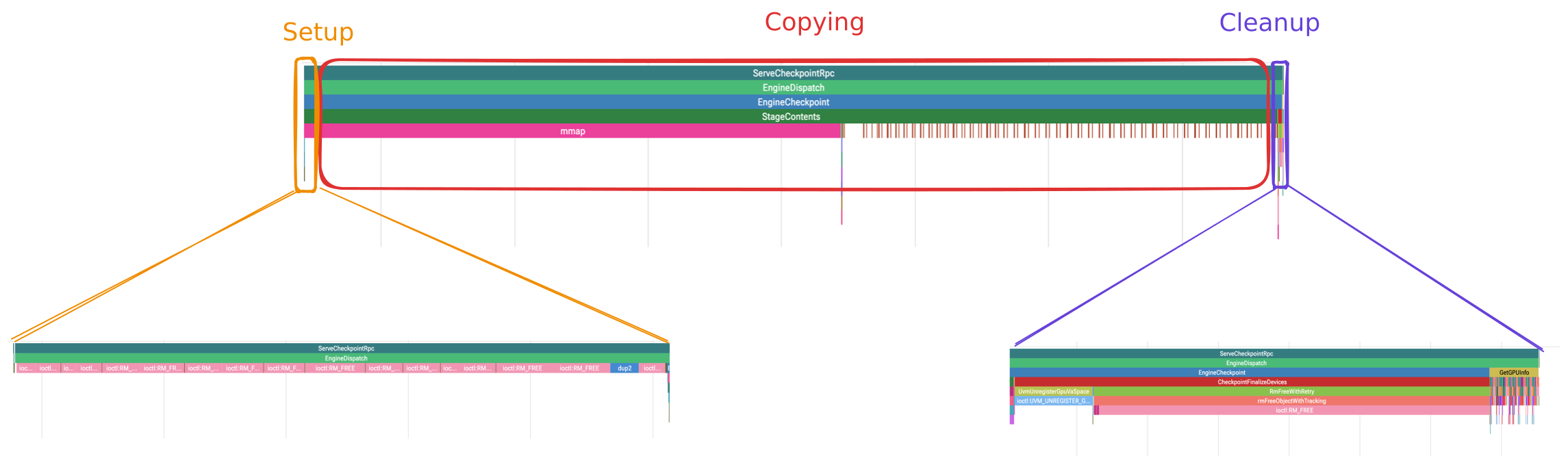
The checkpointing profile has three main phases: setup, copying, and cleanup. Copying takes up the most of the time. Even with the theorical PCIE max bandwidth of 64GB/s on the machine, that would take at least ~2.5s to checkpoint 172GB
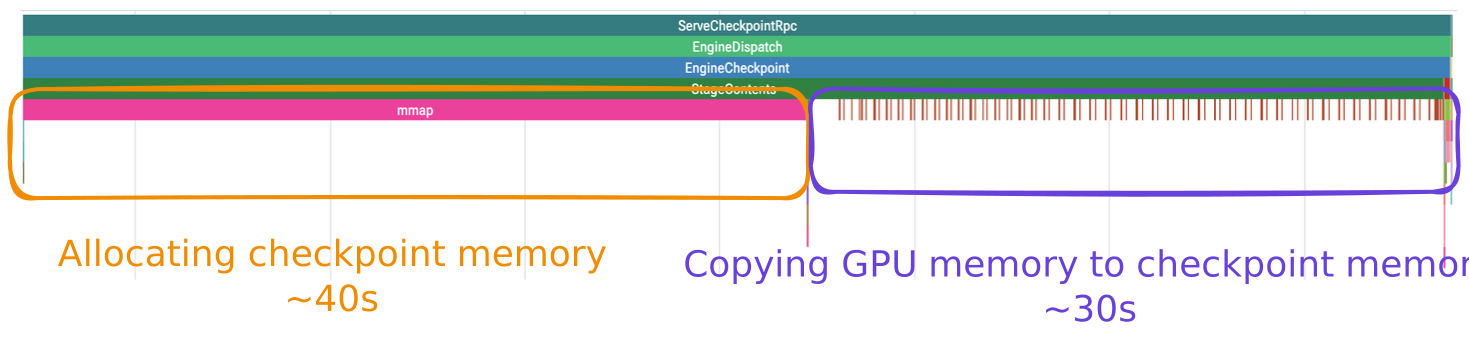
It’s interesting tha mmap is taking longer than copying. We’ll revisit this later once we piece everything together.
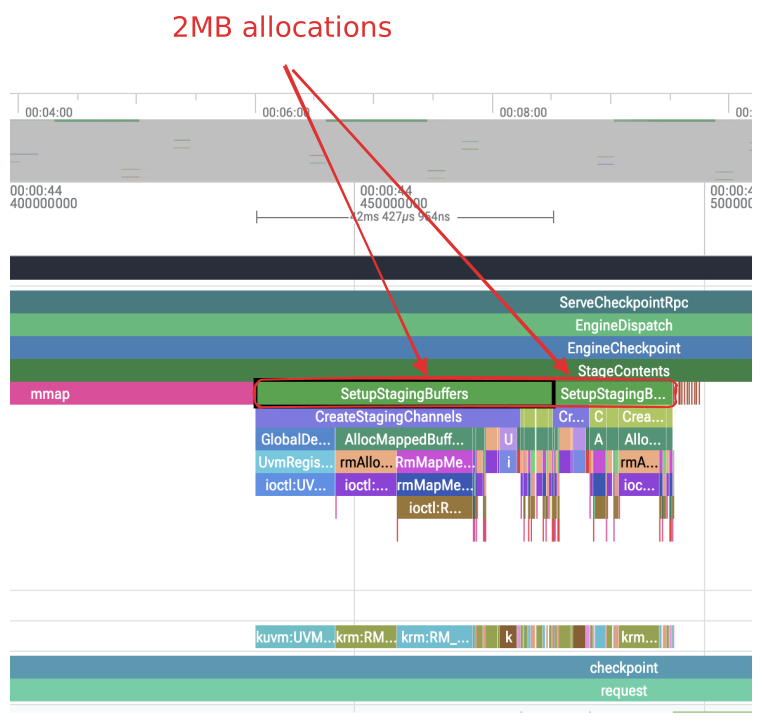
The copying path allocates a large host buffer with mmap and two pinned staging buffersEach staging buffer is 2 MB with small pushbuffers for executing the copies. This large buffer holds the final checkpoint image.
The staging buffers appears to alternate in a double-buffering scheme: while the GPU copies data into one, the CPU copies data from the other into the final checkpoint buffer:

The GPU’s DMA engine transfers data from VRAM into one staging buffer while the CPU copies data from the other into the final checkpoint buffer allocated with mmap.
So now that we understand the individual parts, taking a step back, we can stitch a more complete pictureI haven’t explained the restore, but intuitively, it should reverse operations of checkpointing:
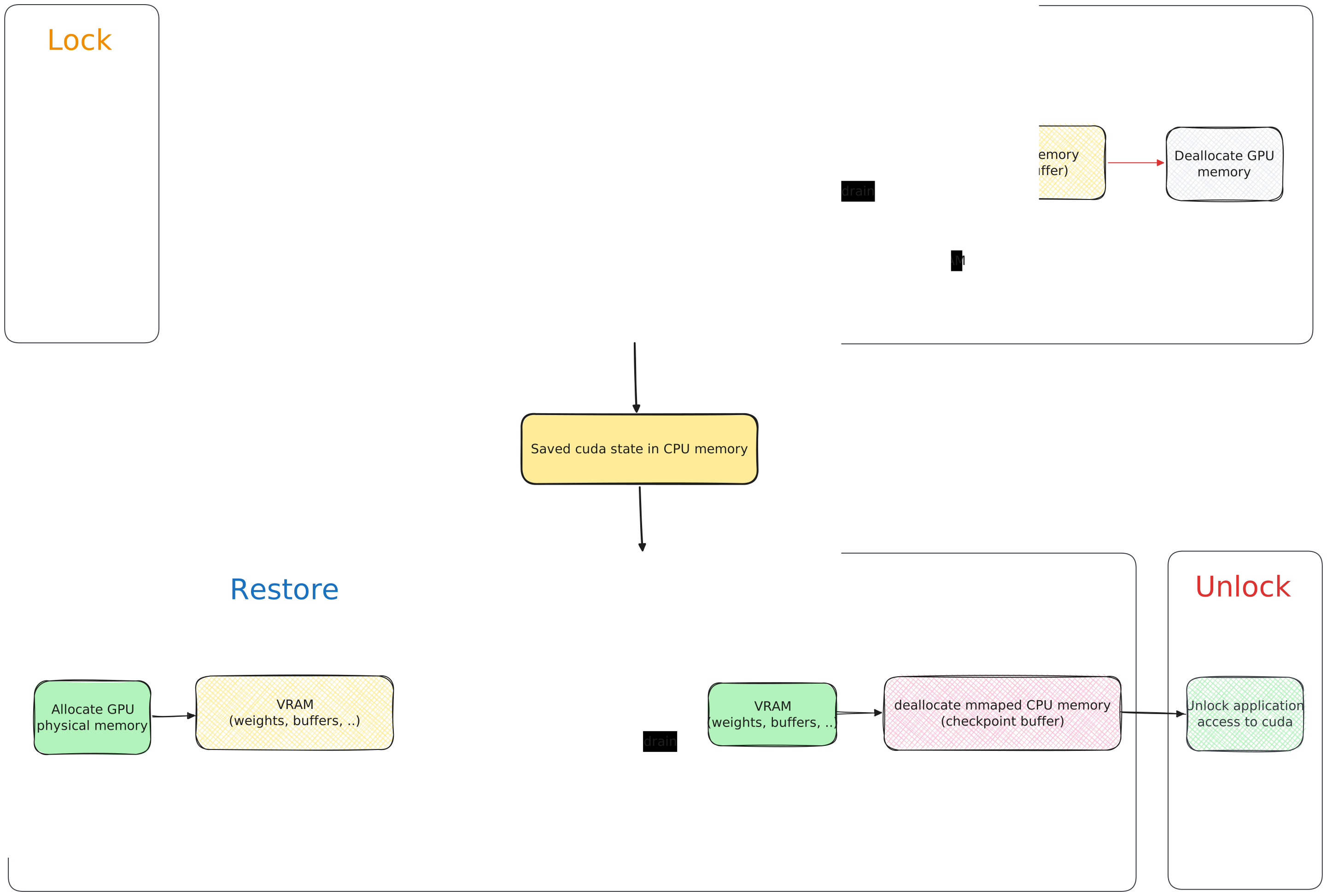
How does the engine know what to copy?
And how does the engine know what to copy? By walking memory manager’s blocks and copying its contents from GPU memory to CPU memory.
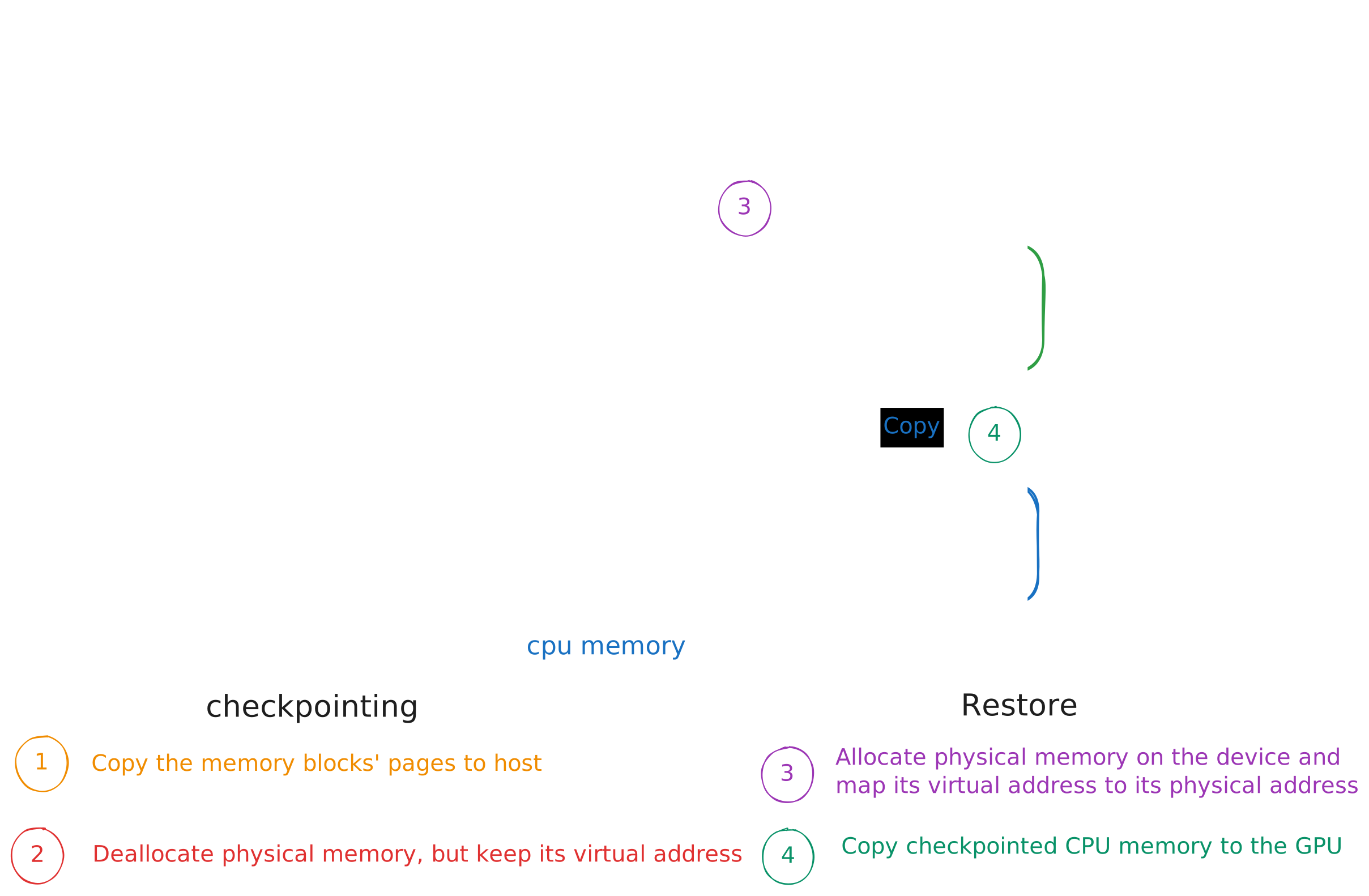
Each block tracks its checkpoint state. During checkpointing, its physical GPU memory is freed while its virtual address is preserved. On restore, newly allocated GPU memory is mapped back to that addressOne possible reason for keeping the checkpoint in host memory is to leave full-process serialization to CRIU, which can save the driver’s bookkeeping alongside the rest of the process’s CPU-side state.
Reasoning cuda-checkpoint’s design
Let’s dig into why cuda-checkpoint is slow. We have two areas of the checkpoint taking up a good chunk of time.
mmap is called with mmap(address, total, PROT_READ | PROT_WRITE, MAP_PRIVATE | MAP_ANONYMOUS | MAP_FIXED | MAP_POPULATE, -1, 0);.
The fourth argument includes MAP_POPULATEPopulate (prefault) page tables for a mapping. For a file mapping, this causes read-ahead on the file. This will help to reduce blocking on page faults later
- man pages</span> will go ahead and tell the OS to touch every page to page fault. Allocating 173GB of memory twice takes a while.
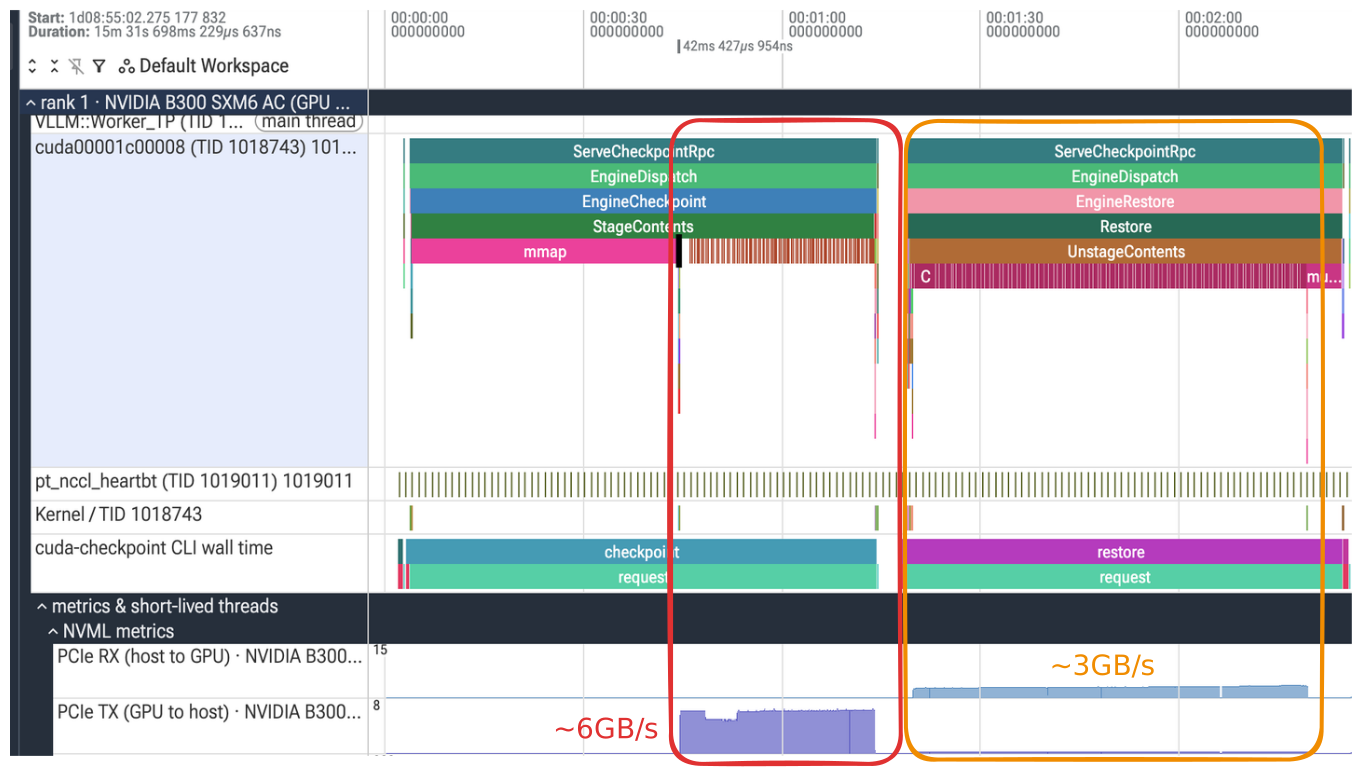
On this B300 node, the theoretical maximum bandwidth of a one way PCIE transfer is 64GB/s. Checkpointing hovers around 6GB/s and restore 3GB/s, an almost 10x and 20x decrease.
Two questions arise here:
- What is causing the checkpointing to be slow? (Is somehow the DMA transfer slow? Is it the CPU copying? Is it the size of the staging buffers?)
- What makes restore slower than checkpointing? We should expect the same bandwidth from both.
The first quesion can be answered by taking a look at the following graph how much time the copy spent calling memcpy to drain the staging buffers. If the total time of memcpy is small, then the staging buffers are taking too long to fill up. Otherwise, the CPU is taking too long to copy the buffers from the staging buffers into the checkpoint memory. We can see that this is the case belowYou might be wondering why I don’t show the memcpy in the cuda track. There are hundred of thousands of memcpys in the trace and I wanted to clearly separate it out:
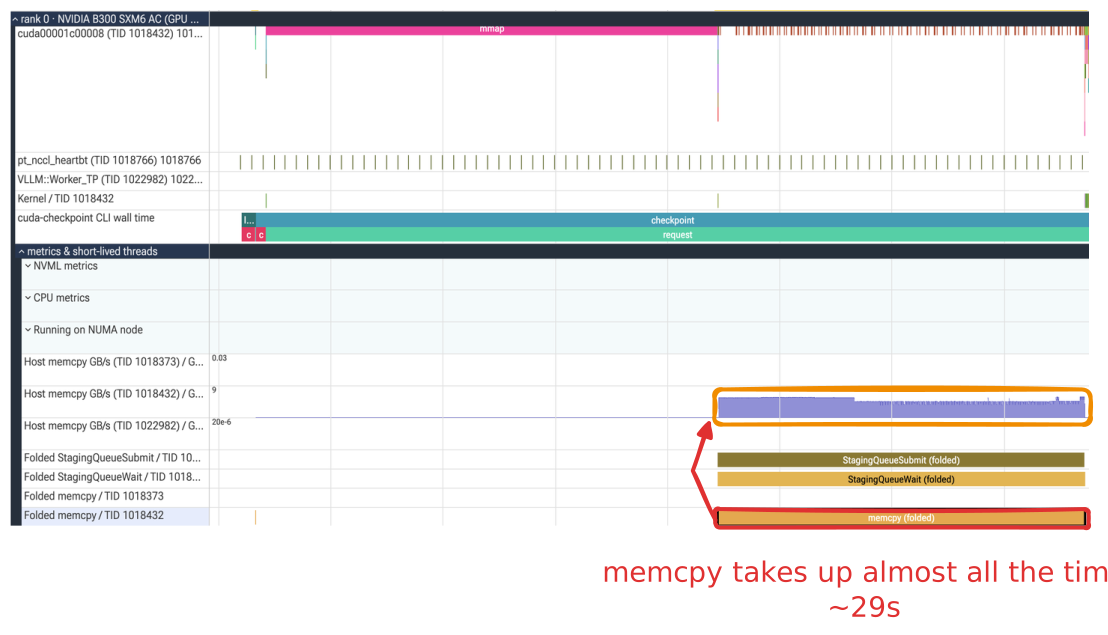
Now we see that bottleneck is the CPU, being a single thread that copies from the buffer.
On to the next question: Why is restore then so much slower? If we take a look at the number of page faults in the restore phase, the trace reports around 800k faults per second for each GPU. If each 4 KiB page copied incurs one fault, that corresponds to:
1.6 million faults/s × 4,096 bytes/page ÷ 2 GPUs ≈ 3.3 GB/s per GPU
Which matches the reported PCIE RX GB/s.
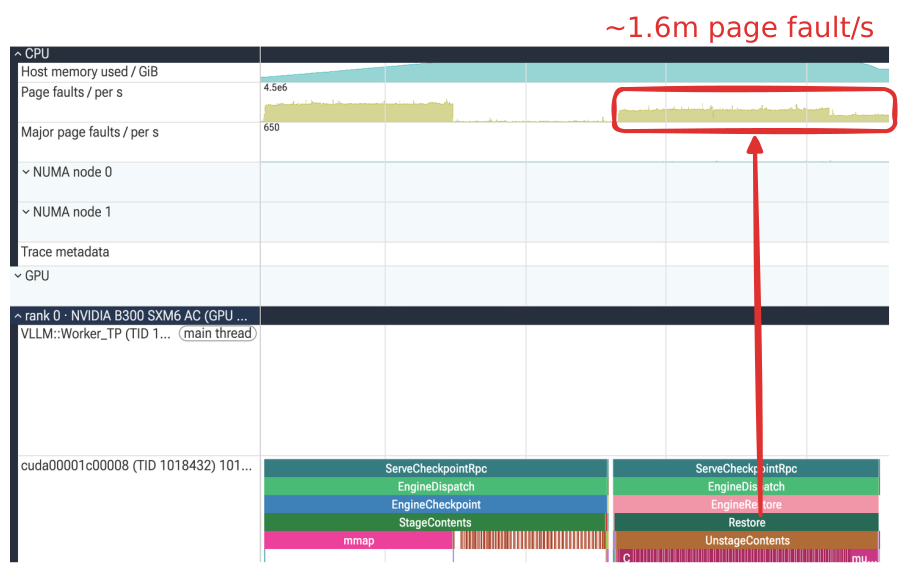
Why is the number page faults higher? We shouldn’t really be page faulting here. We have enough memory ad we’re not allocating any memory because we’re reusing the checkpoint buffer. I suspect it might be dealing with numa because the system is setup with two sockets:
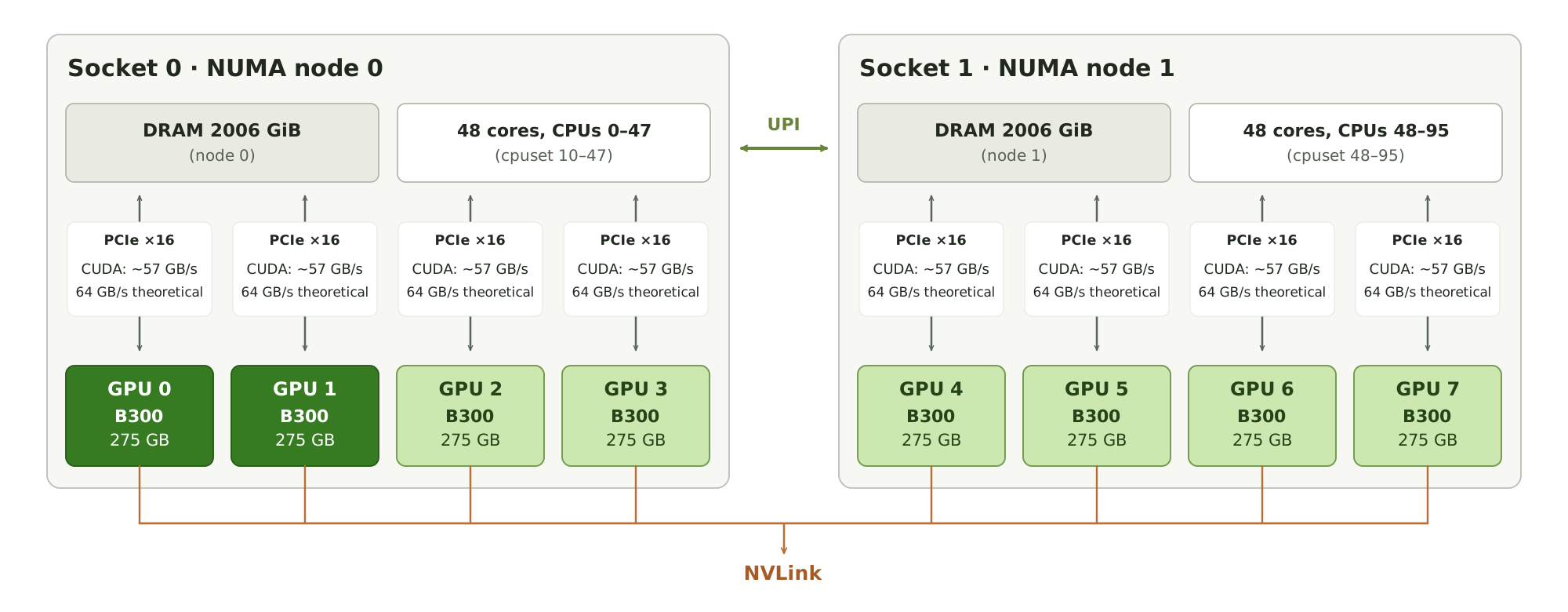
If we rerun the baseline with some NUMA tracing (reading /proc/vmstat), we can see there’s local and total NUMA page faultsNUMA page faults are categorized into local and remote. Local means the page exists on the same CPU node. Remote means that the CPU has to go read the memory through another CPU, incuring cost:
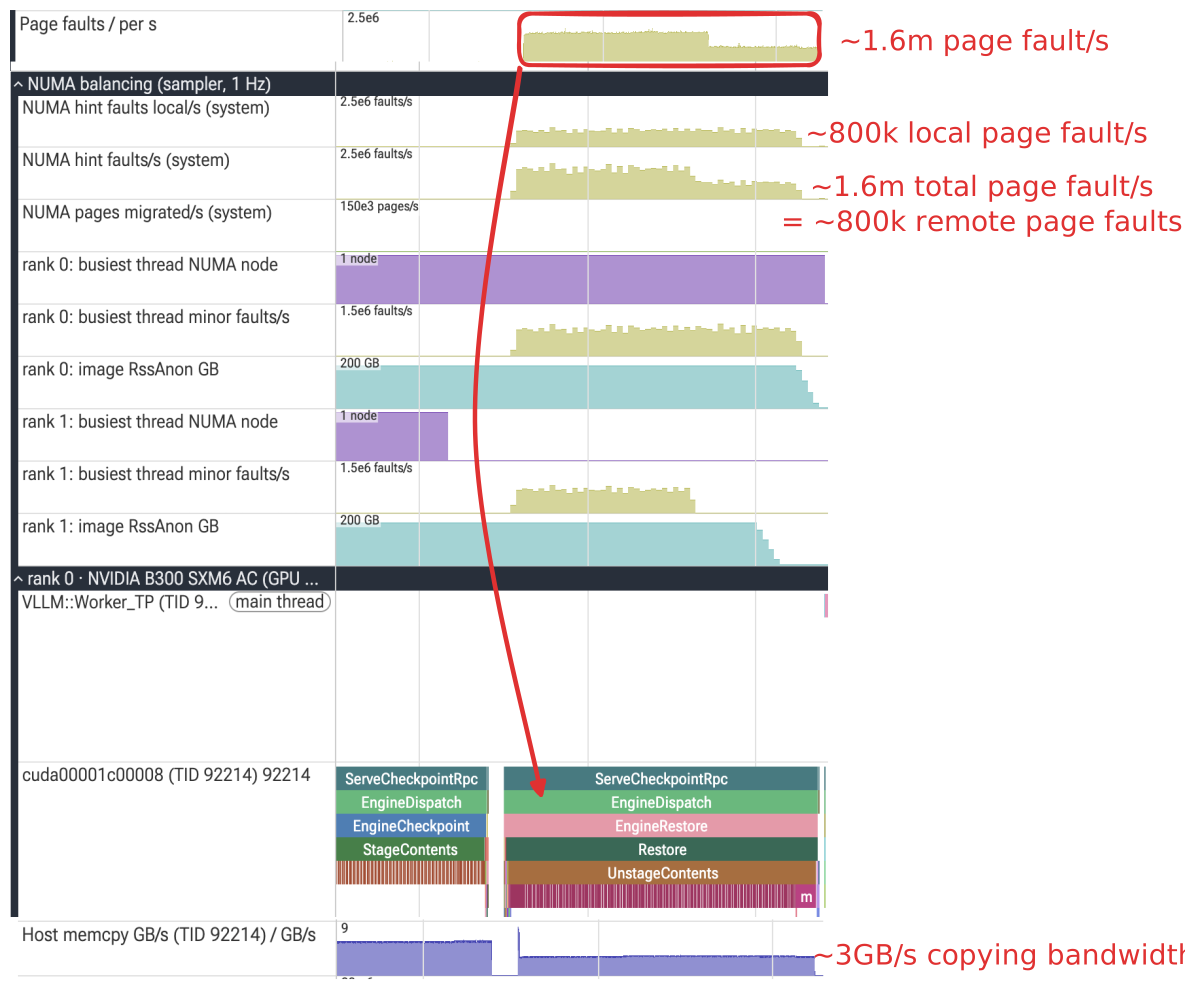
Local page faults don’t incur much cost, but remote page faults indicate that the application is reading memory through another CPU socket. With half of the reads going to through another socket, we can see why the throughput is halved.
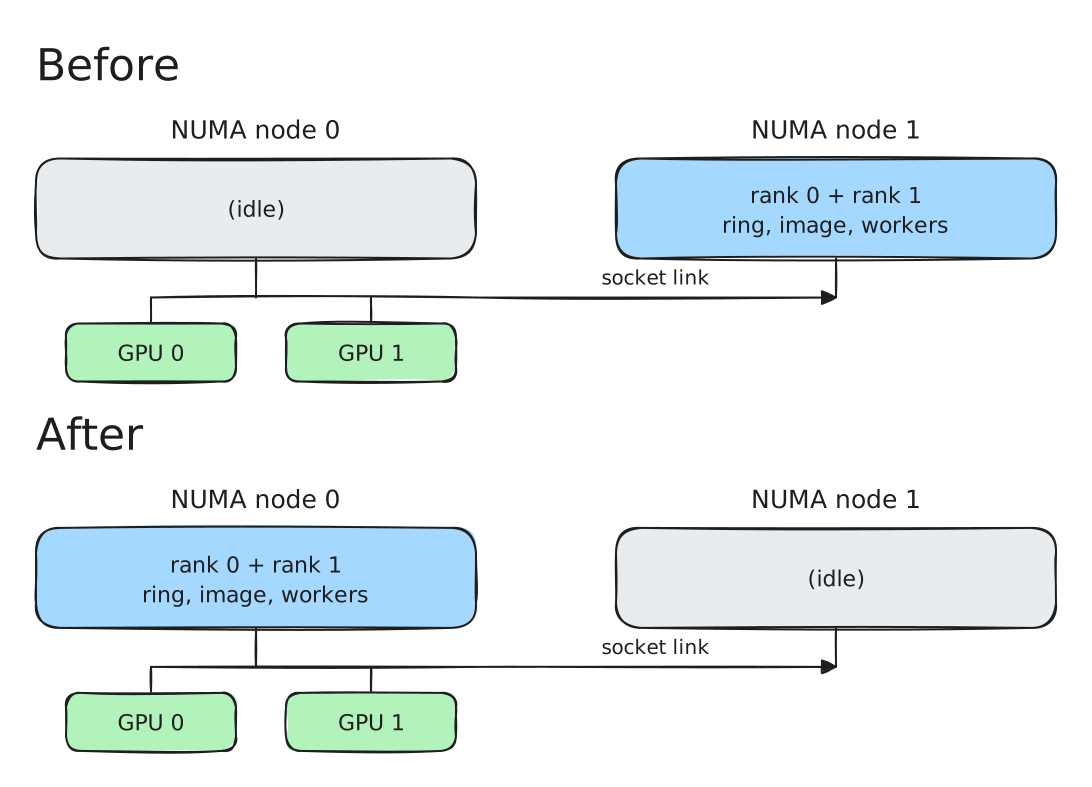
In this example, both GPUs connect to NUMA node 0. If the buffers are on node 1, GPU transfers must cross the link between sockets. Placing the buffers and workers on node 0 avoids that extra path.
Let’s see a quick fix by setting mpol to localGives a hint to the kernel to prefer to allocate memory from the local CPU node.
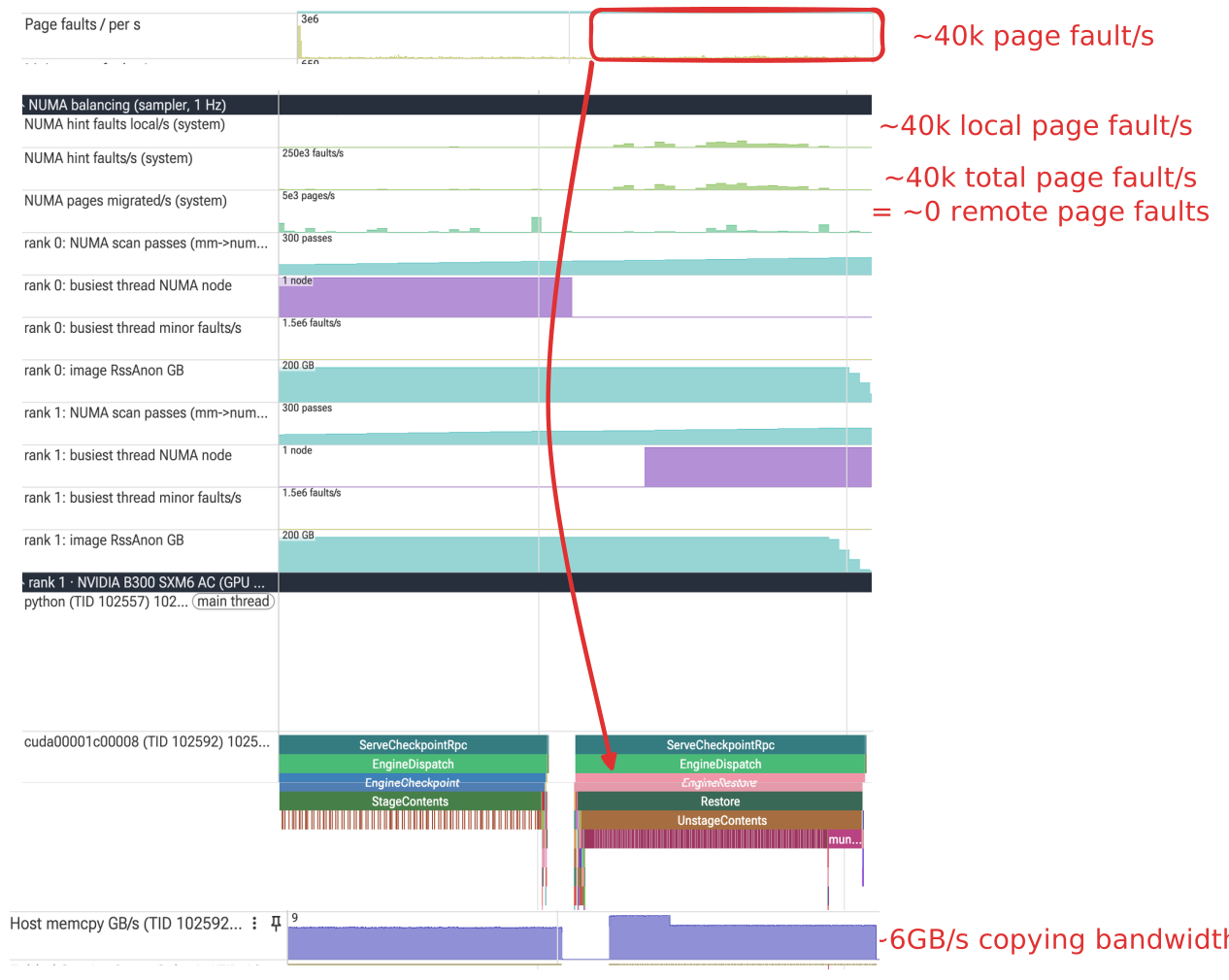
No more remote reads and we see now see that the restore is now equal to the checkpoint (~6Gb/s)!
Why was cuda-checkpoint designed this way?
The driver cannot assume a particular CPU or pinned-memory budget, keeping compatibility and usability a priority:
- A large worker pool could compete with the application or other checkpointing processes, especially when several GPU processes checkpoint simultaneously. P- inning the entire checkpoint could demand more pinnable memory than the system can support.
- Two small staging buffers and a single copying thread keep those requirements modestEach 2 MiB staging buffer matches a common huge-page size. I’m not sure if this is a concidence.
- The newer drivers (as of writing, 2026), allow users to specify what to do with the gpu memory. See custom storage checkpointing.
Optimizations for cuda-checkpoint
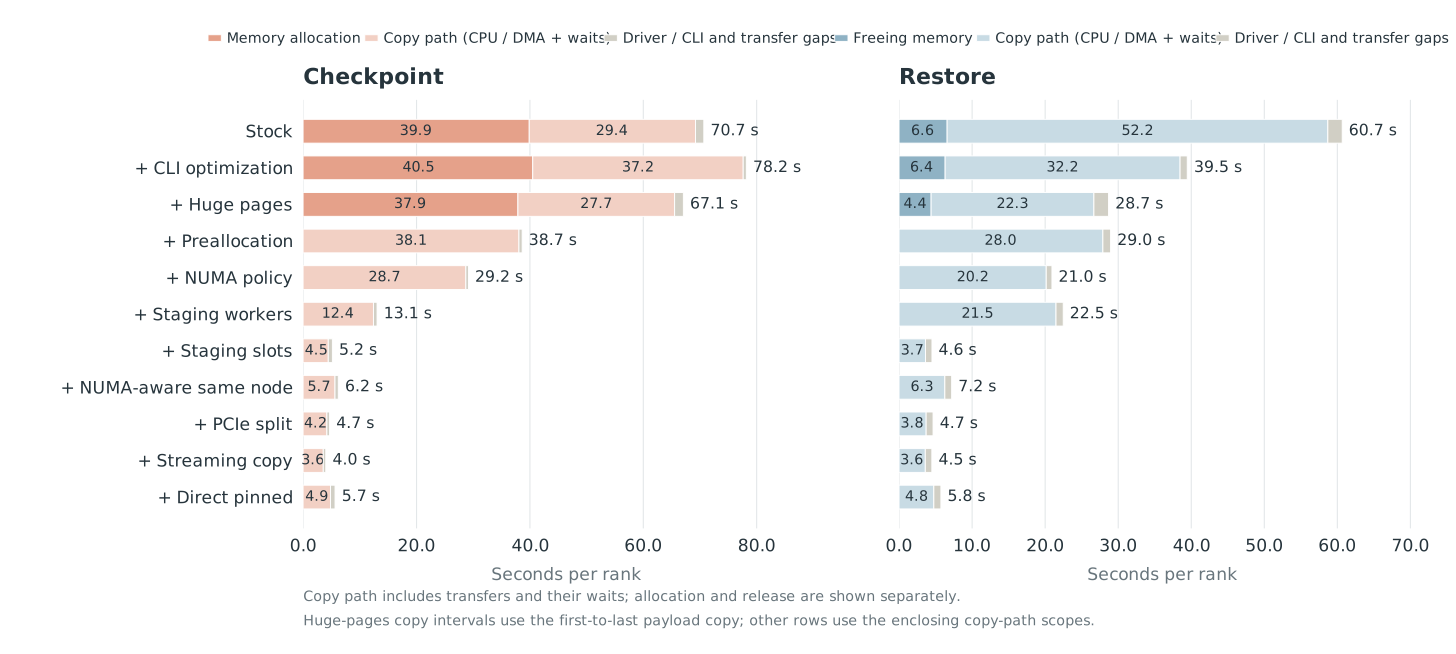
Each optimization below will break down what the optimization is and have a perfetto trace associated with itEach trace shows a GPU checkpoint and restore of a vLLM instance running glm5.3 on two B300s. Each checkpoint and restore is ran multiple times (at least 3). A cycle is locking + checkpointing + restoring + unlocking. The run measurement is the median time taken for a cycle after the first cycle.
Rewriting the CLI
Why is the CLI slow in the first placeI was curious from the DoubleWord blog, but it didn’t have an explanation? If we take a profile, it becomes immediately obvious:
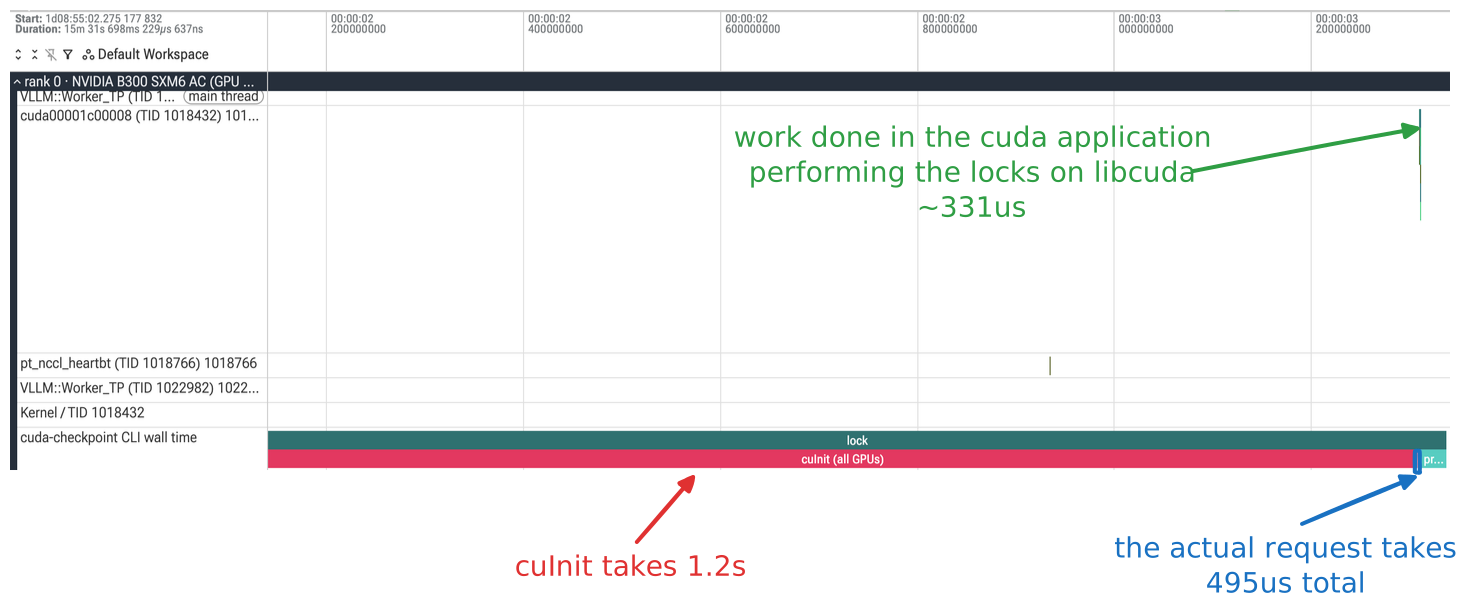
The actual work done locking is miniscule compared to time to call the cli to setup and then send the requestThis CLI time is constant. You can observe it for every command. So, every invocation of cuda-checkpoint will have an overhead of at least one second.
Each CLI call initializes CUDA before it sends a request. We can keep a controller running and reuse it for lock, checkpoint, restore, and unlock. This avoids repeating initialization for each action.
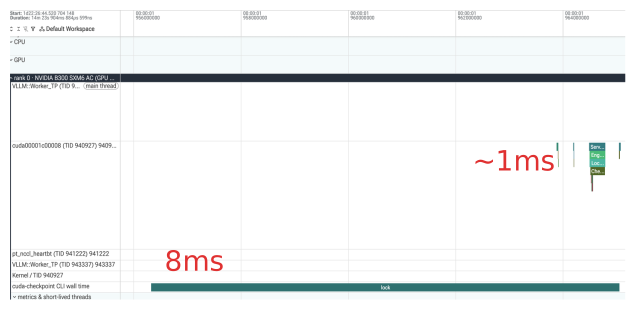
This startup cost matters more as the rest of the cycle gets shorter because this is a decrease in ~4 seconds, one second per action commnad. When we reduce the checkpoint and restore to a couple of seconds, the cli optimization matters more.
Huge pages
Let’s try out huge pages. It should speed up the mmap call to allocate the checkpoint buffer as well as speed up copying a bit.
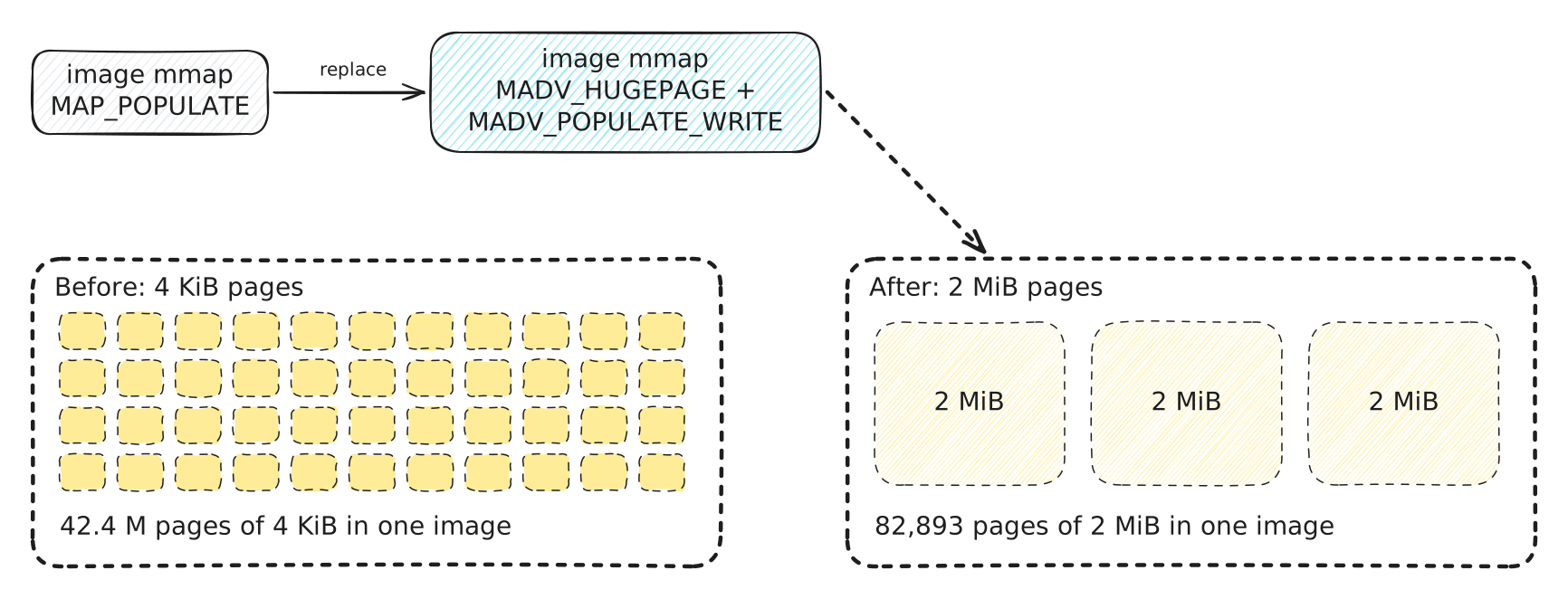
The checkpoint buffer holds the same amount of data. Larger pages mean fewer pages for the kernel to manage. This can reduce the time needed to prepare the buffer before copying starts.
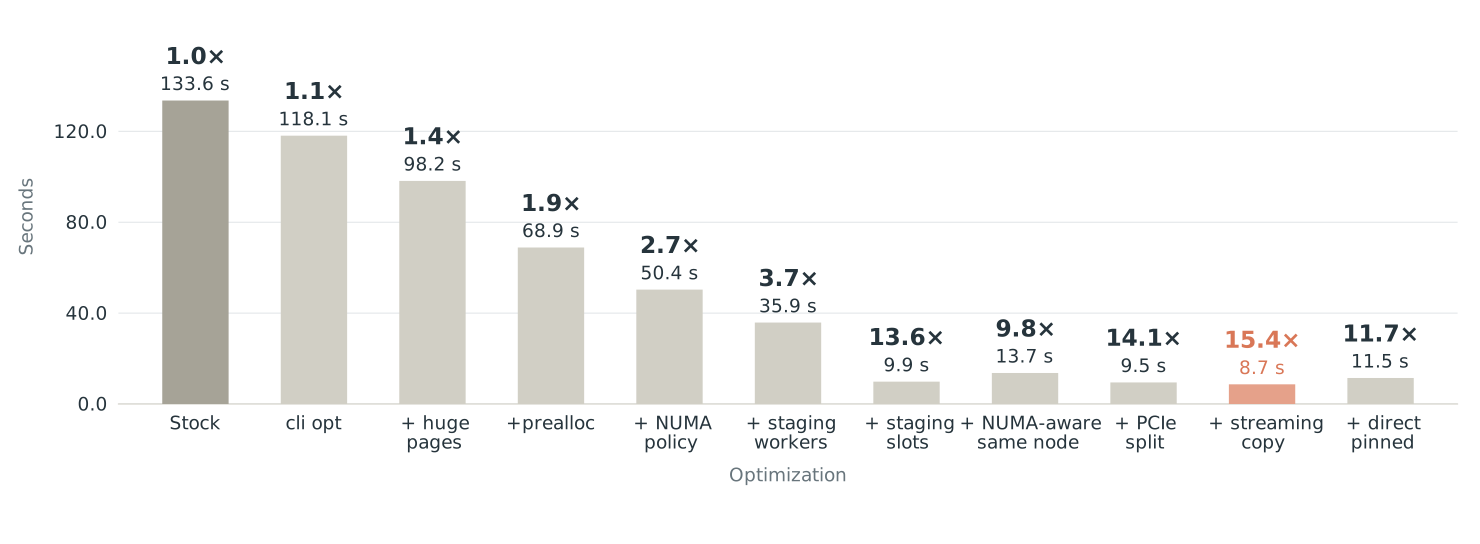
This optimization reduces the time from 118s with the cli optimization to 98s (~1.4x speedup compared to baseline).
Copying differently
How can we speed up the copying?
Minimizing page faults
mmap consumes most the time for copying. Each time a page is allocated, the system page faults to bring in the physical page. We see that for every checkpoint, this consumes ~40s.
Instead, we can just preallocate the page ahead of time and remove that bottleneck.
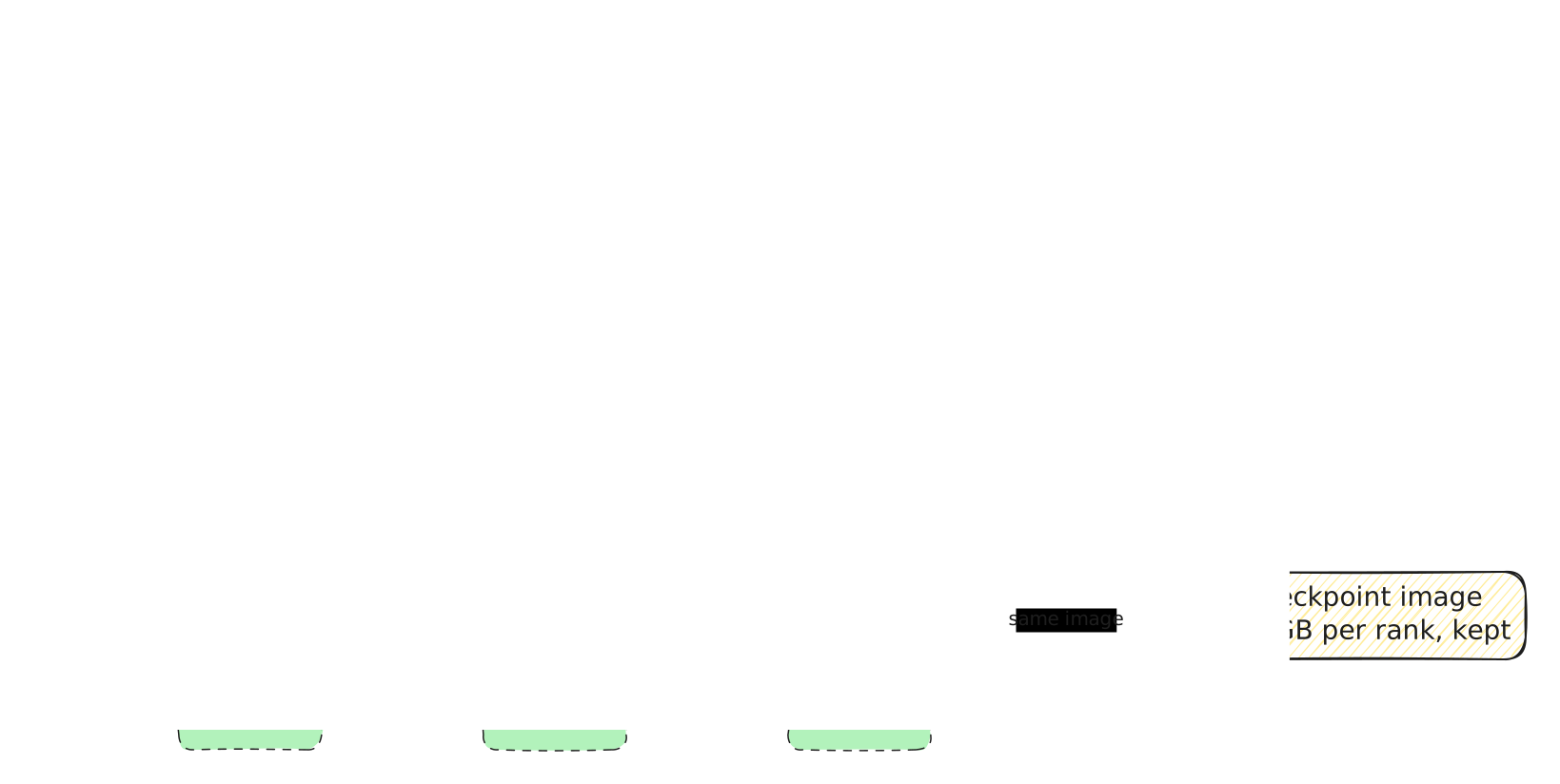
We allocate and populate the host buffer once, then keep it after restore. The next checkpoint reuses this memory, avoiding repeated allocation and cleanup. We still copy the GPU memory into the buffer each time.
This optimization reduces the time per checkpoint + restore cycle from 98 s to 69 s (about ~1.4× faster, and ~1.9x compared to the baseline)
At this point, we’ve reached about the same result as what’s descrbed in the Doubleword blog. We get a ~2x speedup compared to the baseline, which is great! Although the Doubleword blog describes a 4x speedup, we will try to match that and even more so on this node.
Parallelizing the copy
Now that preallocation solves the time spent in the allocation, we can tackle the ~30s spent in copying.
cuda-checkpoint uses a single CPU thread to copy data from the staging buffers into the final checkpoint buffer. Can that thread keep up with data arriving over PCIe? We’ll first compare single-threaded and multithreaded CPU-copy bandwidth against GPU-to-host PCIe bandwidth on the same machine.
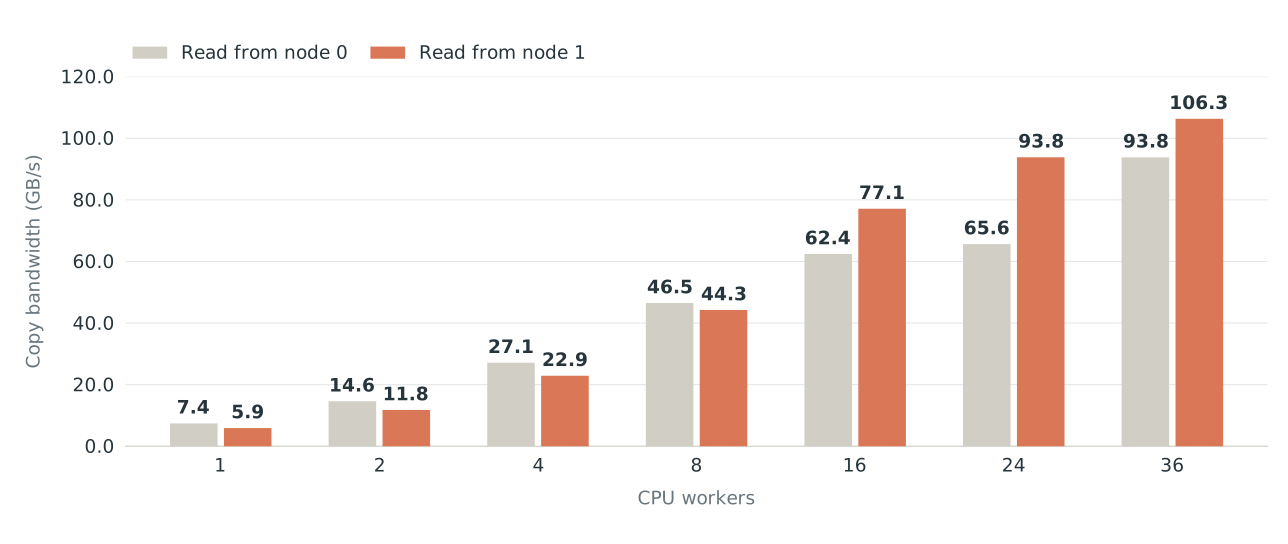
We can start by keeping the staging buffers and trying to drain them faster. Multiple CPU workers can each copy part of a completed staging buffer into the final checkpoint buffer, while the GPU fills the other staging buffer.
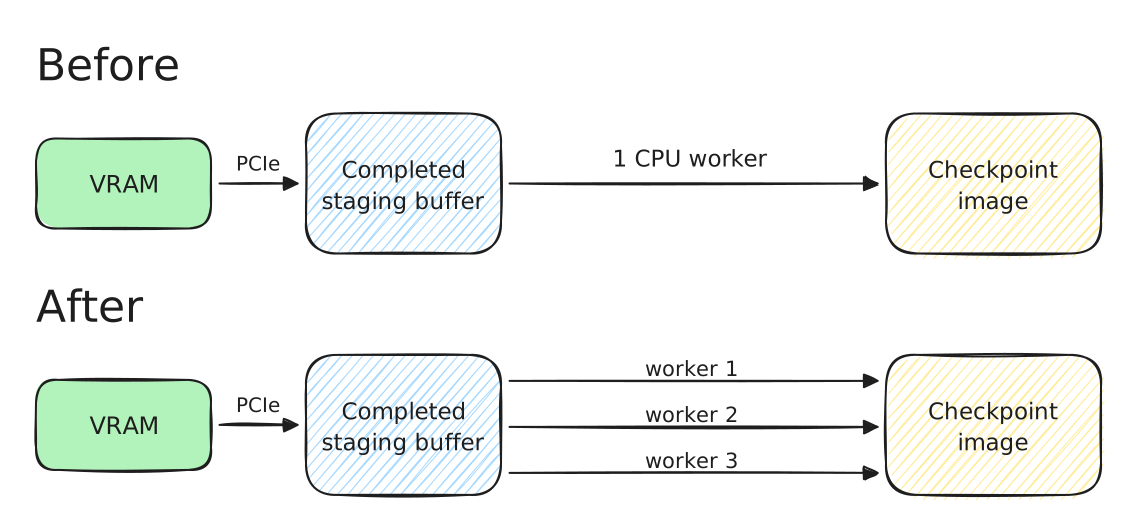
Each worker copies a separate part of the completed staging buffer into the checkpoint image. The GPU can fill another staging buffer while the workers finish this copy.
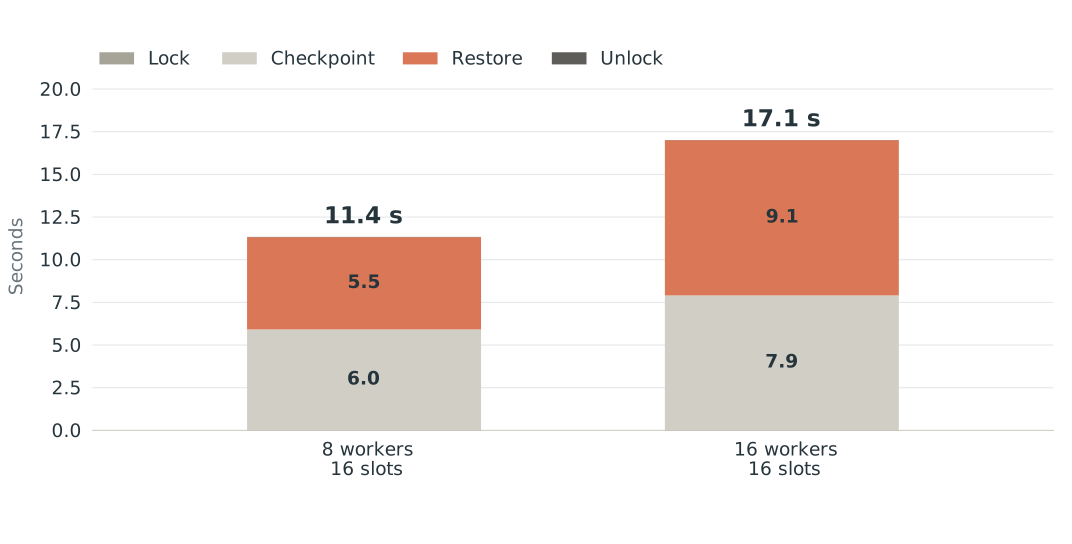
With sixteen staging slots, eight workers take 11.3 s and sixteen workers take 17.0 s. More workers do not always help. This comparison uses warm cycle 2 for eight workers and warm cycle 1 for sixteen workers.
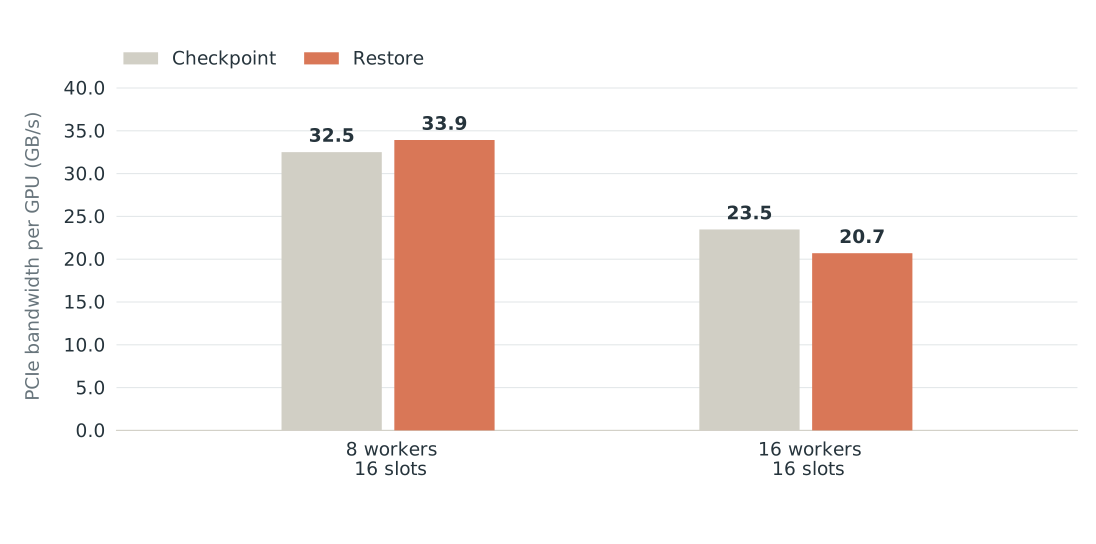
We can also vary the number of staging buffers.
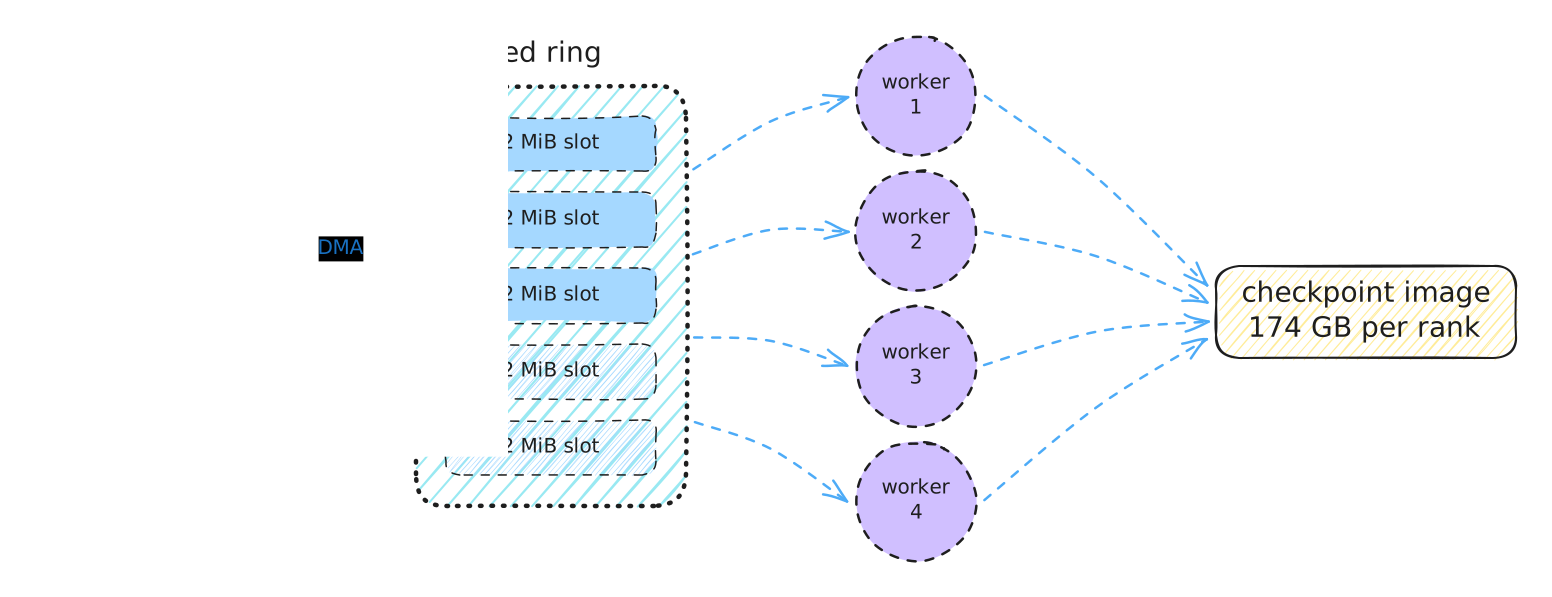
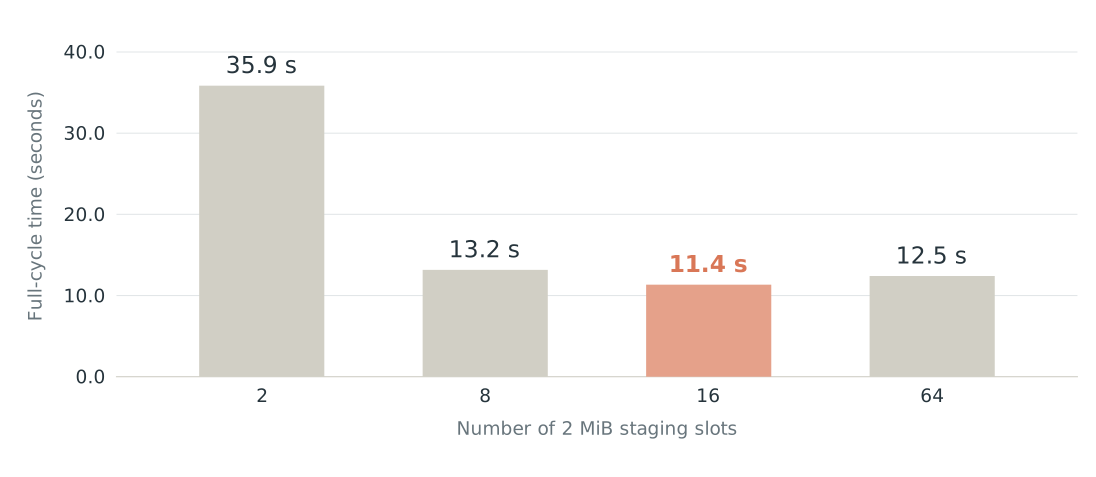
More slots let GPU and CPU copies overlap. With eight workers, increasing the slot count from two to sixteen reduces the full cycle from 35.9 s to 11.3 s (3.2× faster). Increasing it to sixty-four slots raises the cycle time to 12.4 s.
Worker and staging-slot traces
Vary staging slots — 8 workers
Vary workers — compare with the 8-worker, 16-slot run above
Ring2-spin — tuned ring settings
Removing the staging buffers
But can we avoid the CPU copy altogether? Instead of copying through staging buffers, we could copy GPU memory directly into the final checkpoint buffer.
The catch is that the final buffer is pageable host memory. To use it directly for DMA, we need to pin its pagesPinning keeps the pages resident at stable physical addresses while the GPU accesses them.
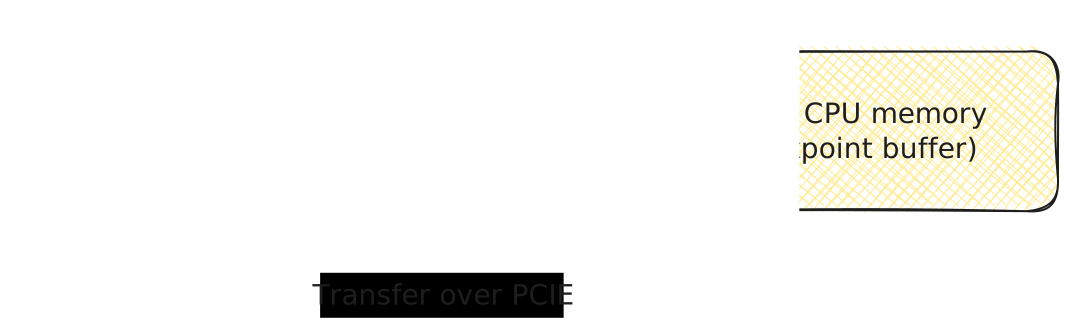
This removes the extra CPU copy, but requires pinning the entire checkpoint buffer rather than two small staging buffersFor a large checkpoint, allocating or registering that much pinned memory may fail.
Direct copying removes the extra CPU copy, but it is slower than using staging buffers. An increase from 8.7s to 11.5s.
Why does should this happen? Wouldn’t copying the GPU memory to the final checkpoint buffer be faster than having an intermediate buffer?
The answer lies in how the page tables are setup on the GPU. One calls map the pinned CPU memory by calling cuMemHostRegister. Each checkpoint call must register this pinned memory and deregister the pinned memory with cuMemHostUnregister during restorewe must enforce the policy that we release all GPU resources during a checkpoint which includes unmapping the pinned cpu memory.
However, this page table setup is slow. The GPU creates 4KB pages for its PTEs to be mapped to the CPU pages and does this serially through the kernel. It’s not that slow, but for 174 GB, this takes up quite a bit of time.
174 GiB ÷ 4 KiB / 512 entries per page = ~90k calls to kernel to allocate PTEs
You might ask: why not use 2MB pages on the GPU? That isn’t supported through cuMemHostRegister yet.
Becoming NUMA-aware
As we’ve seen from analyzing the NUMA bottleneck in the baseline, it can decrease bandwidth by quite a bit if not configured correctly.
To reiterate, GPUs may be connected to one host chip. This chip may be copying memory from this CPU node to another CPU node:
I want to show the results with no options (letting the kernel figure it out for us), forcing all allocations to be on a remote node (the worst case), and forcing the allocations to be only local. Here is that graph with the results:
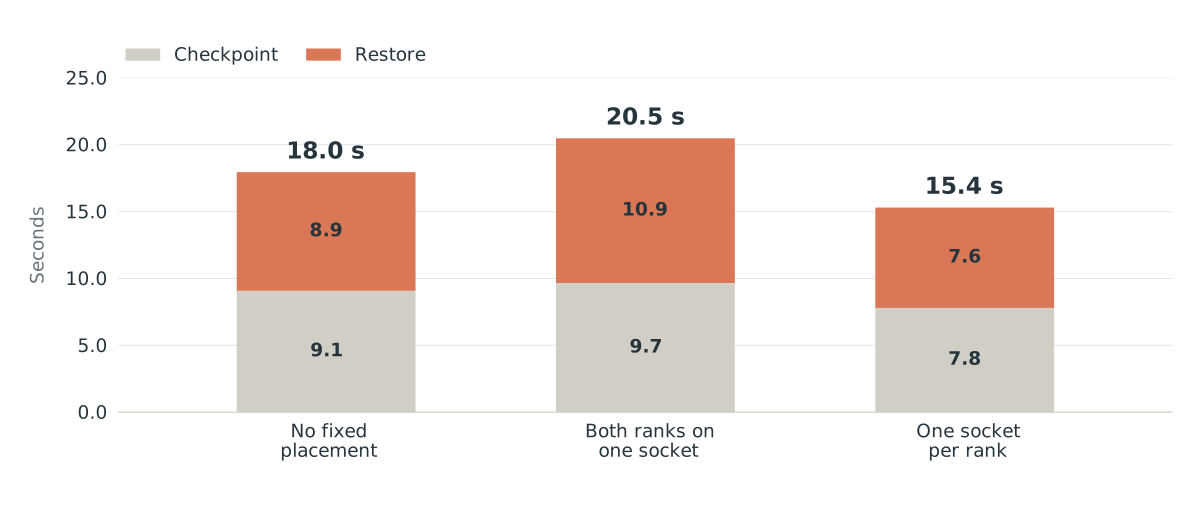
Here I’ve included two different runs to demonstrate the difference between using the memory allocations on a local node versus a remote node.
Howeever, this didn’t show an improvemnt for our system, probably due to MPOL NUMA policy working properly.
Becoming PCIe link aware
GPUs may share PCIE bandwidth by sharing a root complexTander poder’s blog is first how I learned about this type of bottleneck.
This occurs for the B200 for example, unlike the B300.
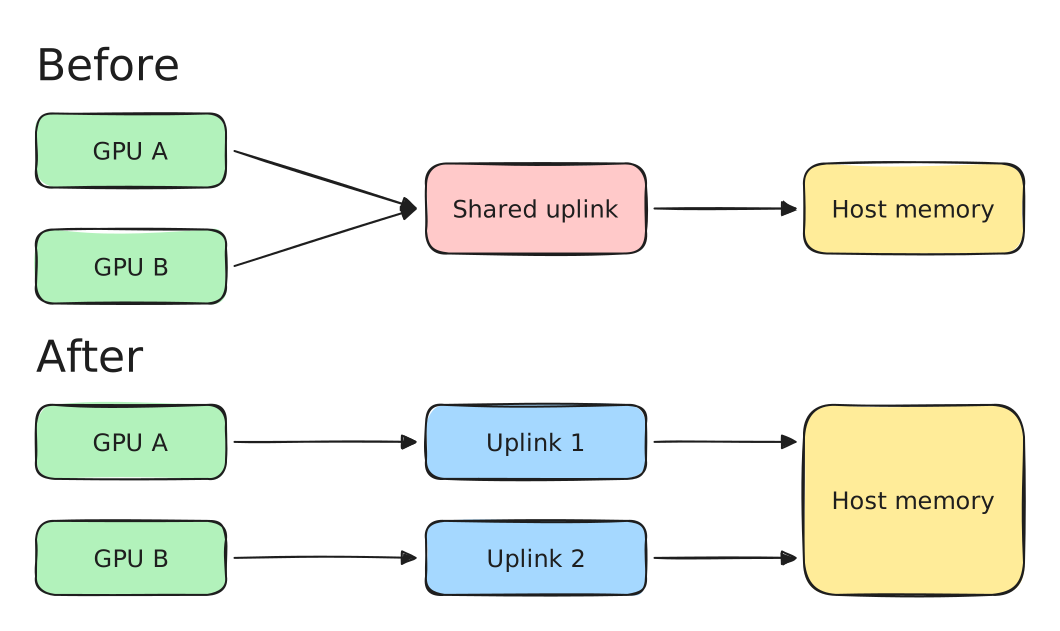
When two GPUs share one uplink, their transfers compete for its bandwidth. Choosing GPUs with separate uplinks removes that shared-link limit. Both transfers still use the host’s memory bandwidth.
Here is a microbenchmark testing the bandwidth with cudaMemcpyDtoH and cudaMemcpyHtoD with 1GB copies:
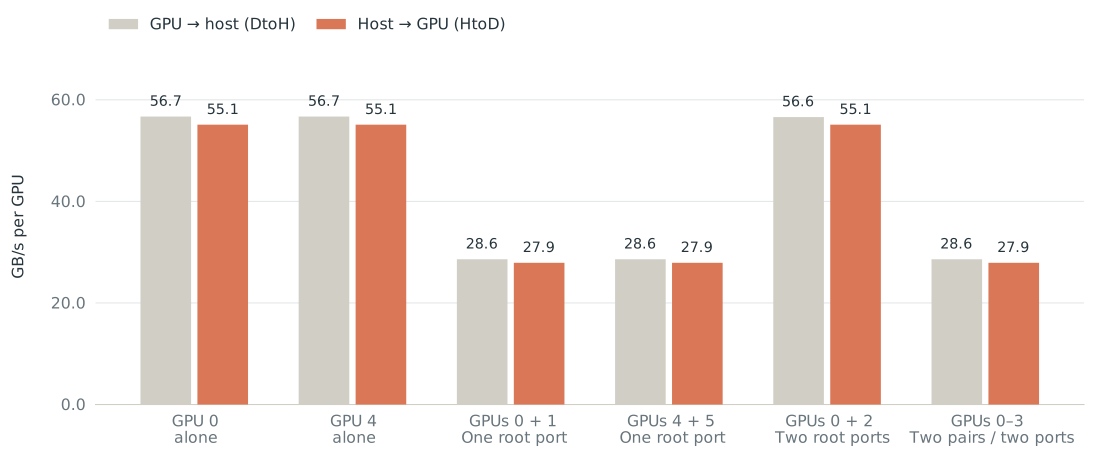
We see that in the first two bars, we’re running with the workload on a single GPU and that hits the PCIE limit. However, in the next two bars, we have two copies happening on two GPUs sharing a root GPU. This results in halving the bandwidth for both GPUs. In the 5th bar, the bandwidth is again at max because those two gpus don’t share the same PCIE bandwith.
Separate PCIe links avoid a shared bandwidth limit. Copy bandwidth rises from about 30 GB/s to 55 GB/s per GPU (about 1.8× the bandwidth). These are transfer measurements.
Here’s a small bandwidth benchmark measuring the copy throughput at different sizes with inference (either from another process on another GPU that sharing the PCIE bandwidth and another process on the same GPU):
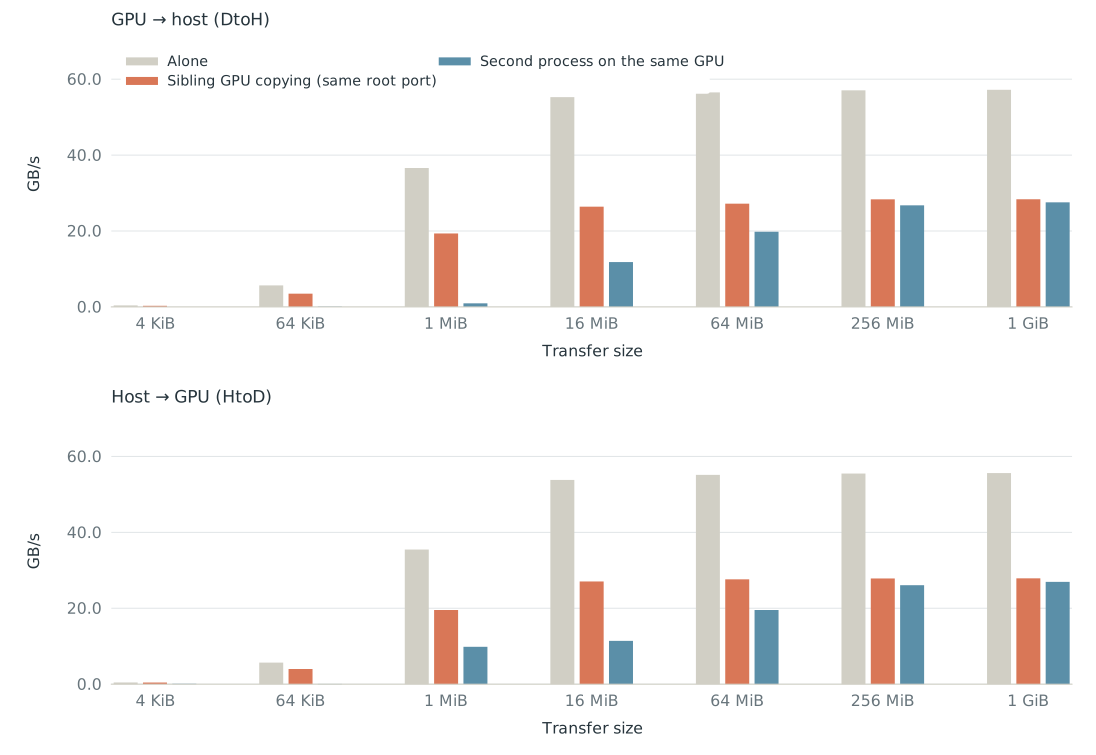
B200 PCIe microbenchmarks
B200 workload traces
But I had an idea: what if we can also utilize the other link if it’s not being used for extra bandwidth on a B300 (placing half the weights on GPU 0 and the other half on GPU 4, which are connected to separate NUMAs):
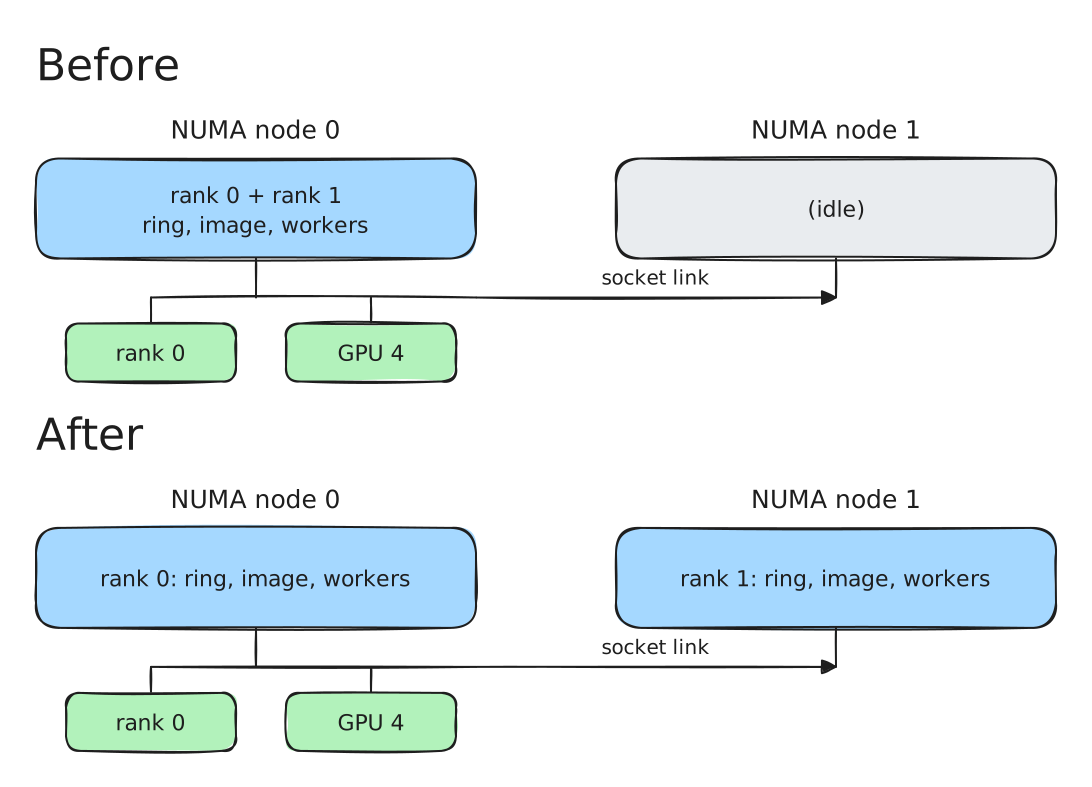
This increases the performance slightly: from 9.8s to 9.5s.
Streaming Stores
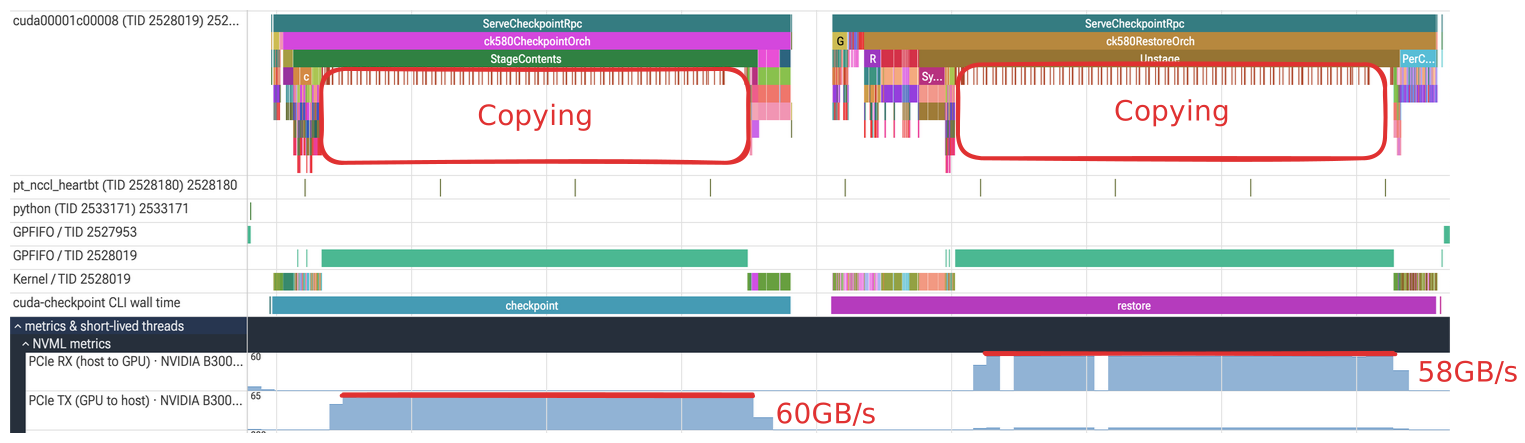
Small idea with copies: If we know that the memory being copied to is not going to be reused (cough cough, the staging buffers), then we can optimize the CPU copies even more. By using CPU specific intrinstics, _mm512_stream_si512Intel Intrinsics Guide: _mm512_stream_si512 for AVX512 (the CPU we test supports AVX512) or _mm256_stream_si256Intel Intrinsics Guide: _mm256_stream_si256 for AVX2, we can speed up the copy. This gives a hint to the CPU to write directly to memory rather than populating the CPU caches.
This optimzation reduces the last run from 9.5s to 8.7s, almost a 1s decrease!
Not-so-generic optimizations
Blackwell decompression
NVIDIA introduced a dedicated Decompression Engine with Blackwell, announced in March 2024. It is integrated with the copy engine and is supported on B200, B300, GB200 and GB300Blackwell announcement, March 18, 2024
NVIDIA: Decompression Engine and supported GPUs
Software support arrived in nvCOMP 4.2 in February 2025: release notes, release archive..
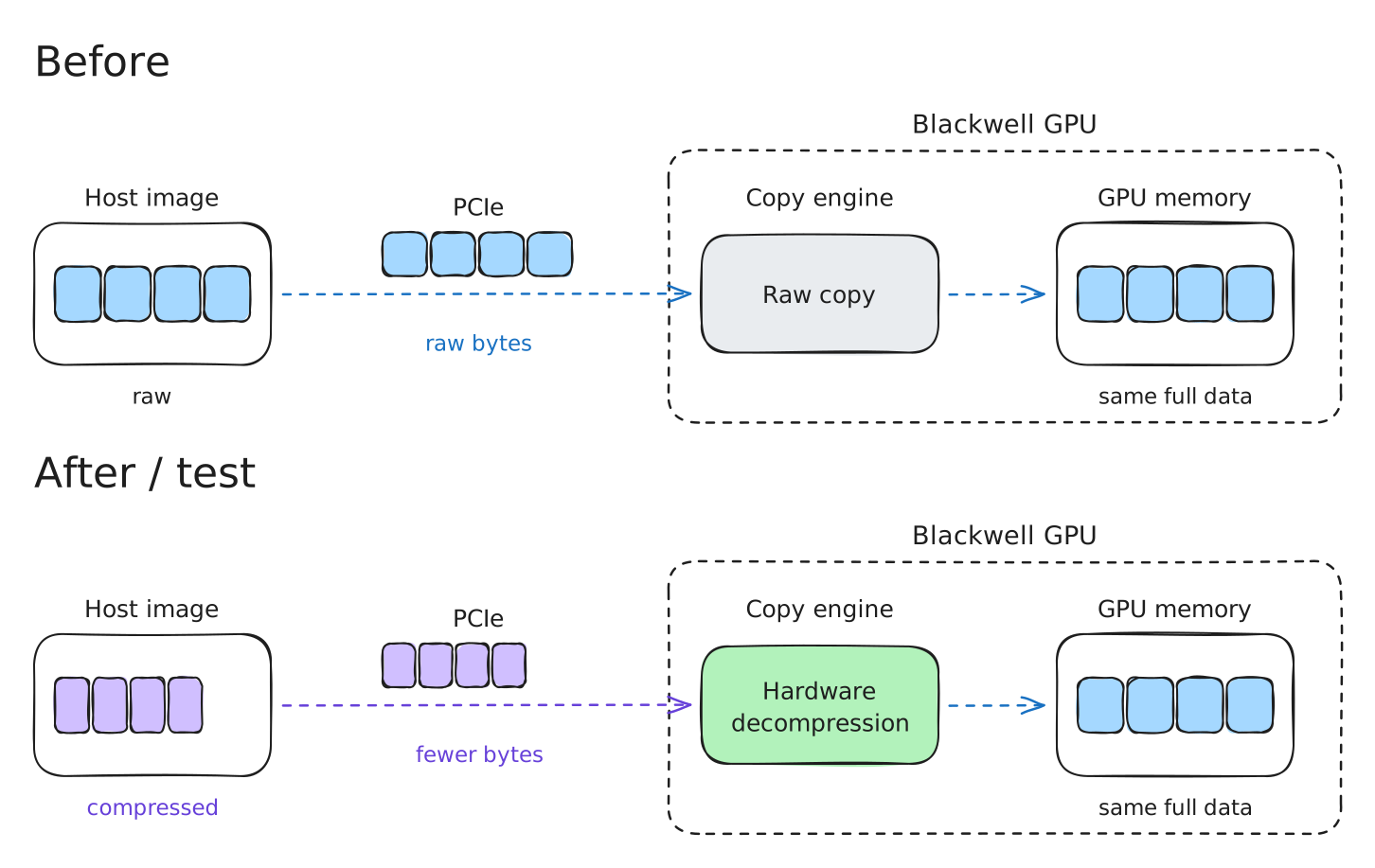
A microbenchmark compares the decompression engine bandwidth against nvCOMP kernels running on SMsnvCOMP: NVIDIA’s GPU compression and decompression library.
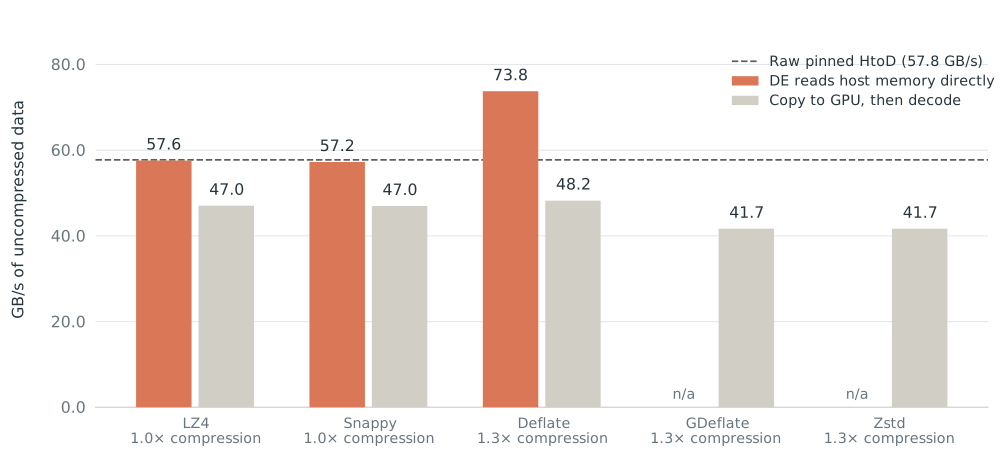
The only compression that had gains was Deflate (1.28 compression) as well as a huge throughput gain. GFlate and Zstd aren’t supported on the B300 hardware (yet).
If we now limit it across the PCIE, we see that the decompression engine has gains beyond the raw transfer bandwidth because the hardware can handle both the copying and decompression.
However, running with nvCOMP kernels to compress the data and using the decompression engine to decompress the data on restore doesn’t result in an improvement.
The time per cycle goes from about 9.4 seconds to 12.5 seconds.
Skipping zero-filled chunks
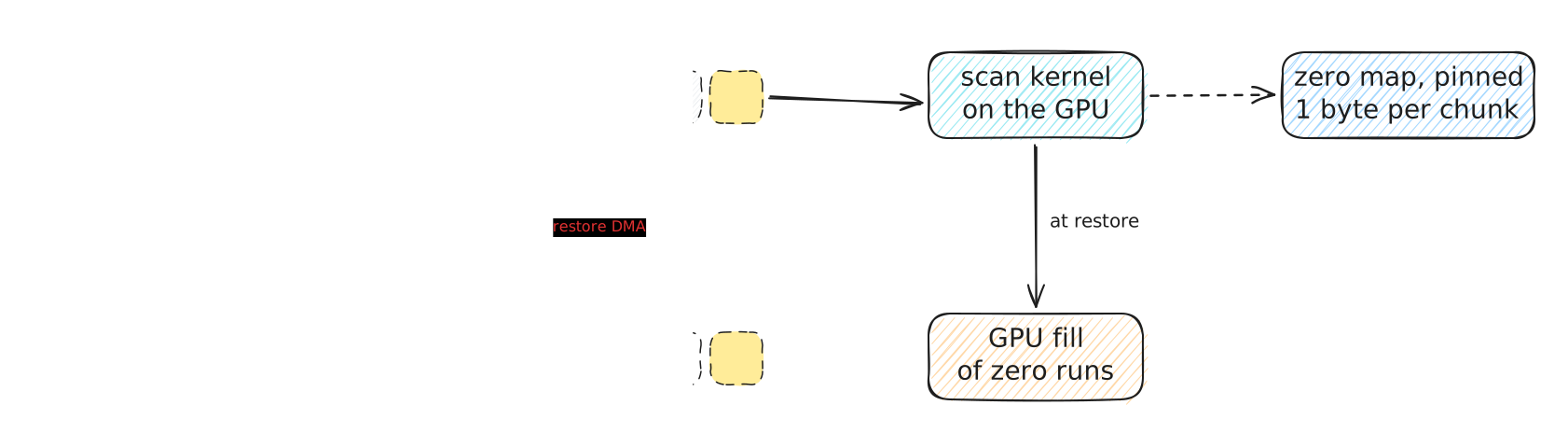
This is an experiment where zero pages are marked in as a byte in an array instead of sending the entire chunkThe chunk here is the size of the staging buffer, which I just chose as 64KB. This could potentially speed up the checkpointing and restore as less bytes are sent. However, it seems that the image did not have many chunks containing many zeroes. I was motivated by some older experiments where pytorch or vLLM would manage its own memory allocator by allocating all of its memory up front.
Incremental checkpointing
Incremental checkpointing is an optimization that takes a snapshot that records only the pages that have been modified. We can do this by running a kernel before hand and then guiding the copy to only copy pages that have been modified.

The red pages have changed since the saved checkpoint. We copy these pages and keep the earlier checkpoint for the unchanged pages. Restore needs both. Finding which pages changed also takes time.
We copy only changed data during checkpointing. This experiment was ran with an AMD CPU.
Another platform to run on!
I’ve ran on AMD to see how it behaves and results in this graph:
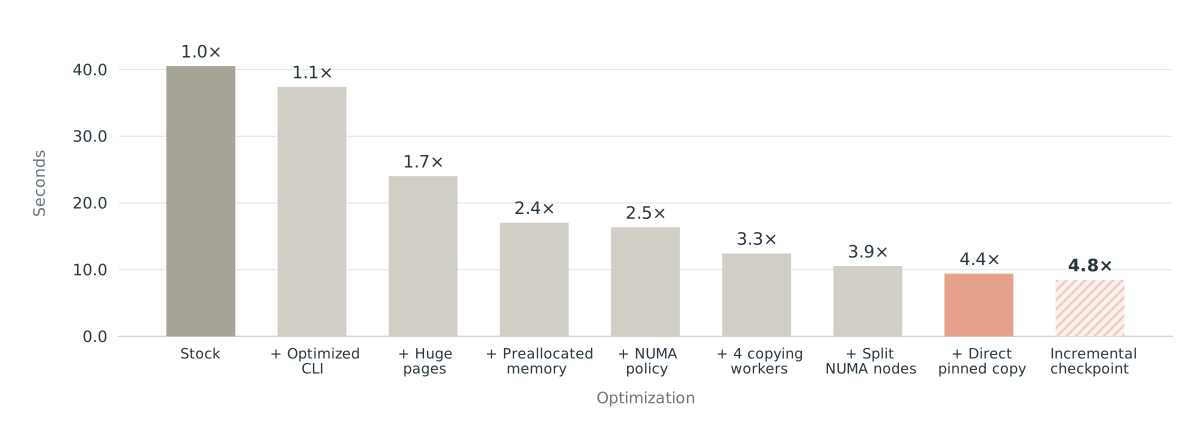
We can see that out of the box, the AMD machine behaves with much higher performance. Here is a breakdown of the checkpoint/restore times
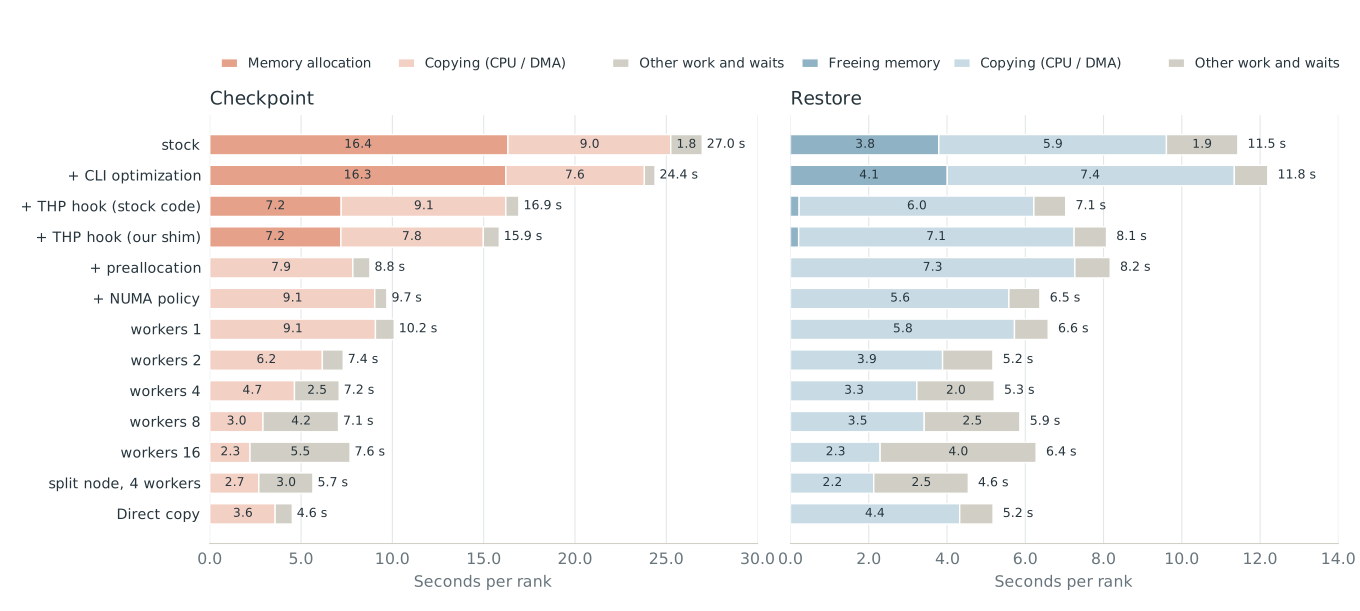
Expand to see the EPYC traces for each step
Although we get 4x, we can see why we get ~3x because copies are faster on these chips:
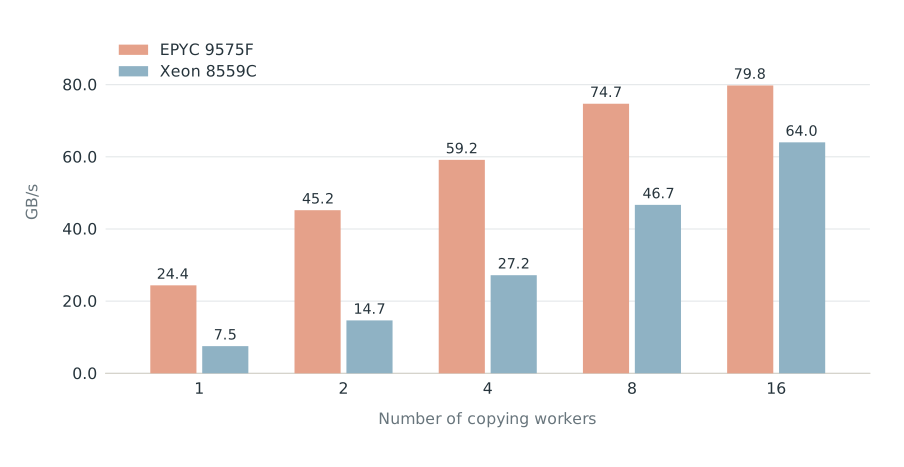
When we run these, it makes it so that you have to configure the number of threads on the intel to be higher to achieve the same bandwidth. So the takeaway is that because hosts hardware perform differently, you have to tune the copy to be the most performant.
To conclude
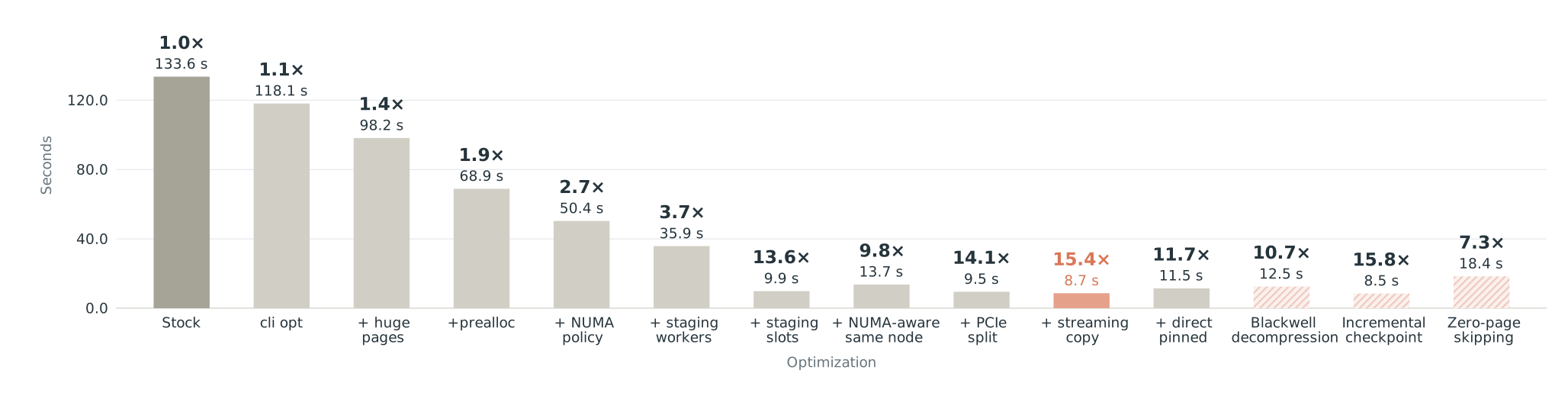
At this point, we’ve reached at least a 15x speedup, which is great. Each technique mostly builds on top of each other:
The cli optimization + transparent huge pages + preallocation + NUMA awareness are pretty generic optimizations that any application can use, resulting in a 2x speedup.
By digging into the cuda stack and changing the number of workers and staging buffers, we can achieve a greater speedup.
Optimizations for sandboxes
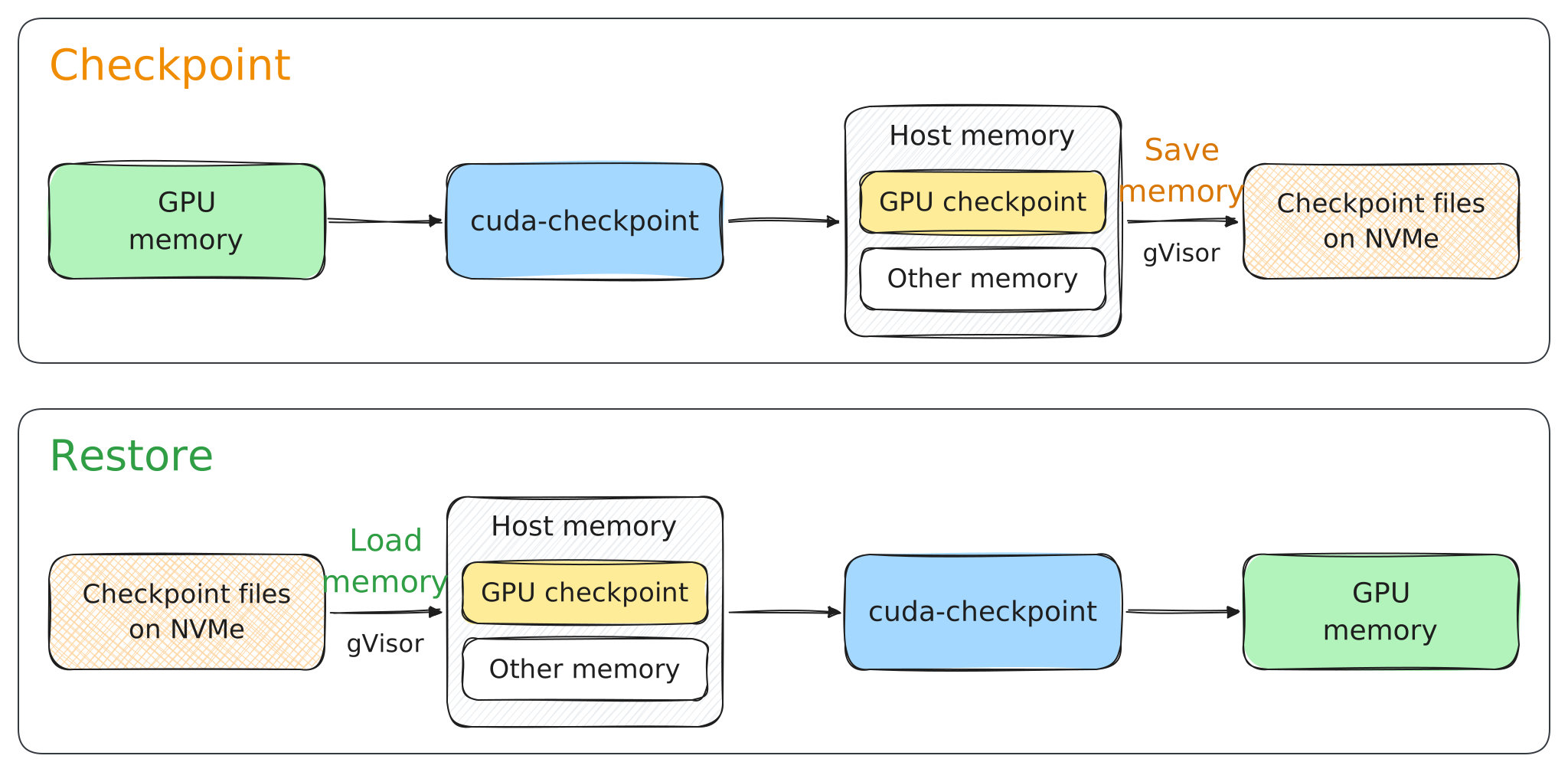
But checkpointing cuda applications from GPU memory is one slice of the bigger pie. The final goal is to serialize the entire application state to some medium. Typically a disk is preferred because it can store a whole lot more than CPU memory at significantly less cost.
So let’s see how well the cuda-checkpoint optimizations play in these applications. We can use gVisor, a popular sandboxing tool built and maintained by google. Modal uses gVisor’s runsc runtime for container isolation and memory snapshotsModal: Memory snapshots with gVisor
Modal: GPU memory snapshots.
In the following sections, I’ll compare runnning gVisor running cuda-checkpoint with different flags used by gVisor with the goal in mind to minimize the CPU bottlenecks as much possible so we can see the cuda-checkpoint optimizations shine. We ran with commit 309599c1ec020ad52c82b7b6657acba73888e367.
Where gVisor spends the time
Let’s start with stock gVisor running the same GLM workload. I’ll ask the same question again: where does the time go?
cuda-checkpoint leaves the GPU checkpoint in host memory. gVisor then pauses the sandbox and saves its memory and kernel state. Then it serializes checkpoints as images on disk.
Here’s a breakdown of that timeline at a high level:
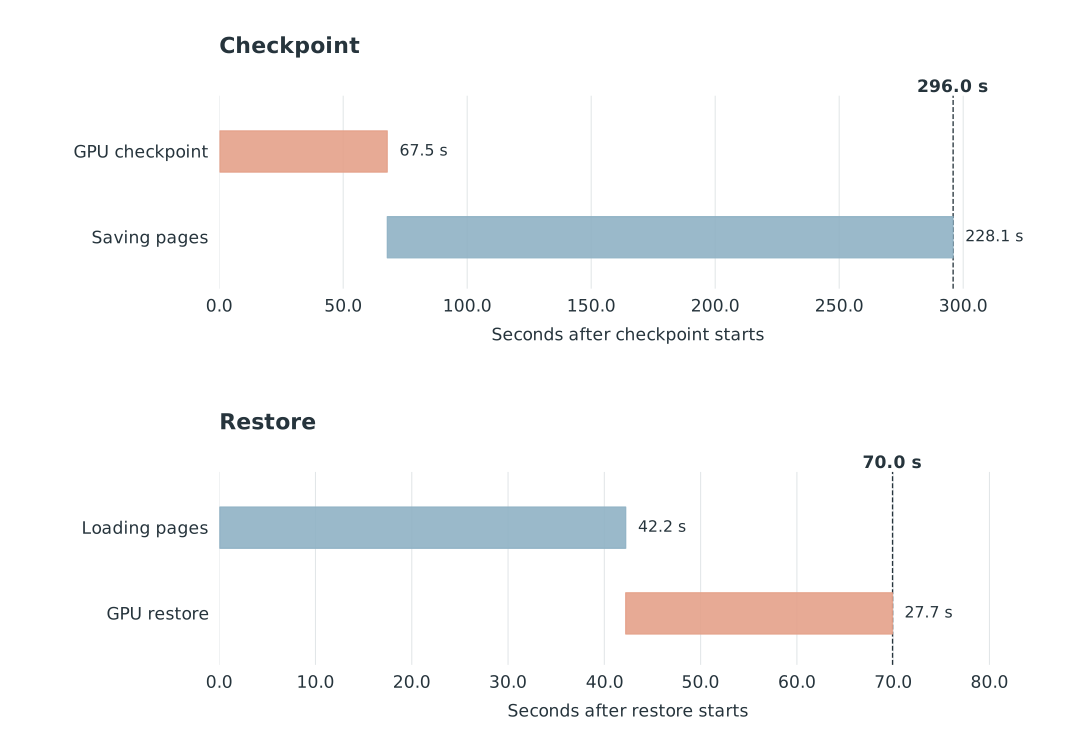
Serialiazing the GPU memory takes ~64s, but then serializing all of the CPU memory takes 228s (almost 3x more)? Almost all of that second part is spent saving about ~333GB of memory pages.
Unexpectedly restore does the reverse. Load the pages from the file, restore the GPU state, then let the application run. Loading pages takes less time at 42 seconds and GPU restore takes 27 secondsYou might wonder why restore is quite fast? Looks like the NUMA memory placement was correct for restore.
So making CUDA faster can help, but it won’t remove those 228 seconds. We need to look at how gVisor saves memory too.
Seeing cuda-checkpoint optimizations in action
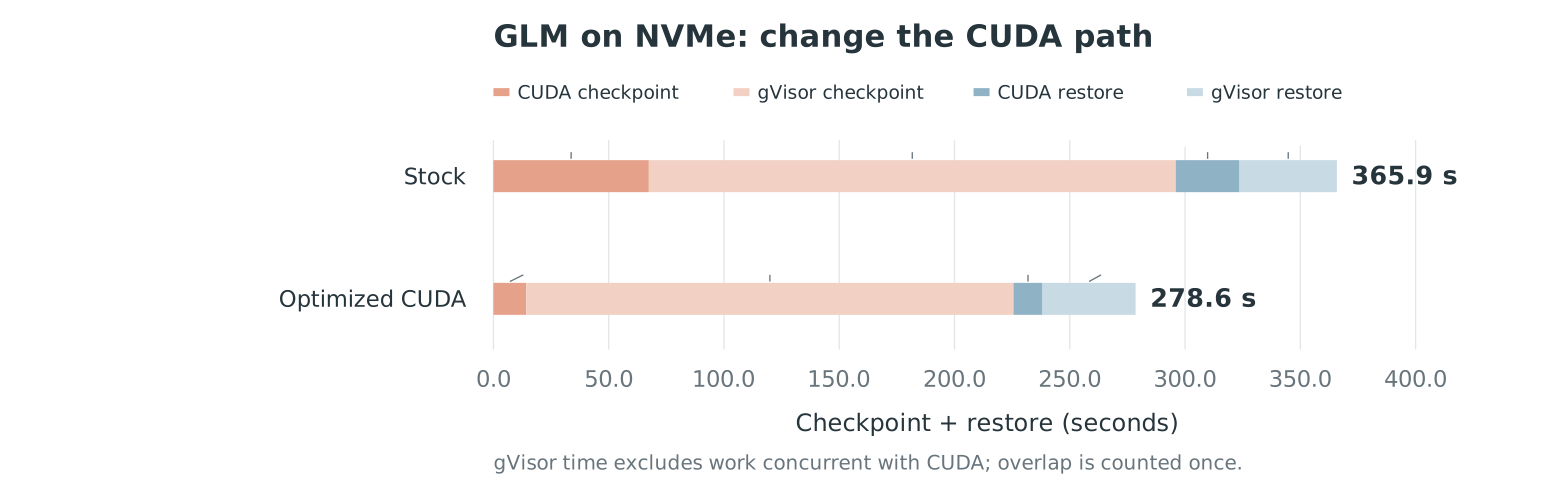
First, let’s use our optimized CUDA path without changing gVisor’s page writer.
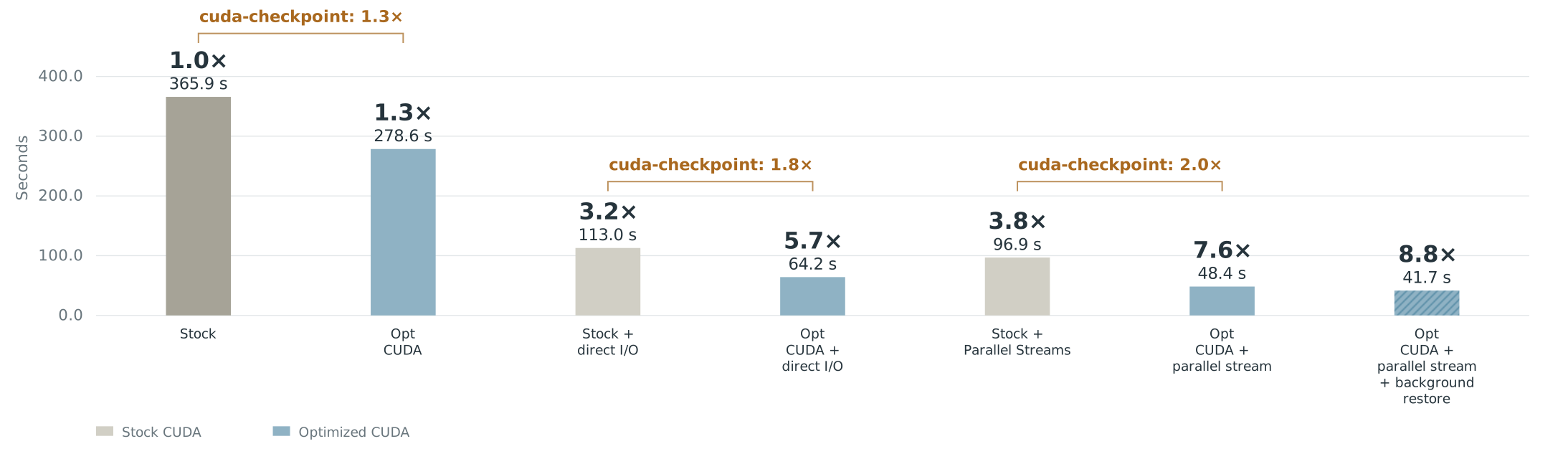
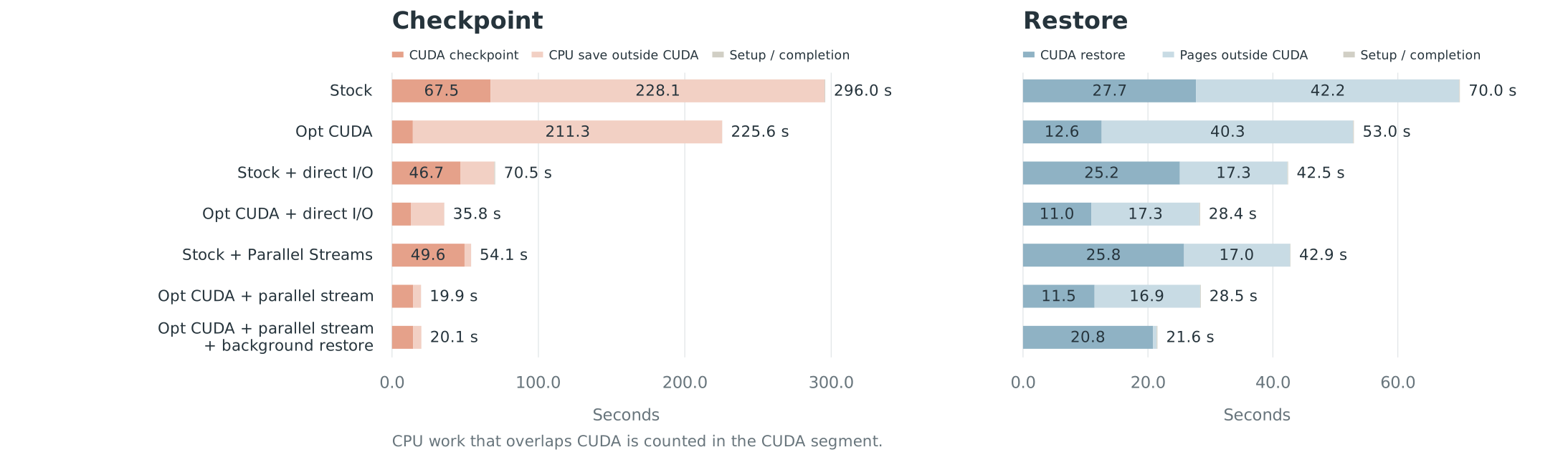
The gpu checkpointing/restore swap in reduces the end to end time by almost 100s, which is pretty neat.
Getting the checkpoint onto storage faster
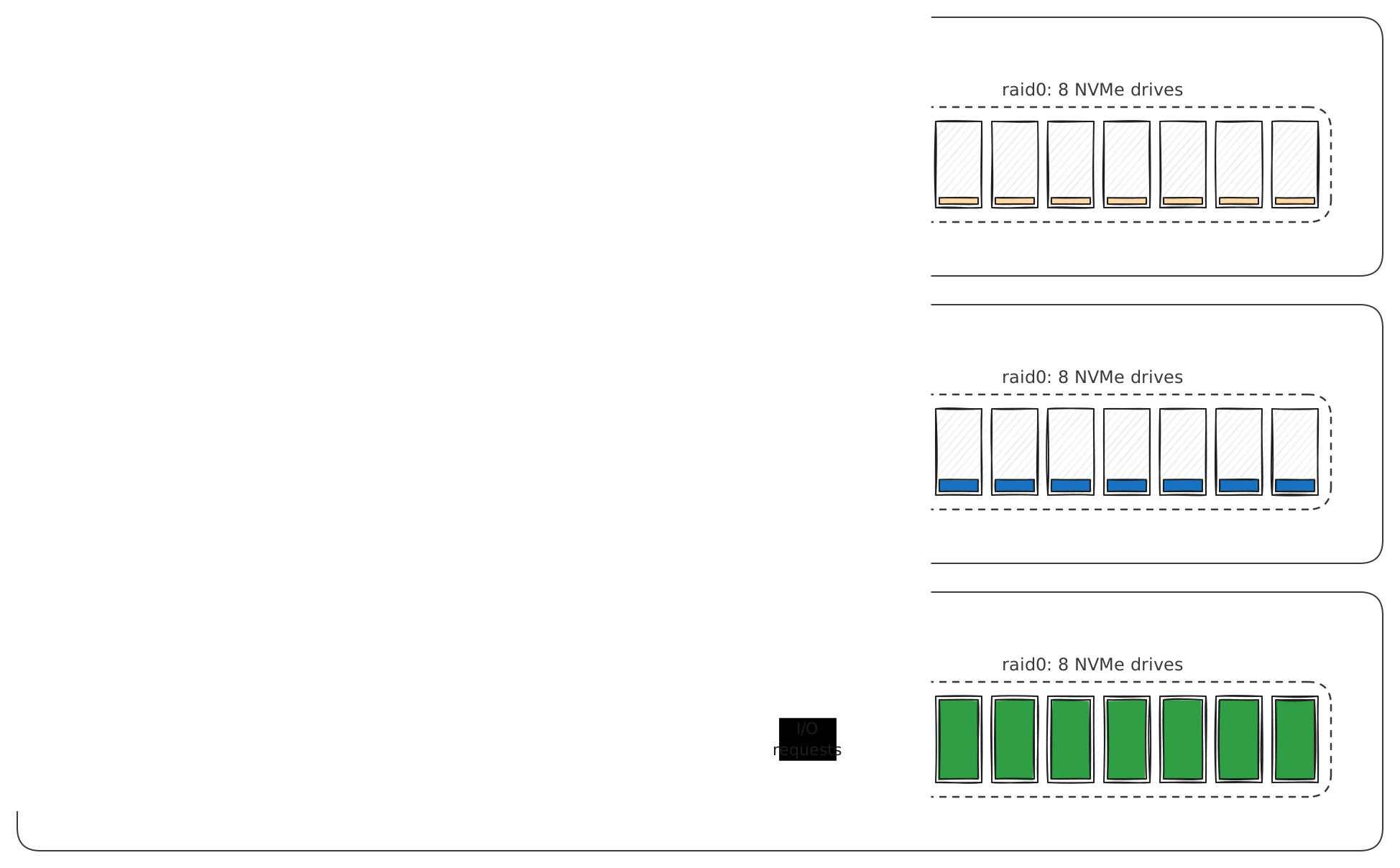
Most of the time is spent in gVisor trying to serialize the pages to disk. Why is this so slow? It’s because the gVisor sends 256 KiB writes through one serial worker. We can skip this with --direct flag turned on.
By opening the pages file with O_DIRECT to bypass the page cache. gVisor then uses Linux asynchronous I/O, allowing several requests to be in flight instead of finishing one buffered write at a time, which it configures to have a depth of 128 instead of 1. We can also make the buffers bigger.
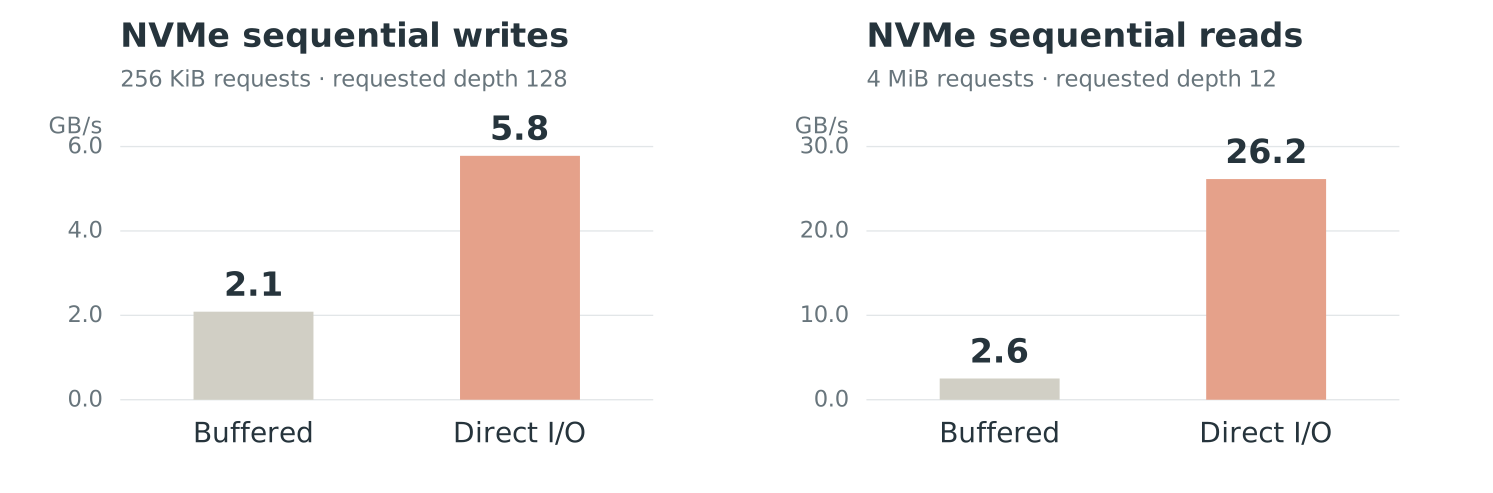
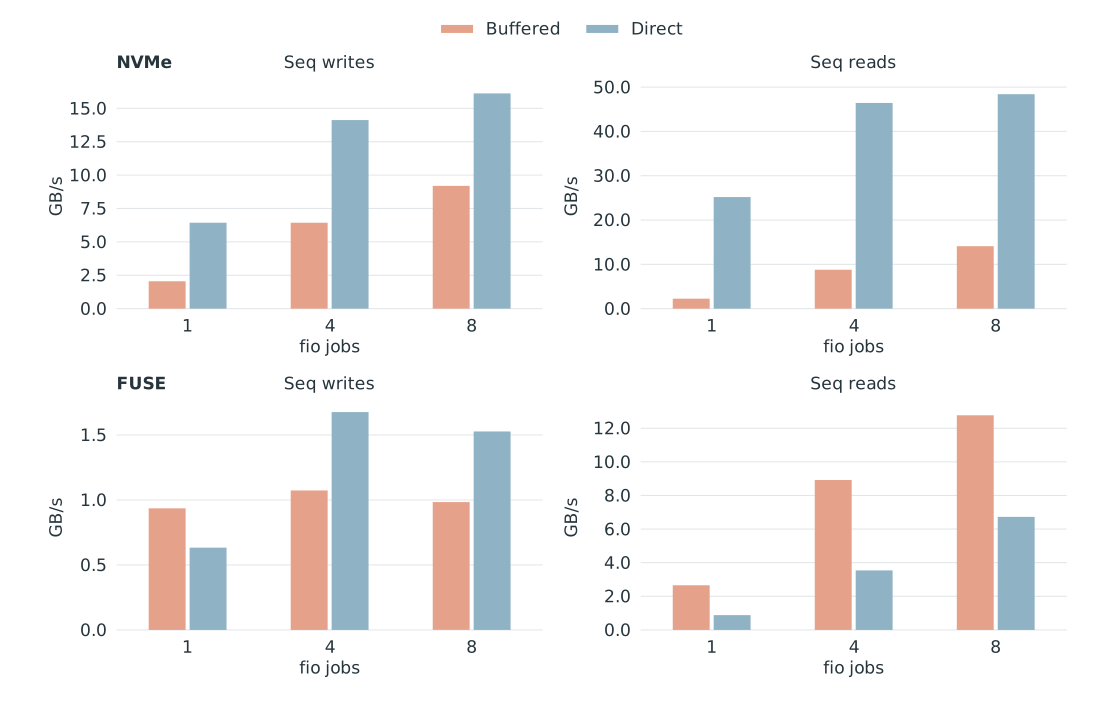
First, let’s measure file I/O by itself. This fio test uses one job and moves 16 GiB per pass. Writes use 256 KiB requests; reads use 4 MiB requestsThe requested I/O depth is 128 for writes and 12 for reads. These match stock gVisor’s request sizes, but fio’s queueing differs from gVisor’s workers. The runs are short and may use backend caches, so they do not establish sustained storage limits. Measurements and achieved I/O depth..
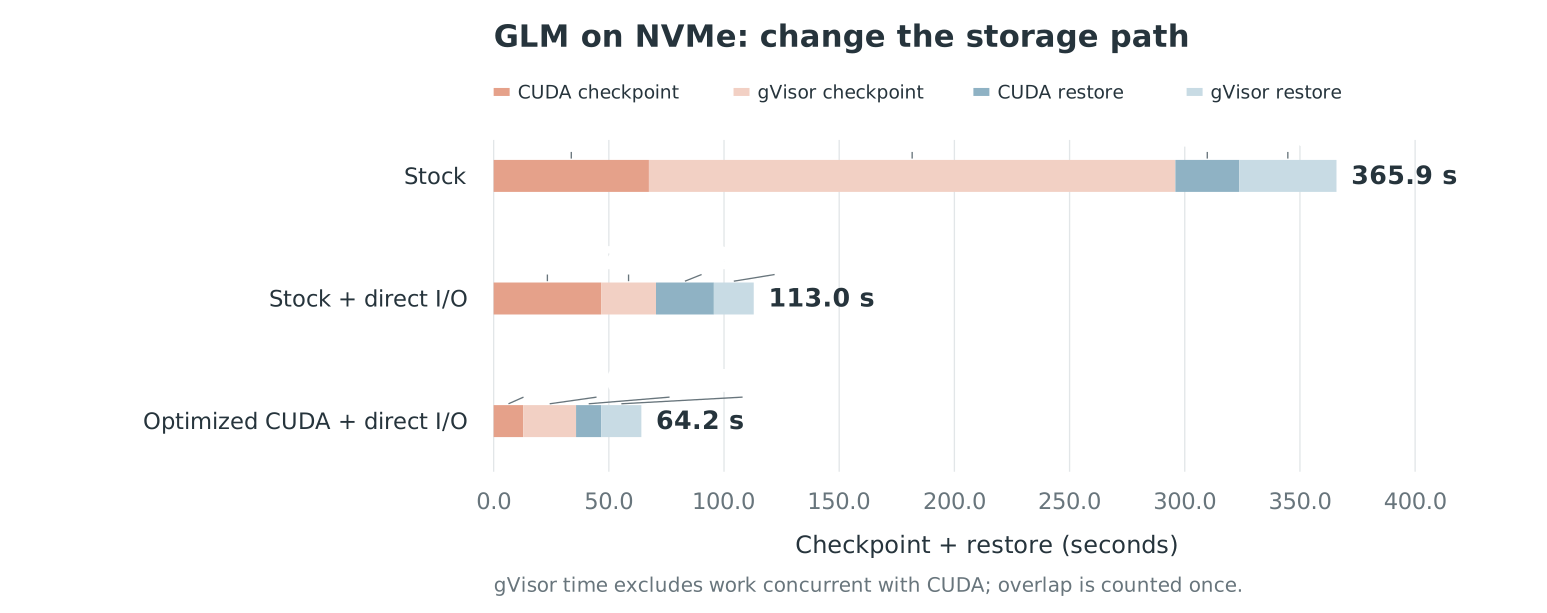
This change with larger requests decreases the time taken by almost 90%, cutting down the time spent copying CPU memory from about 228 seconds to 23 secondsYou might wonder why Stock + direct I/O reduces CUDA checkpoint. Again NUMA allocated memory correctly this time on the right node. Running with optimized cuda-checkpoint reduces the time by 50%.
Here’s the perfetto traces for this
Parallel CPU/GPU streams
We are still waiting for CUDA to finish before starting most of the page writes. Can we use that time to write pages we already have?
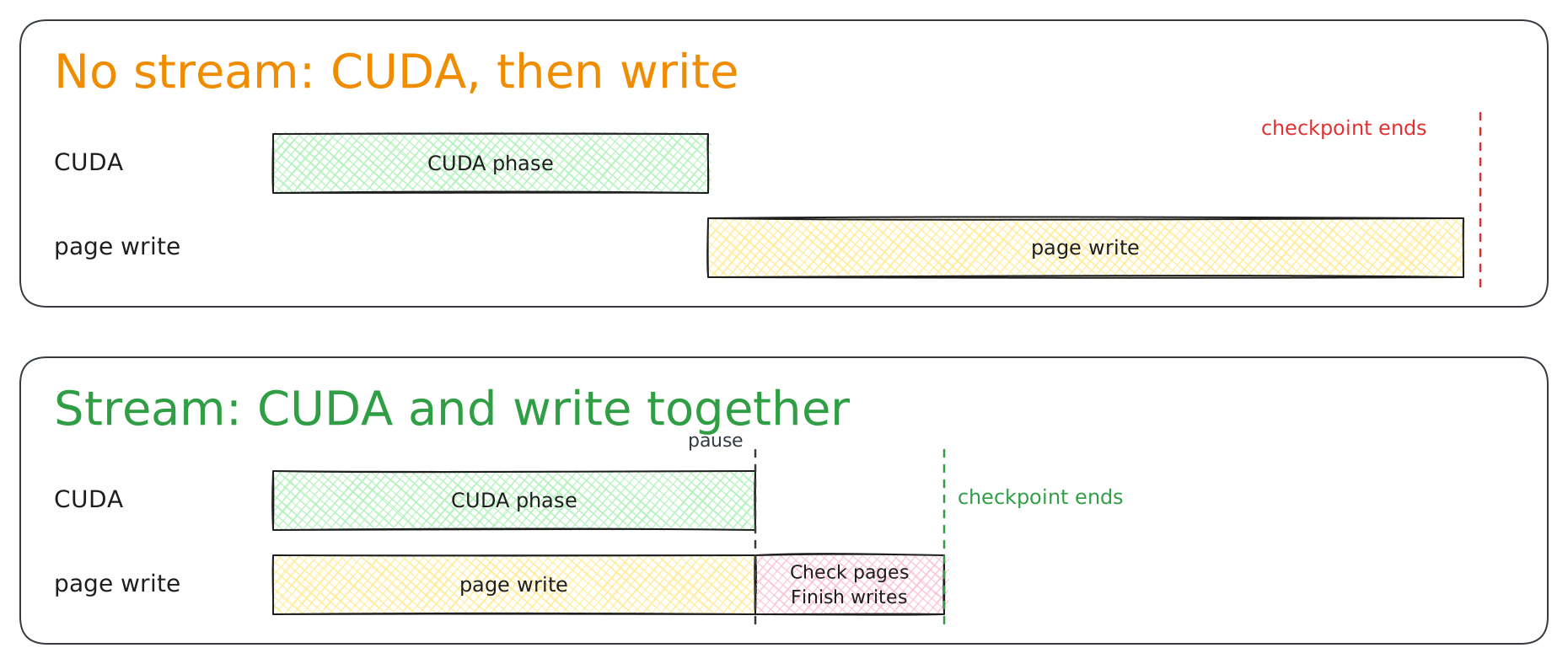
An optimization that be done is to write the gvisor memory and cuda-checkpoint both to disk as images at the same timegVisor has different on disk images for the pages and the gpu checkpoint, which makes this even more promising. However one problem is that the cuda-checkpoint pages and cuda state won’t be synchronized with the rest of the process. How can we fix this?
We record a hash when we copy the bytes, then hash the same memory again after CUDA finishes and the sandbox is paused. If the hashes match, we keep the data we’ve already written. If they differ, we know that the contents has changed and can save the updated contents. We still have to read the every piece of memory again, but we don’t have to write every page again to disk. This optimization is not a flag in gVisor.
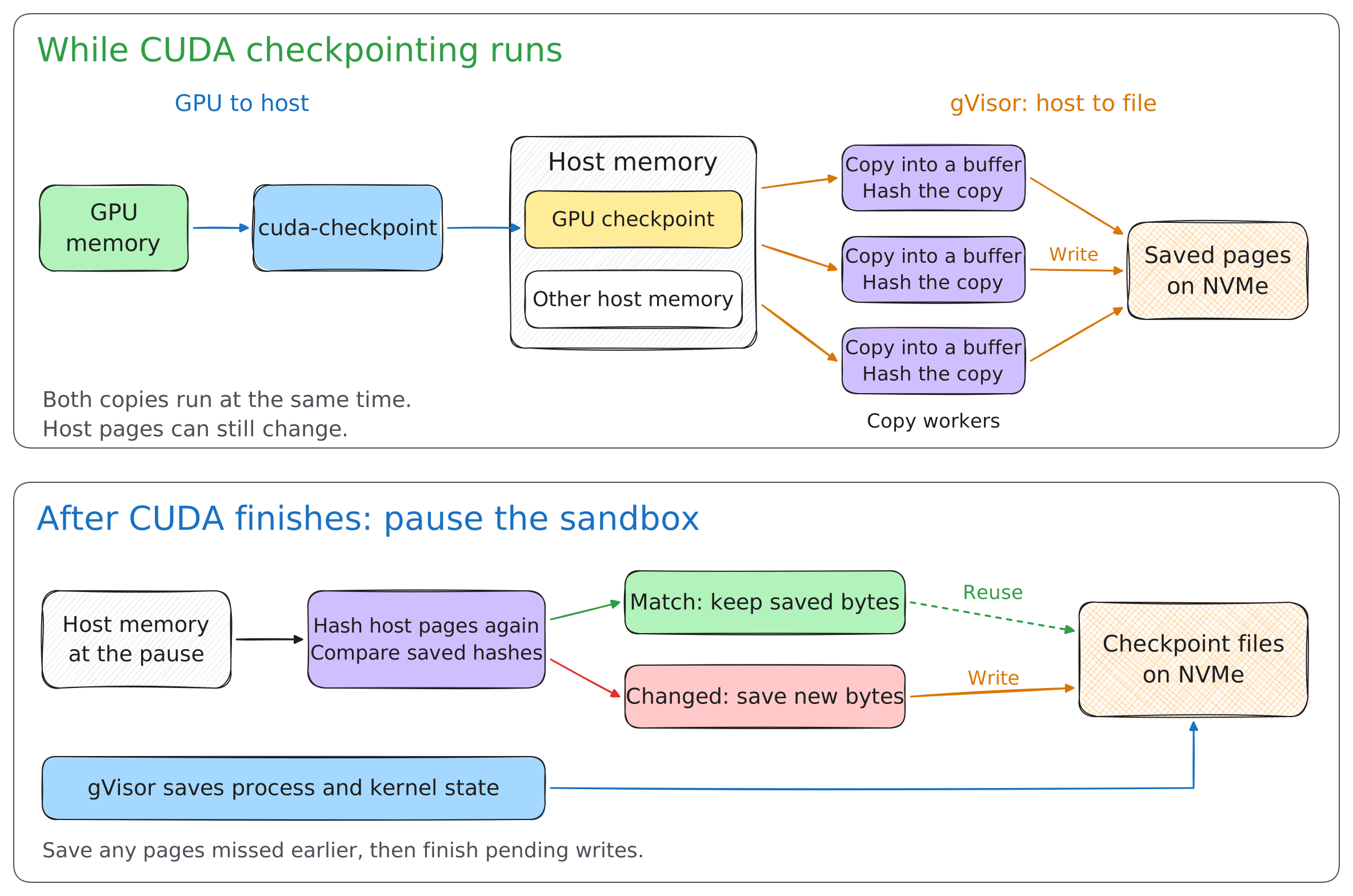
Here is what that overlap looks like in the trace:
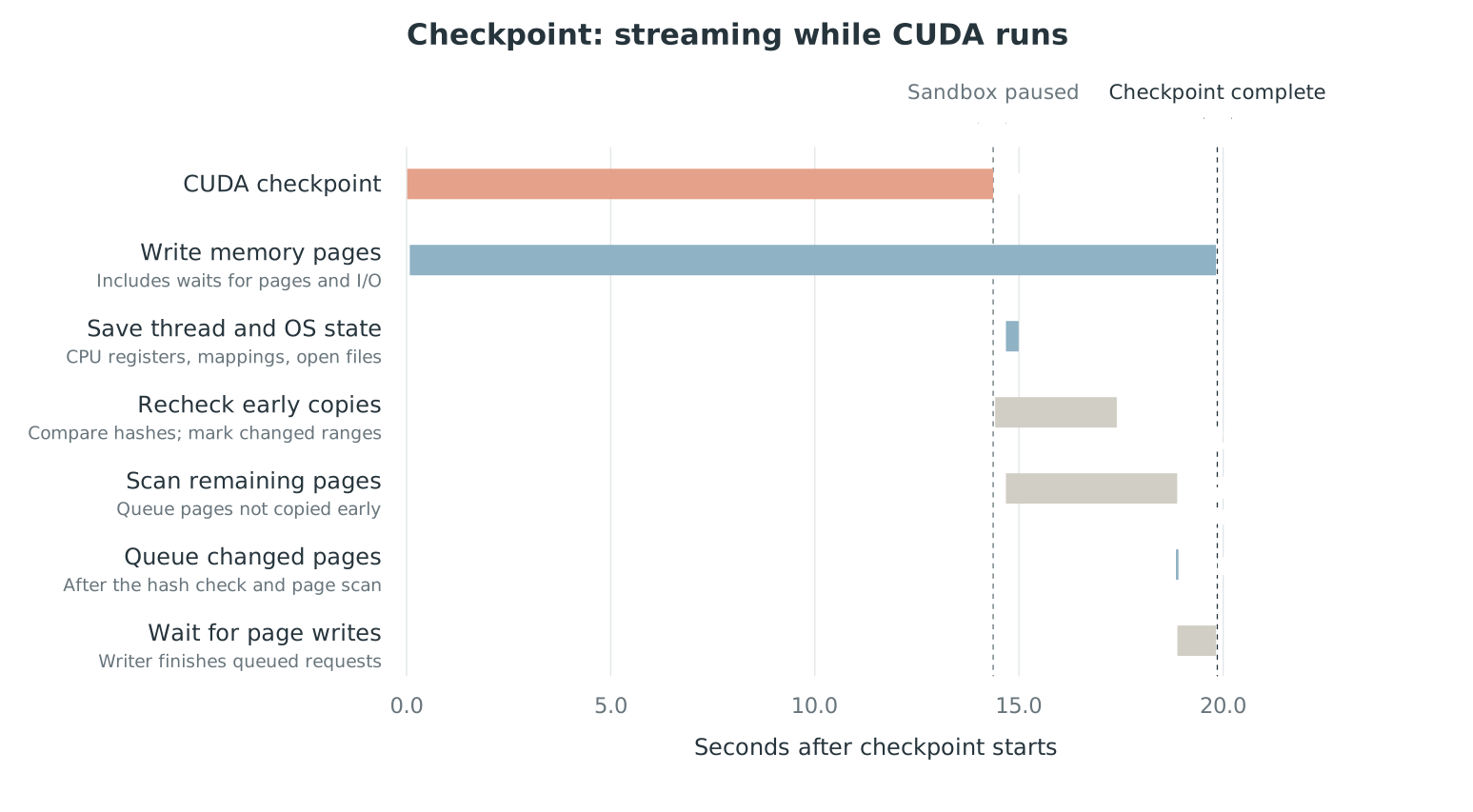
While the gpu checkpointing is running, gVisor starts checkpointing the process at the same time. The GPU checkpoint finishes at 14.4s, so it rechecks the hashes and then serailizes any difference to disk, which would be in this case, the cuda-checkpoint image and and cuda context state.
Starting GPU restore before all pages arrive
Restore has a similar wait. The stock path loads the memory pages, then starts CUDA restore. It can instead load pages in the background and start CUDA restore earlier, waiting when it needs a page that hasn’t arrived yet. This is enabled by setting --background
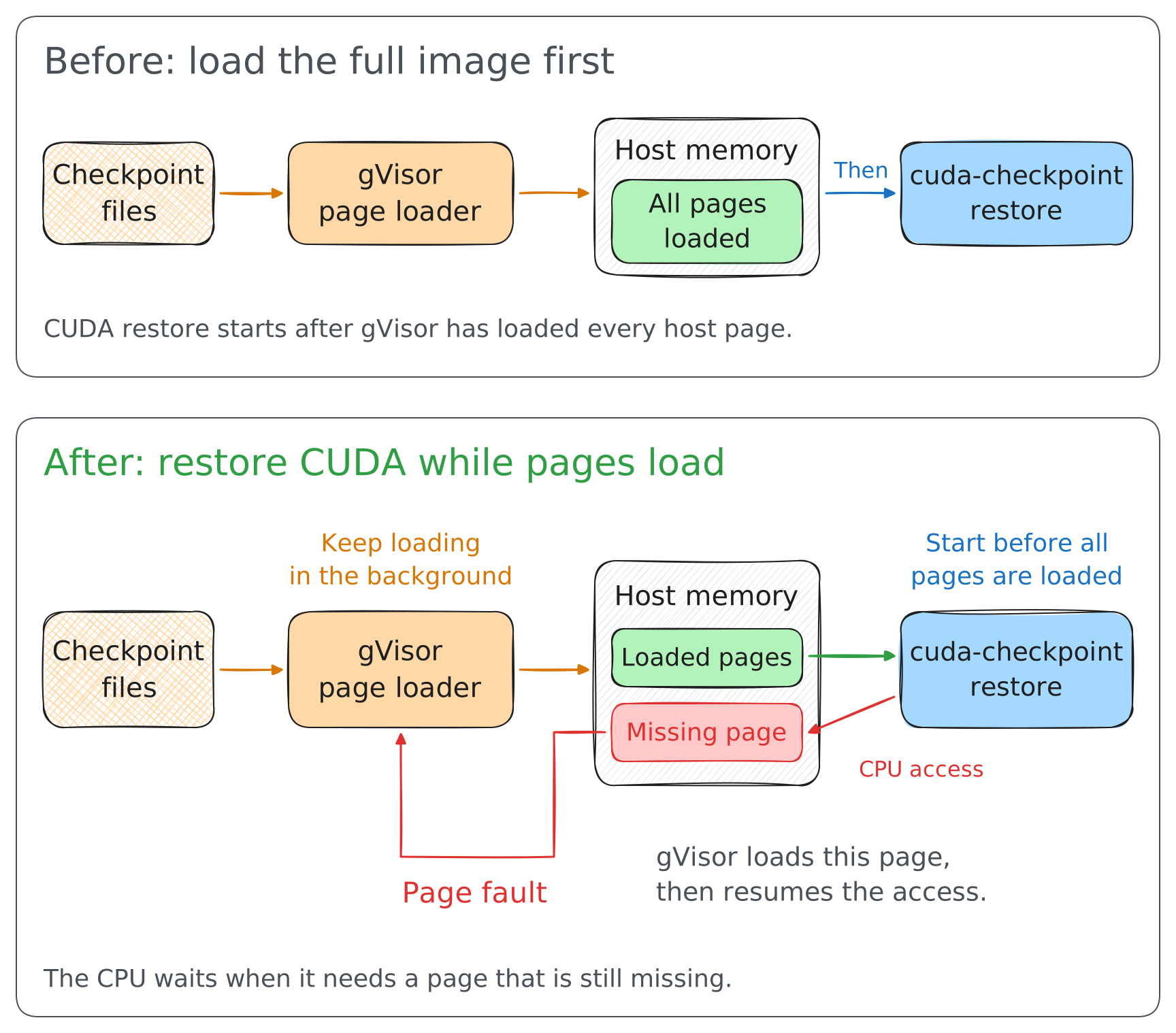
After gVisor restores the process state and memory mappings, it can start CUDA restore while host pages continue loading. If restore needs memory that has not arrived, gVisor blocks that access until the saved data is availableSee HandleUserFault in syscalls.go.. CUDA restore then rebuilds the GPU resources from those bytes.
This makes no difference in speeding up the host pages, but allows cuda-checkpoint to work while the host pages are being loaded.
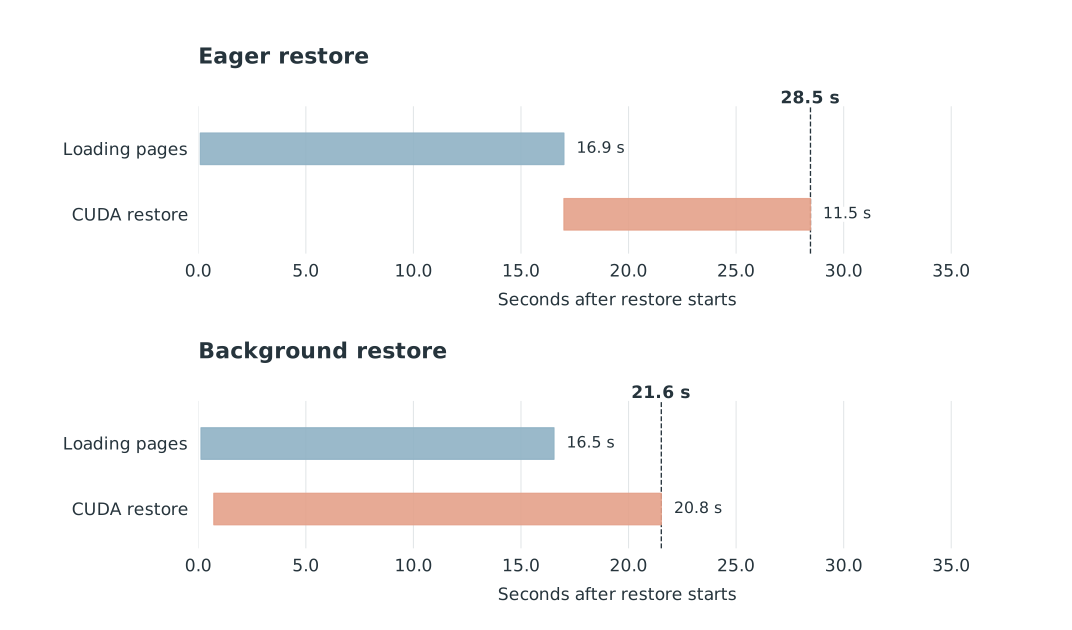
CUDA restore itself seems to get slower: about 21 seconds instead of 11 seconds. But that’s because it’s waiting for the pages to load in from gVisor. Time reduces from 28.5s to 21.5, a nice 7 seconds in reduction.
Putting the changes together
For GLM on NVMe, we brought checkpoint time from 296 seconds to about 20 seconds, roughly 15× faster.
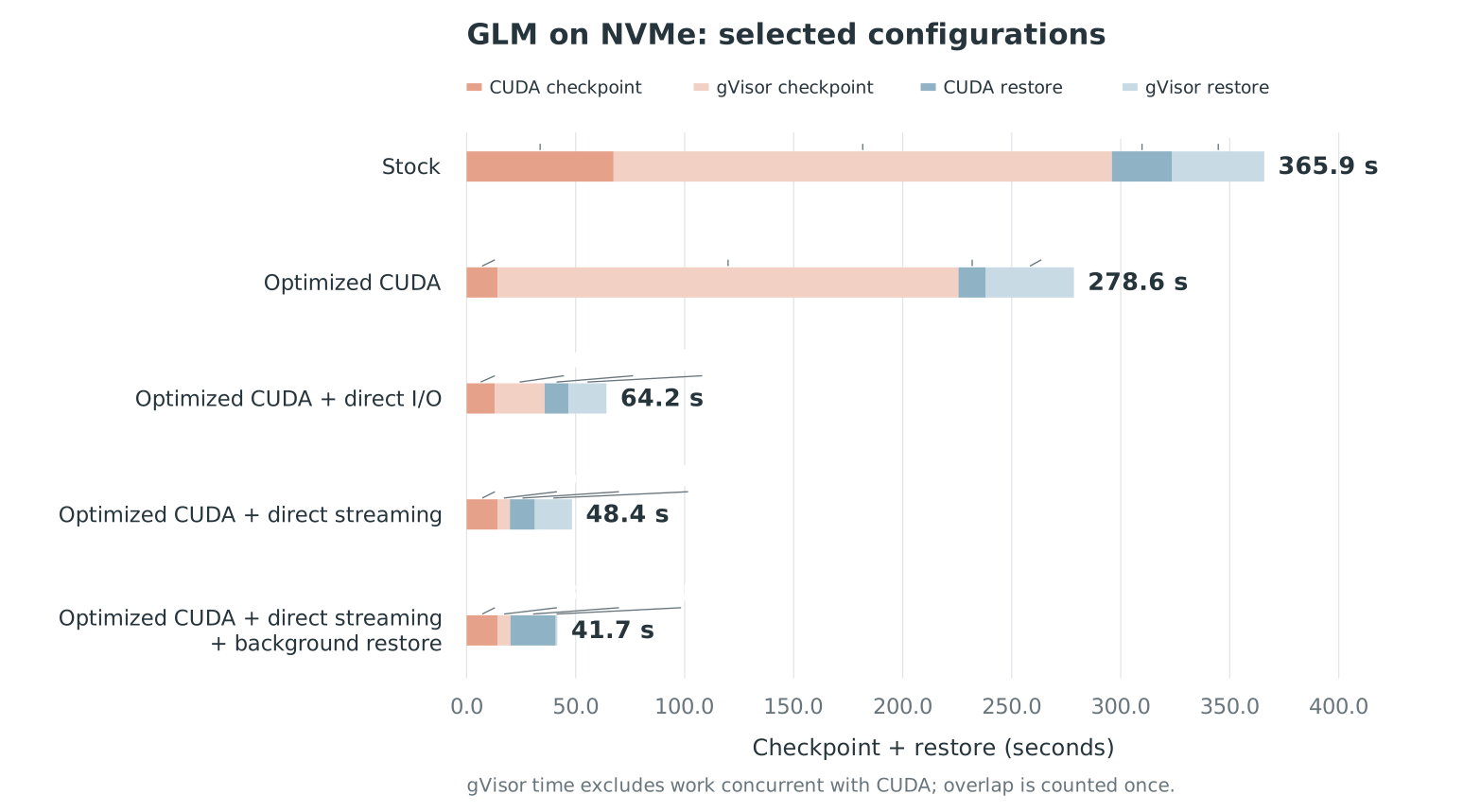
What changes on an object store vs running on NVMe?
These results use local NVMe. What if the checkpoint file is on something like FUSE on S3?

Repeating the same fio test on FUSE gives a different result: direct I/O lowers both write and read bandwidth in these runs.
The same choices don’t work as well here.
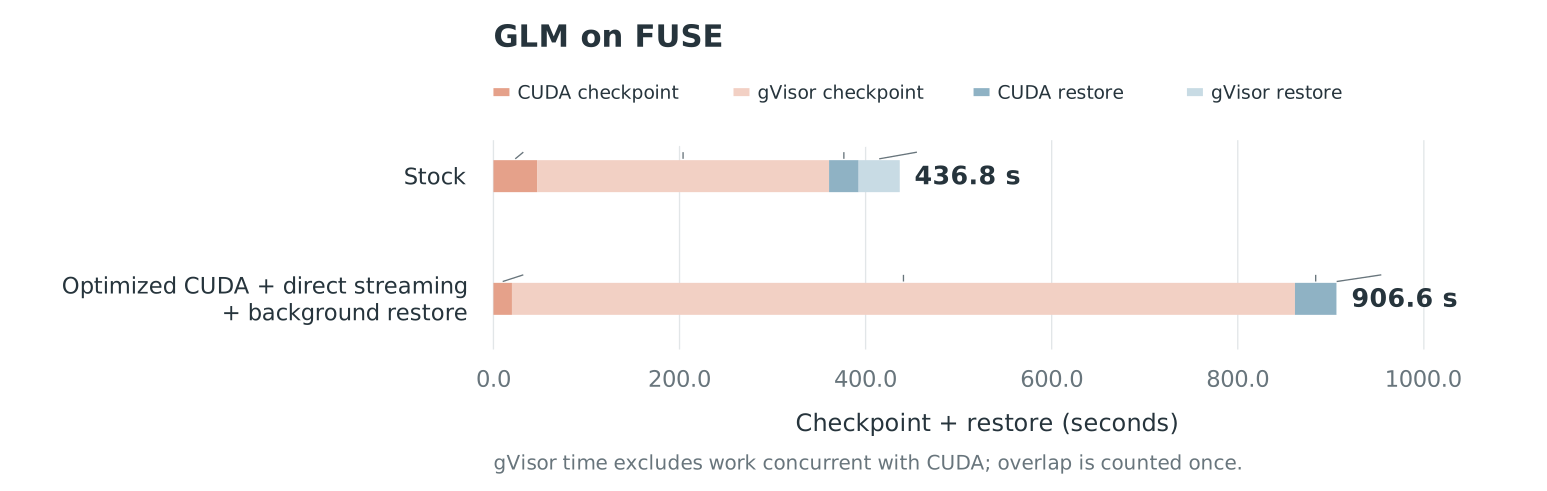
The reason is that there is contention in the fuse layer. The seq write speed caps out at 1.5 GB/s already.
FUSE traces and storage microbenchmarks
Does this help a smaller model?
GLM5.3 is a fairly large model at doesn’t fit on a single GPU. Let’s try Qwen3-4B-FP8 on one GPU (~5GB vs ~344GB).
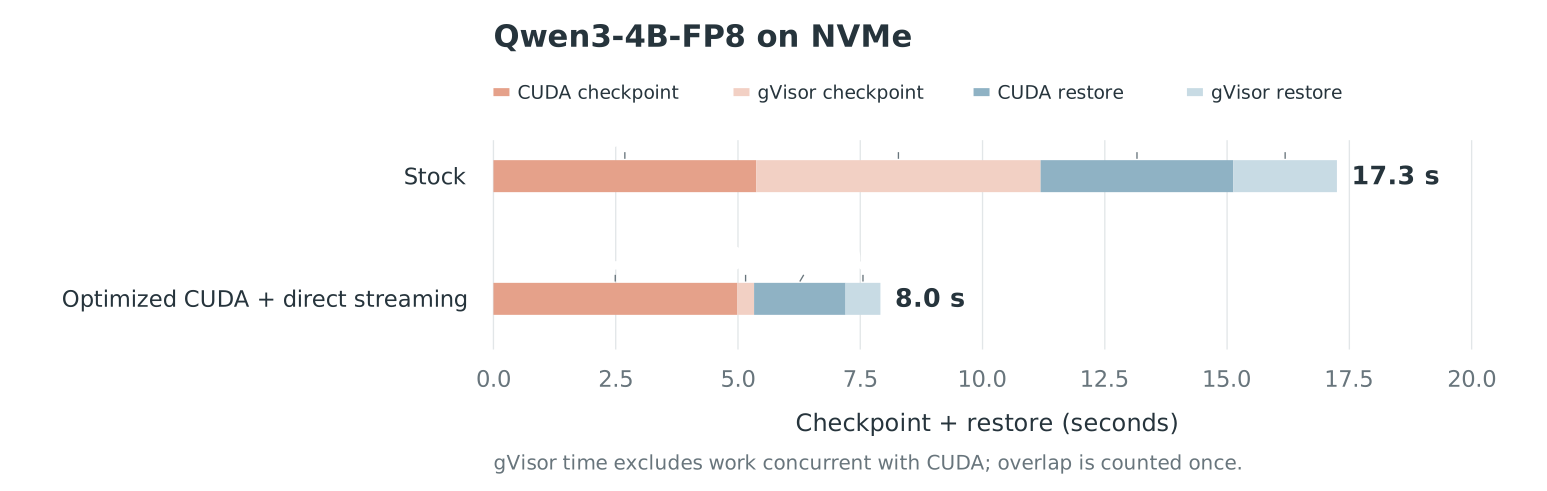
Stock takes 17.3 seconds for checkpoint and restore. Direct streaming with optimized CUDA takes 8.0 seconds, about 2.2× faster. Even with such a small model, we still can see a 2x improvement.
Qwen traces
Other tidbits
I see that gVisor also calls cuda-checkpoint on contexts with very small memory (like a vLLM monitoring processed that forked from the original). There could be ways to optimize for this if cuda isn’t being used in the process.
I think gVisor could greatly benefit from hardware decompression on blackwell. Even for weights, a ~1.2x speedup while compressing 1.3x for model weights is pretty good. When there’s a lull in activity, a couple of cores can be used for compressing the gpu checkpoint image.
Future thoughts
New kid on the block: custom storage checkpointing
CUDA 13.4 added a custom storage api to the checkpoint API that allows skipping the host buffer entirely CUDA 13.4 release notes: cuda-checkpoint can now write checkpoint state to persistent storage instead of retaining it only in process memory
CUDA Checkpointing API reference . Instead of the driver copying VRAM into its own staging buffers, it hands us a device pointer per GPU and lets us decide where the bytes go.
CUresult do_checkpoint(int pid, void **dst /* one host buffer per GPU */)
{
    cuInit(0);

    CUcheckpointLockArgs lock = {0};
    lock.timeoutMs = 30000;
    CUresult rc = cuCheckpointProcessLock(pid, &lock);
    if (rc != CUDA_SUCCESS) return rc;

    // Ask the driver to map the target's VRAM instead of copying it to host
    CUcheckpointCustomStorageInfo *info = NULL;
    CUcheckpointCheckpointArgs ckpt = {0};
    ckpt.customStorageInfo_out = &info;
    rc = cuCheckpointProcessCheckpoint(pid, &ckpt);

    if (rc == CUDA_SUCCESS) {
        // One contiguous mapping per GPU. Copy it wherever we want.
        for (unsigned i = 0; i < info->deviceCount; i++) {
            CUcheckpointCustomStoragePerDeviceData *d = &info->perDeviceData[i];
            cuMemcpyDtoHAsync(dst[i], d->devPtr, d->size, d->stream);
        }
        // Driver syncs every stream above, then unmaps and releases VRAM
        rc = cuCheckpointOperationComplete(info->handle);
    }

    CUcheckpointUnlockArgs unlock = {0};
    cuCheckpointProcessUnlock(pid, &unlock);
    return rc;
}
The flow is the same lock, checkpoint, unlock as before, with two differences. Checkpointing takes a customStorageInfo_out pointer, and we have to call cuCheckpointOperationComplete once our copies are enqueuedcuCheckpointOperationComplete: synchronizes the returned streams, then unmaps the GPU memory and moves the target to CU_PROCESS_STATE_CHECKPOINTED. Restore is symmetric: cuCheckpointProcessRestore takes the same output pointer, we copy our bytes back into the mapped device pointers, and complete the operation again.
You might wonder how a plain cuMemcpyDtoHAsync from our process work on another process’s memory? Because the driver maps it into our address space for us as described from the docscuCheckpointProcessCheckpoint, CUcheckpointCustomStoragePerDeviceData> all the GPU memory allocated by the process with pid will be mapped onto the calling process’s GPUs so the application can copy the memory to custom storage:
This gives us the previous section should capture similar bandwidthProbably won’t work out of box, but at least when I tried on a spare RTX3090, it had reached PCIE bandwidth calling cuMemcpyDtoHAsync. Also, why won’t it work with older cuda versions? The kernel driver doesn’t expose a clear way to map the same gpu virtual memory between two processes to the same cuda context.
Grace Hopper
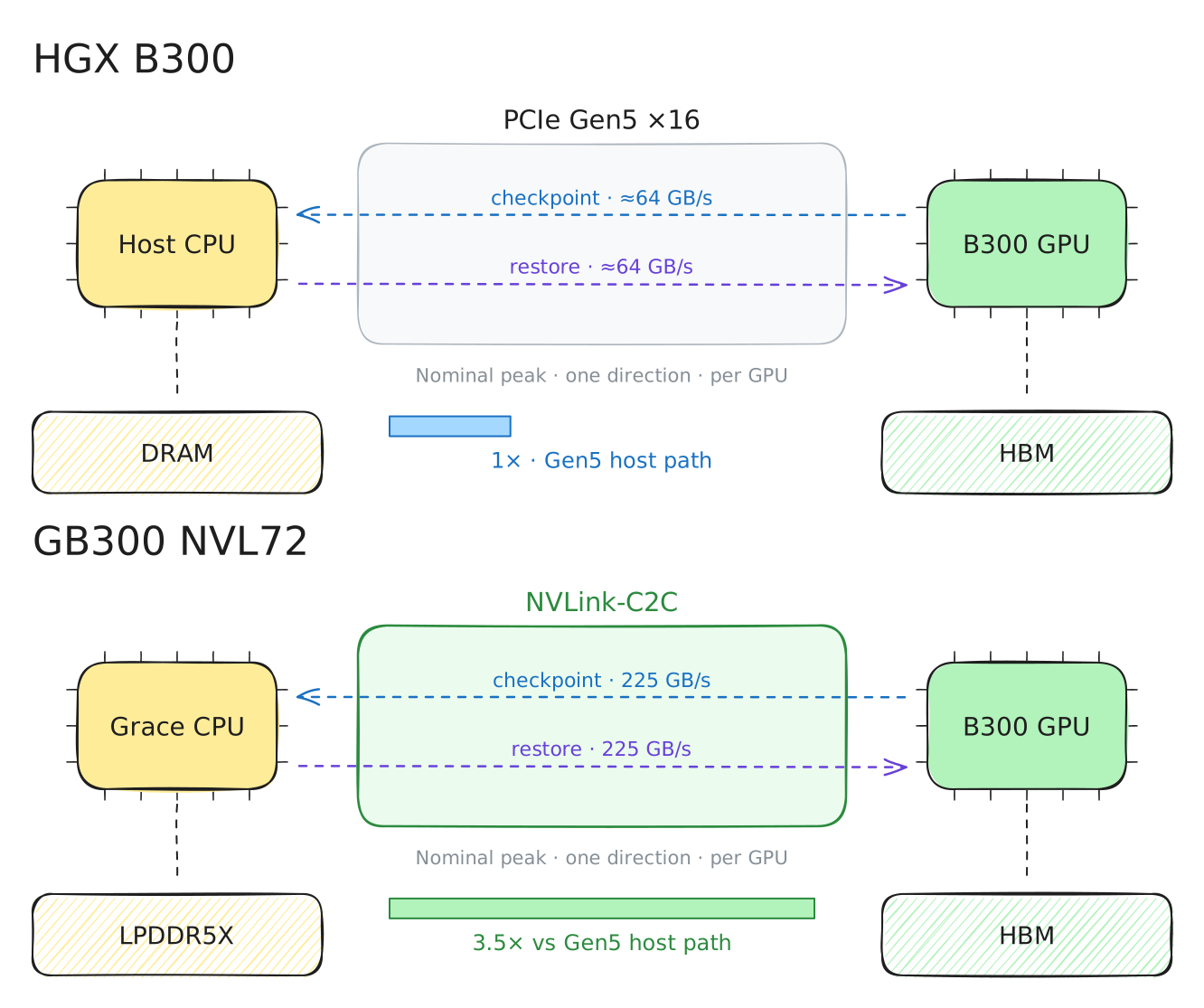
Grace Hopper and Grace Blackwell use NVLink-C2C instead of PCIe for transfers between the GPU and its paired CPU’s memory. GH200 provides up to 450 GB/s per direction for one GPU. GB200 splits the same total bandwidth between two GPUs, giving each up to 225 GB/s per direction NVIDIA: Grace Hopper architecture
NVIDIA: GB200 bandwidth clarification
The advertised 900 GB/s includes both directions: 900 ÷ 2 = 450 GB/s for GH200; 900 ÷ 2 ÷ 2 GPUs = 225 GB/s per GPU for GB200. .
We should expect much higher bandwidth bottlenecks from staging buffers and should much prefer direct copy instead. Many more cores are needed to reach the bandwidth.
Batching setup and teartown commands
Since we know we’re going to setup the state and all of the state for the GPU down, we can batch the commands into one syscall call to the kernel module instead of spreading it out.
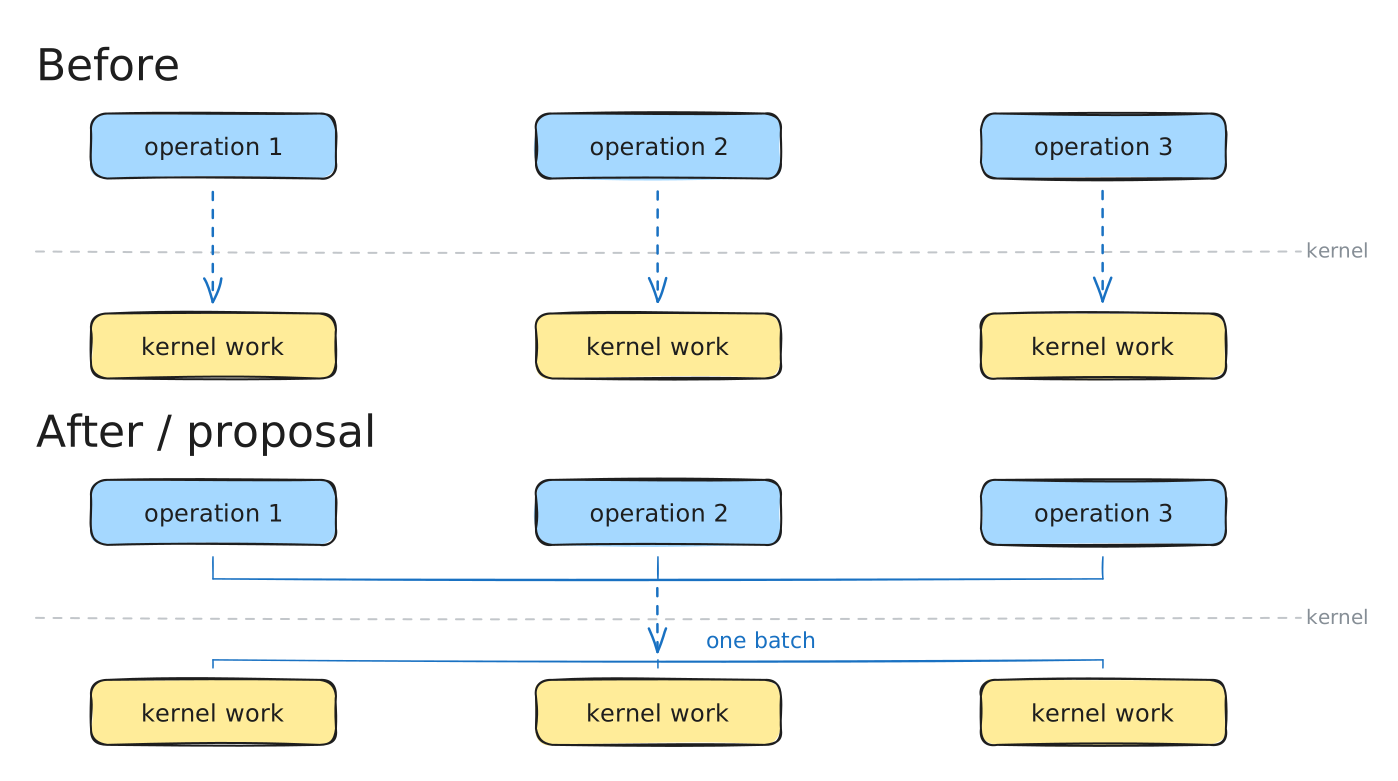
Serializing to other mediums
Other mediums will mostly be the bottleneck compared to PCIE (lower cost!). Could be HDDs, SSDs, Object Stores, memory pools, distributed filesystems. We should try to aim to parallelize the work of these devices to decrease latency
Thinking about running these optimizations in production
Since we are focused on optimizing a single microbenchmark, some questions are left for systems that have multiple concurrent checkpointing and restores that could be happening at once. There could be a burst of requests and then a lull, for example.
Preallocation optimization
I believe that it’s pretty hard to predict the future (and especially if that future is very soon). If we preallocate memory for an image that in the future be stored or restored, how big should that allocation be?
The simplest way is to statically allocate a big pool of memory and use it for checkpointing.
Another hacky way is to throw all the metrics into a machine learning model and tell it to optimize for say checkpointing/restore hits with the mimimal amount of memory by observing a history of requestsUnderstability is a bit harder to get here.
Or maybe just not preallocate at all. Or maybe preallocate only if memory limits never get hit with other workloads. Or maybe just isolate the machine to only allocate up to a certain amount using cgroups and you know that the rest of memory has to be used for checkpointing.
NCCL and other state
NCCL and other custom protocols require serializaton as well, which cuda-checkpoint is unaware of. cuda-checkpoint only checkpoints at the awareness of a single GPU. Most systems running in data centers utilize more than a single GPU.
Priority
To achieve the lowest latency, the gpu sandbox should be checkpointed or restored immediately. But one could imagine a huge queue of sandboxes ready to be checkpointed or restored at any given moment. The GPU process might hold a huge amount of memory or very little. What does one decide to checkpoint? We know that the speed is bounded by PCIE, so that’s the limit. But we could run the workload on any GPU. Perhaps there could be a scheduler that tries to maximize the PCIE bandwidth used while minimizing the contention between applications trying to checkpoint or restore.
Acknowledgments
Thanks to Chirag Shetty and Ayush Ranjan for giving valuable feedback.
Citation
To cite this article:
@article{zhu2026cudacheckpointing,
  title = {Making CUDA Checkpointing 15x and gVisor 2x Faster on a B300: A Worklog},
  author = {Zhu, Henry and Sathia, Vimarsh},
  journal = {maknee.github.io},
  year = {2026},
  month = {October},
  url = "https://maknee.github.io/blog/2026/Cuda-Checkpointing/"
}
Enjoy Reading This Article?
Here are some more articles you might like to read next: