cudamemcpy-tuner: cudaMemcpying up to 5x faster on a B300
I built cudamemcpy-tuner, a tool that can improve pageable copies between the CPU and GPU up to 5x faster without requiring any modifications to the original applicationNo AI was used in writing. AI was used for visualizations and graphs.
Here are some instances where one can see a speedup:
# Copying tensors
a = np.zeros((1024, 3, 224, 224), dtype=np.float32)
b = torch.from_numpy(a).to("cuda")
c = jax.device_put(a)

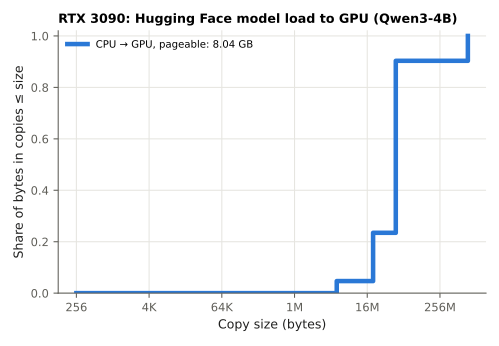
# Huggingface model loading
model = AutoModel.from_pretrained("Qwen/Qwen3-8B", device_map="cuda")
size_t size = 1024 * 1024 * 1024; // 1 GB
void* a = malloc(size);
cudaMalloc(&b, size);
cudaMemcpy(b, a, size, cudaMemcpyHostToDevice); // or cudaMemcpy(b, a, size, cudaMemcpyHostToDevice);
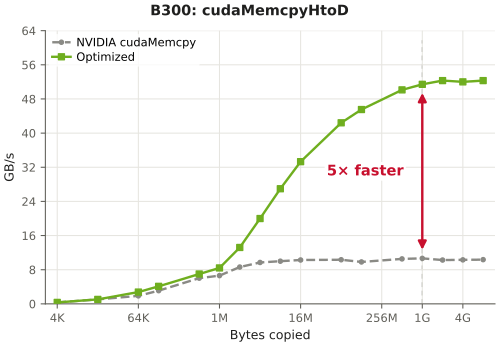
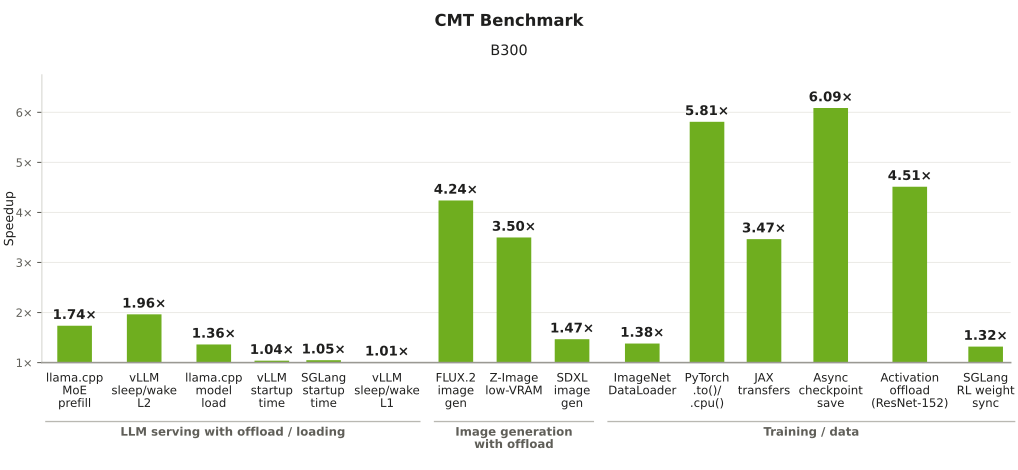
Here are the results on a B300 node:
Here’s a link to ask ChatGPT or Claude for a TL;DR of this article.
Main takeaways
- Pageable copy optimization comes from copying with more buffers and threads
- cudamemcpy.com keeps track of the benchmark. Share your tuned file for others to use by sending a PR
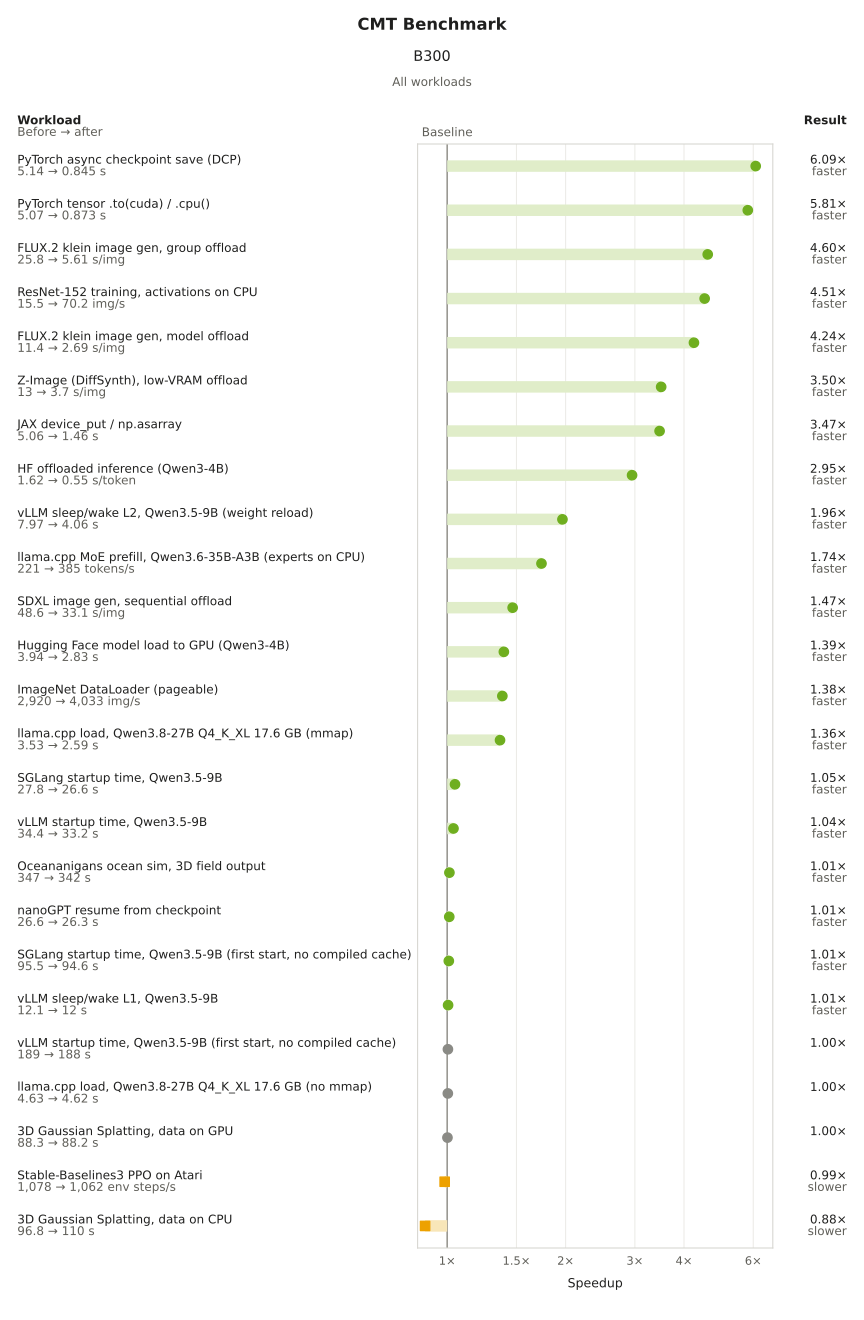
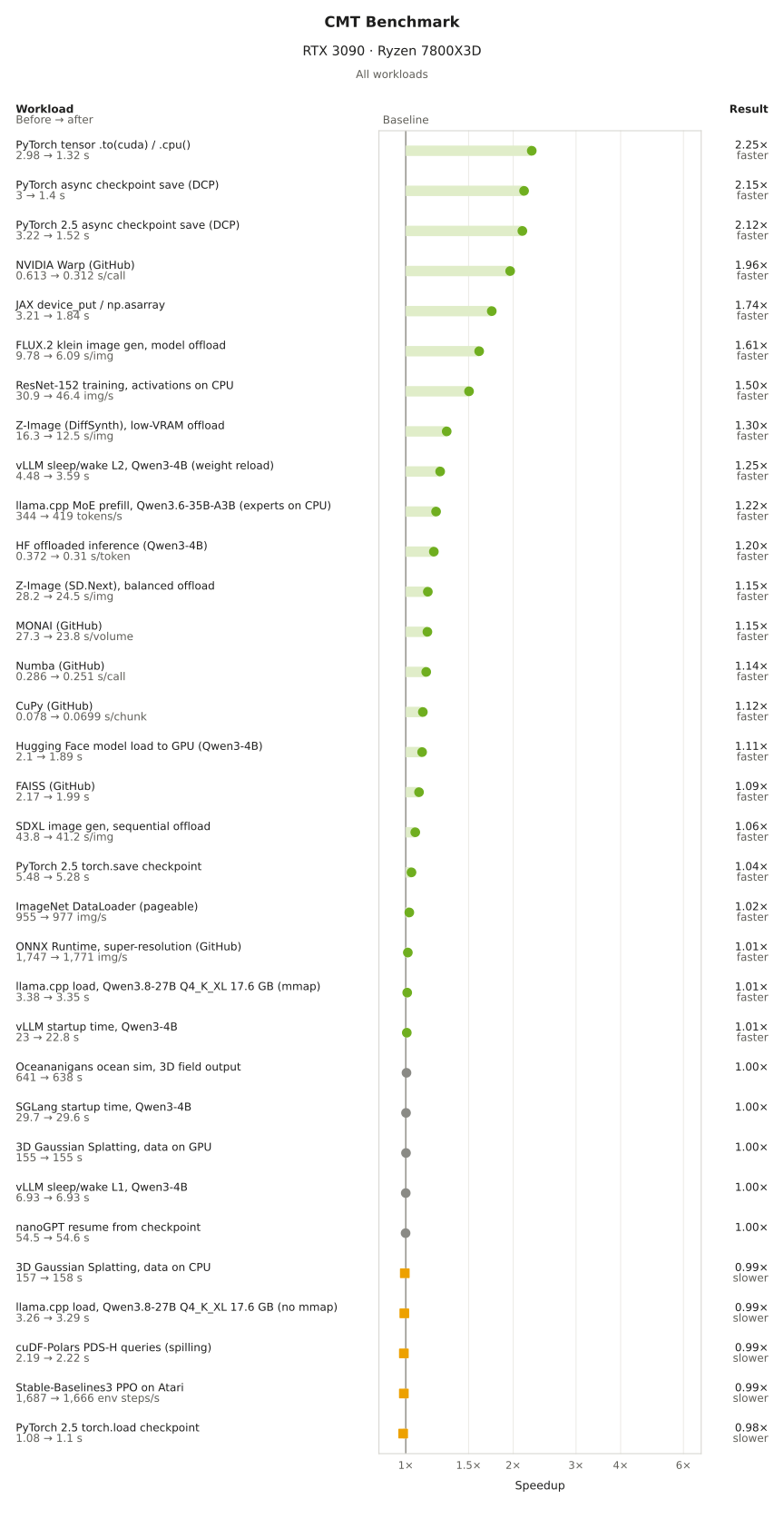
Graphs with full breakdown for b300 and 3090:
Using cudamemcpy-tuner
To improve pageable memory transfers you can just run:
cmt tune -- llama-cli -hf unsloth/Qwen3.8-27B-GGUF
And that’s itYou can also improve performance by passing –search instant for immediate estimated setting or –search full for finding a better configuration suited for your setup.
I’m looking for opportunities in LLM serving and performance engineering in 2027: Email
Pageable and pinned transfers
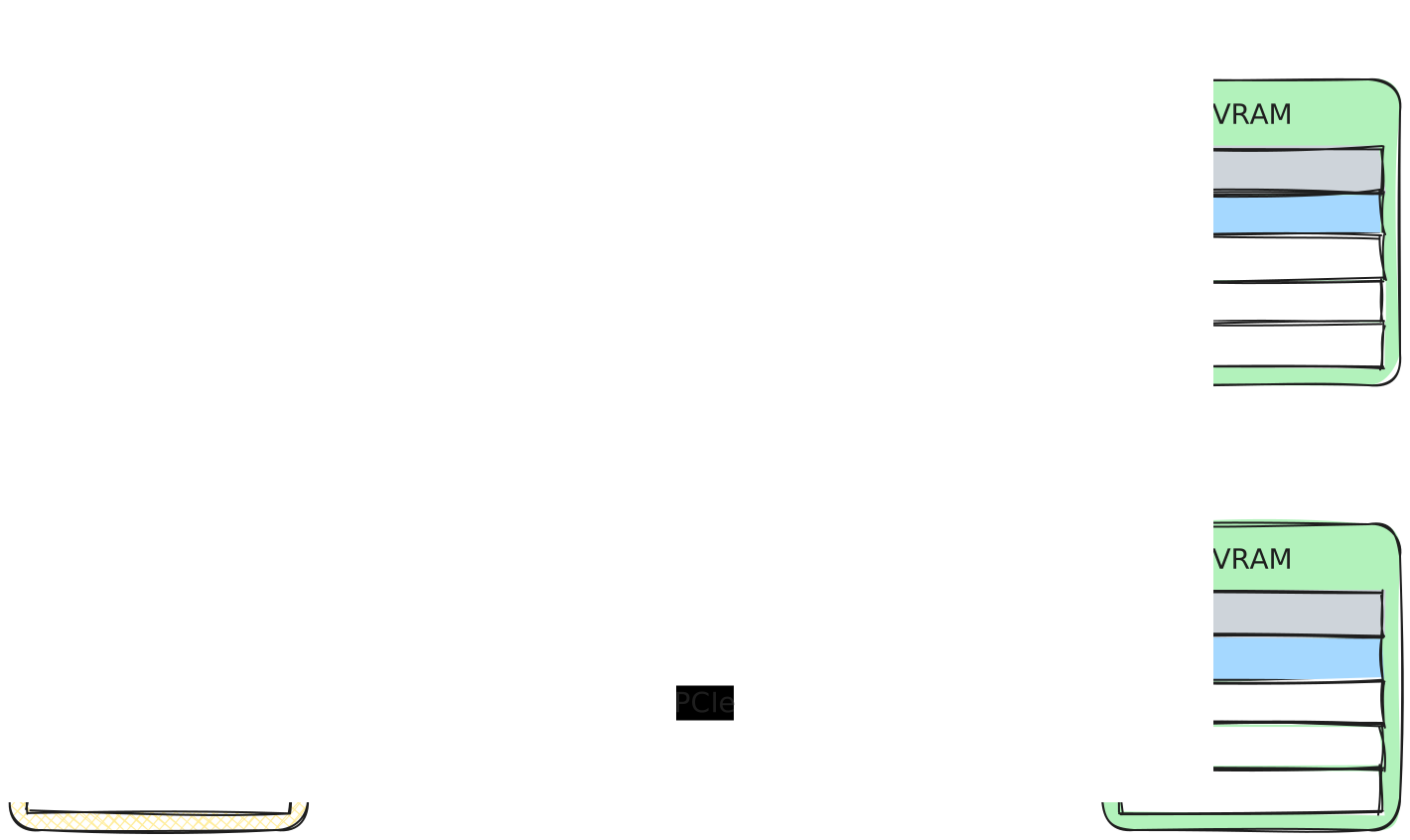
The GPU DMA engine cannot read pageable memory as the OS is free to move the memory. So, pageable memory is first copied to a small pinned buffer and then the GPU DMA engine sends it over to the GPU. Pinned memory gets copied directly to the GPU.
It’s recommended to use pinned memory for copying from the same buffer over and over again like dataloading or kv caching offloading. Allocating pinned memory is resource intensive and the OS cannot swap the memory out. Paged memory could be used for one off copies like model loading.
What brought this idea to mind
Throughout the years, I kept on seeing the same images over and over again with tutorials on the difference between pinned and pageable memory and PCIe link bandwidth. Below shows a few examples of what I mean:
Here’s a tutorial by NVIDIA in 2012 describing the pinned and pageable copiesIn case you’re unfamilar with pageable/pinnned memory or need a fresher, this is a great blog by NVIDIA to get context
Device: GeForce GTX 680
Transfer size (MB): 16

Pageable transfers
  Host to Device bandwidth (GB/s): 5.368503
  Device to Host bandwidth (GB/s): 5.627219

Pinned transfers
  Host to Device bandwidth (GB/s): 6.186581
  Device to Host bandwidth (GB/s): 6.670246
Another by pytorch, showing pinned memory copies with tensor.pin_memory().to(device, non_blocking=True) in 2024.

I also frequently see PCIe bandwidth tests, especially by academic work and more hardware focused blogs documenting new chips’ performance with microbenchmarksIf you’re unfamilar with these graphs, X axis is the amount of bytes being copied. Y is the time it takes to copy the bytes by dividing the bytes by the seconds. Y is typically in GB/s. Higher GB/s is better..
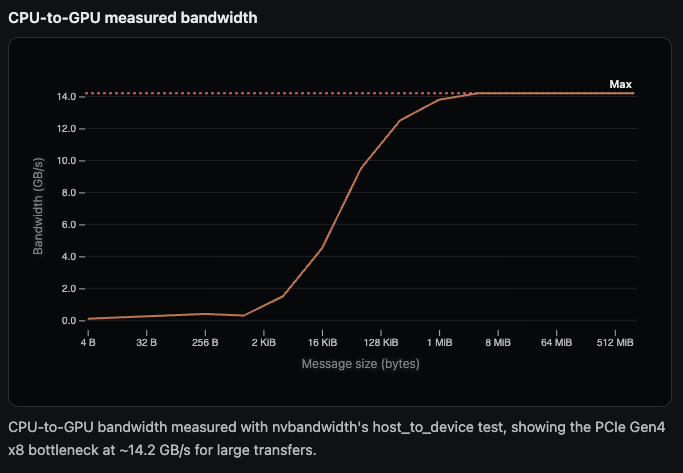
More graphs I've seen over the years

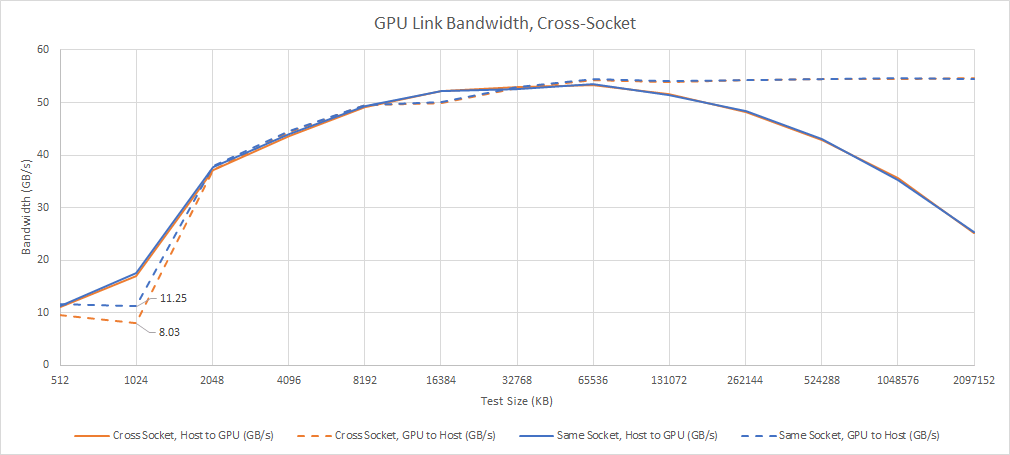
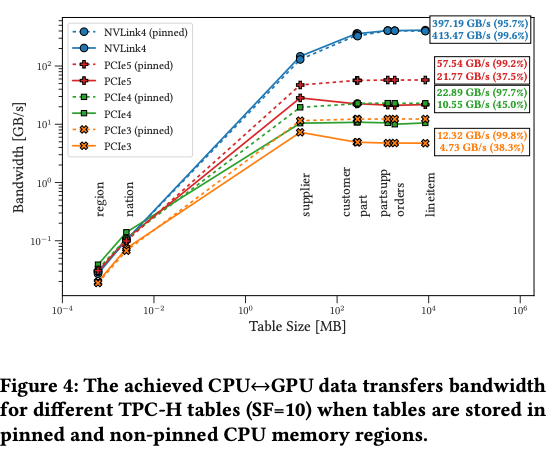
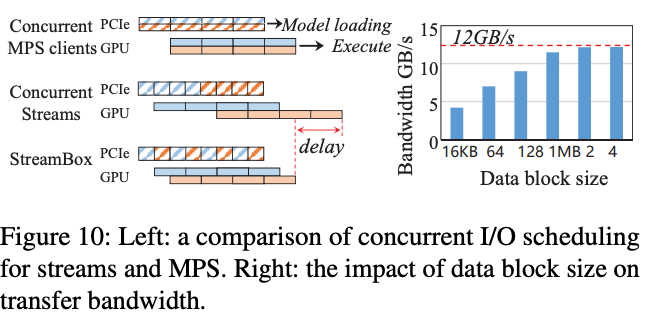
One day something came to mind. Why are pageable copies that much slower than copies with pinned memoryPinned PCIe copies hover around 85% of the max. For example, if motherboard/GPU are rated at ~32GB/s at PCIe 4.0, you can expect ~27GB/s copies. This is due to how PCIe protocol works for copies. There’s a 20 byte overhead per payload least on AMD, which I assume should to be true for NVIDIA as well.? Based on benchmarks I’ve seen with CPU copies, CPU copying are pretty fast compared to the PCIe transfer speedsAs per usual, these benchmarks don’t represent what we will achieve, but a good idea of the potential maximum bandwith.
Here’s a graph on the copy bandwidth on recent-ish Intel CPUs:
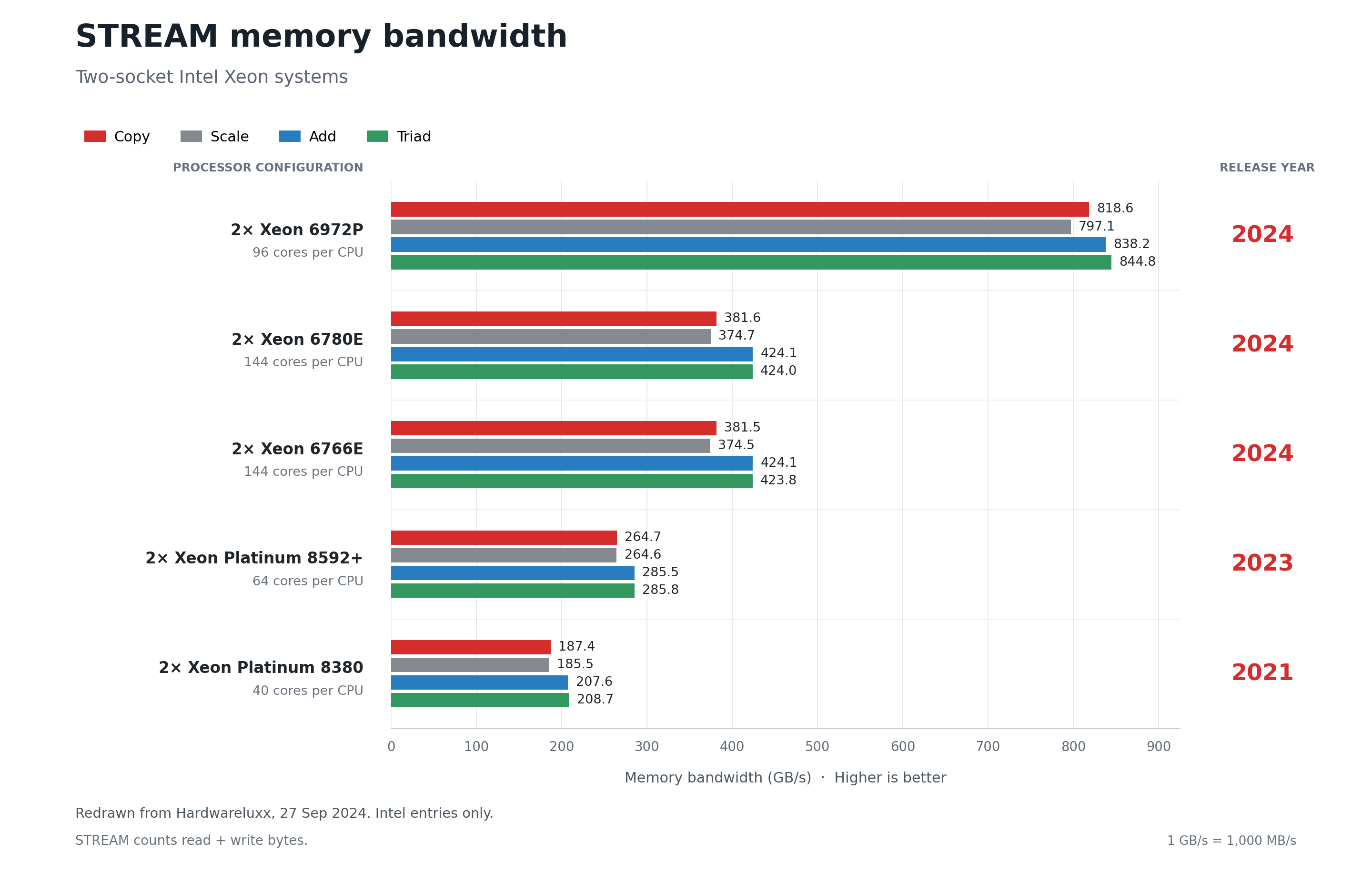
In theory, they should overlap, if the CPU copying and GPU transfer are equal. Transfer time = max(CPU copy, PCIE bandwidth) and PCIE bandwidth should become the bottleneck if the CPU/Memory can sustain the copy bandwidth.
How and why cudamemcpy-tuner optimizes copying
NVIDIA’s cudamemcpy implementation copies data with two staging buffers by double bufferingFor host to device copies, the buffer from pageable source buffer is copied to an intermediate pinned buffer. Then the GPU copies the data directly to the GPU memory.

This tool runs cudamemcpy with multiple threads and staging buffers.

The main takeaway is that the original implementation probably hasn’t kept up in the last couple of years while PCIe bandwith and multithreaded copying had scaled since then.
More context on why the original implementation may not be suitable for modern systems
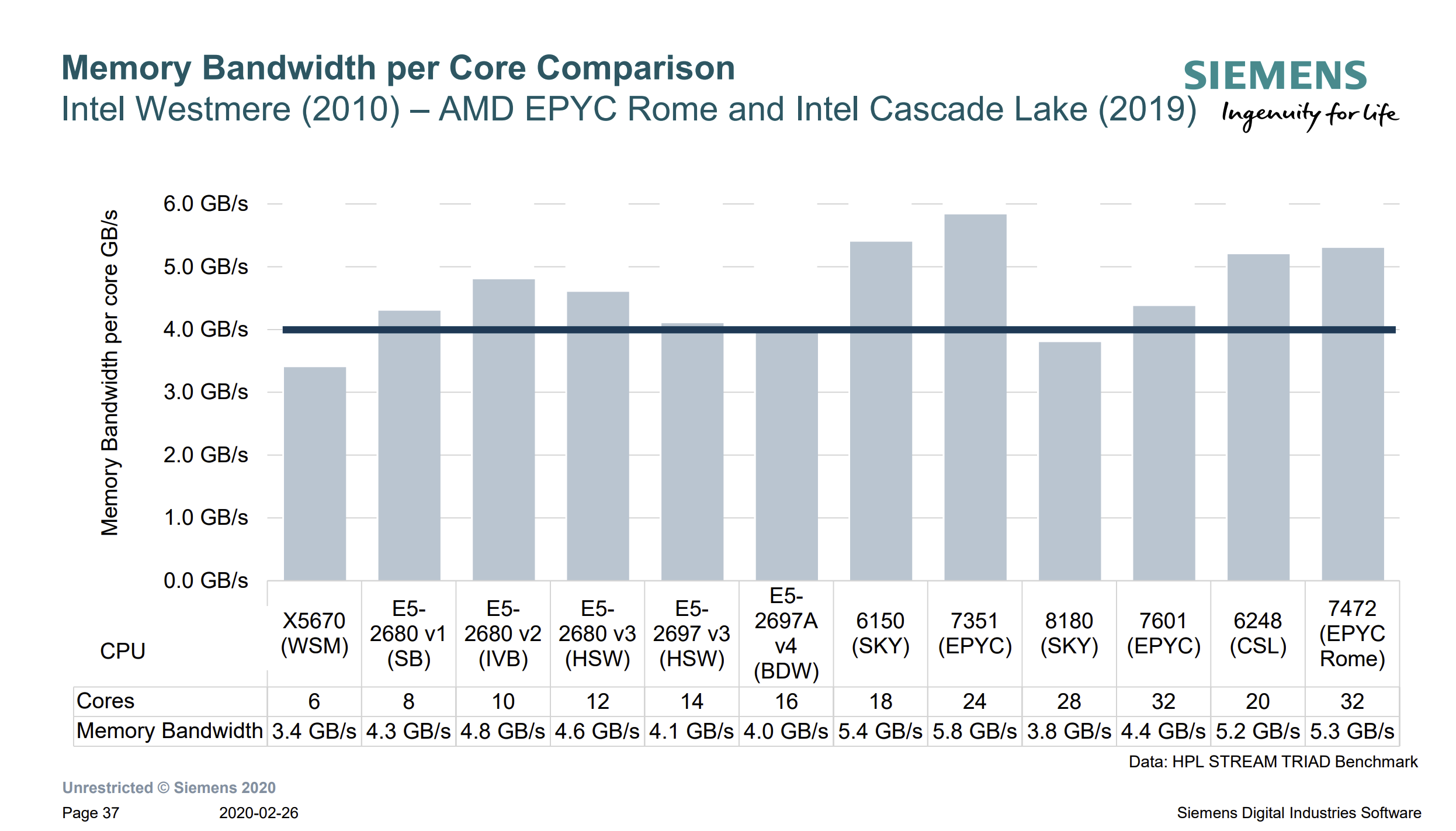
I was taking a look at single core copying speeds for modern intel datacenter processors. Single core copying has kept to a relatively constant rate throughout the years.
This is also what I saw from the B300 I ran on.
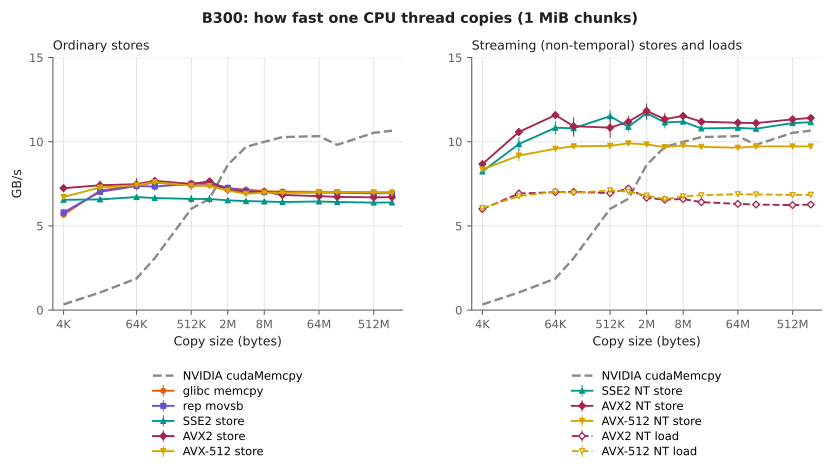
However, copying with more cores has scaled:
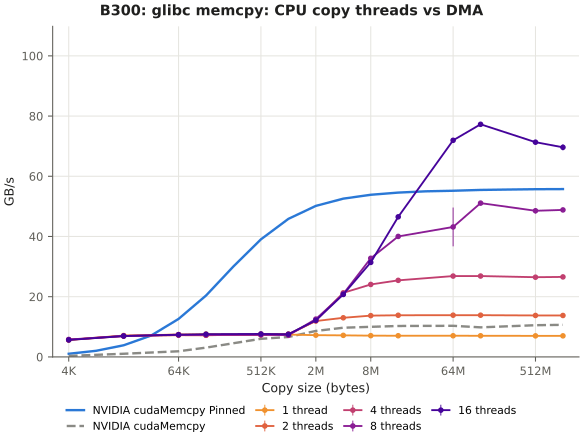
Workloads for meausuring Cudamemcpy performance
I wanted to build a benchmark that measures the tuner’s impact on applications that people run day to day. In particular, I want representing workloads cover a range of hardware that is ran on: from a personal laptop to datacenters of GPUsI’ll refer to this as the CMT benchmark.
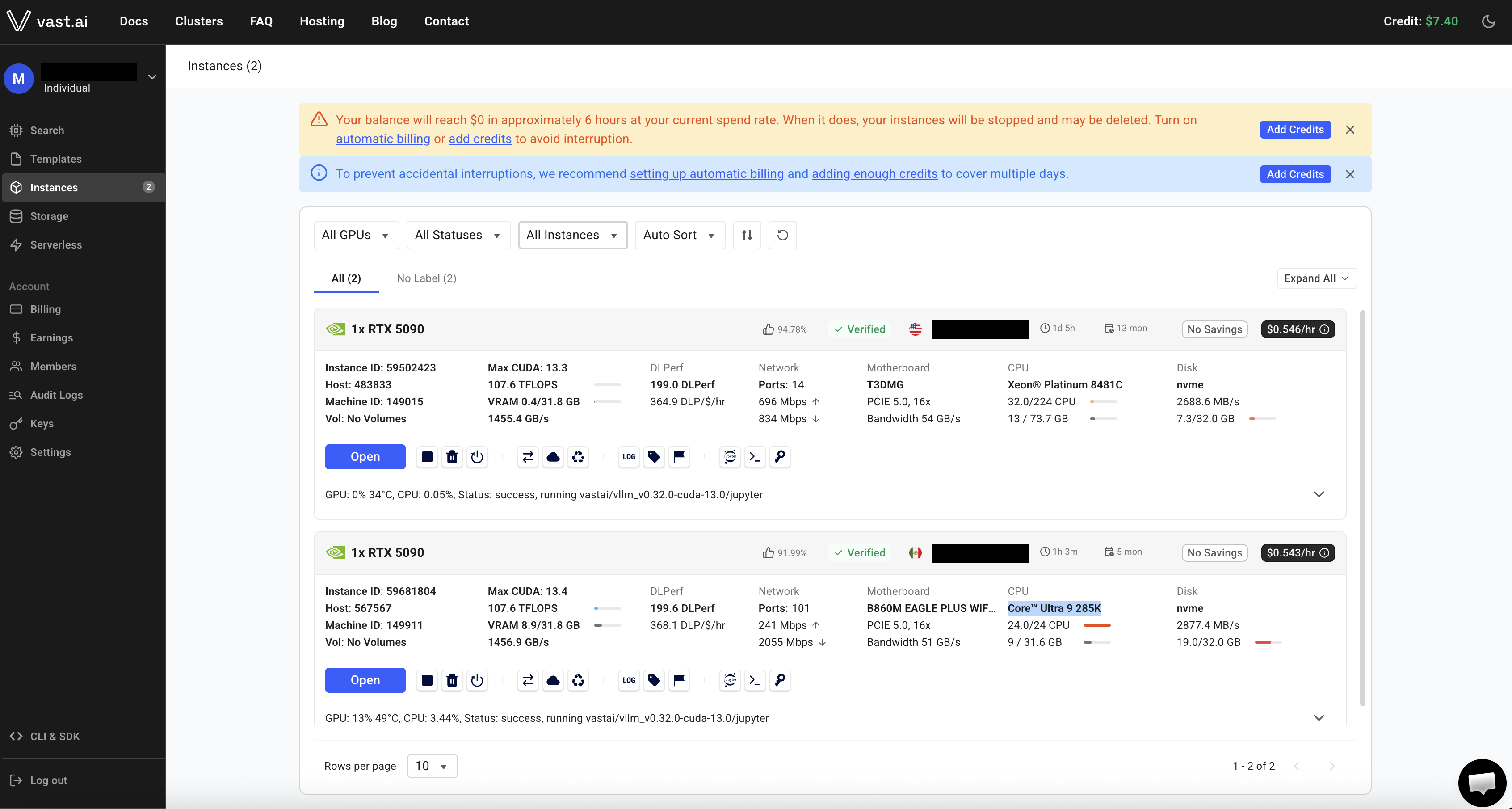
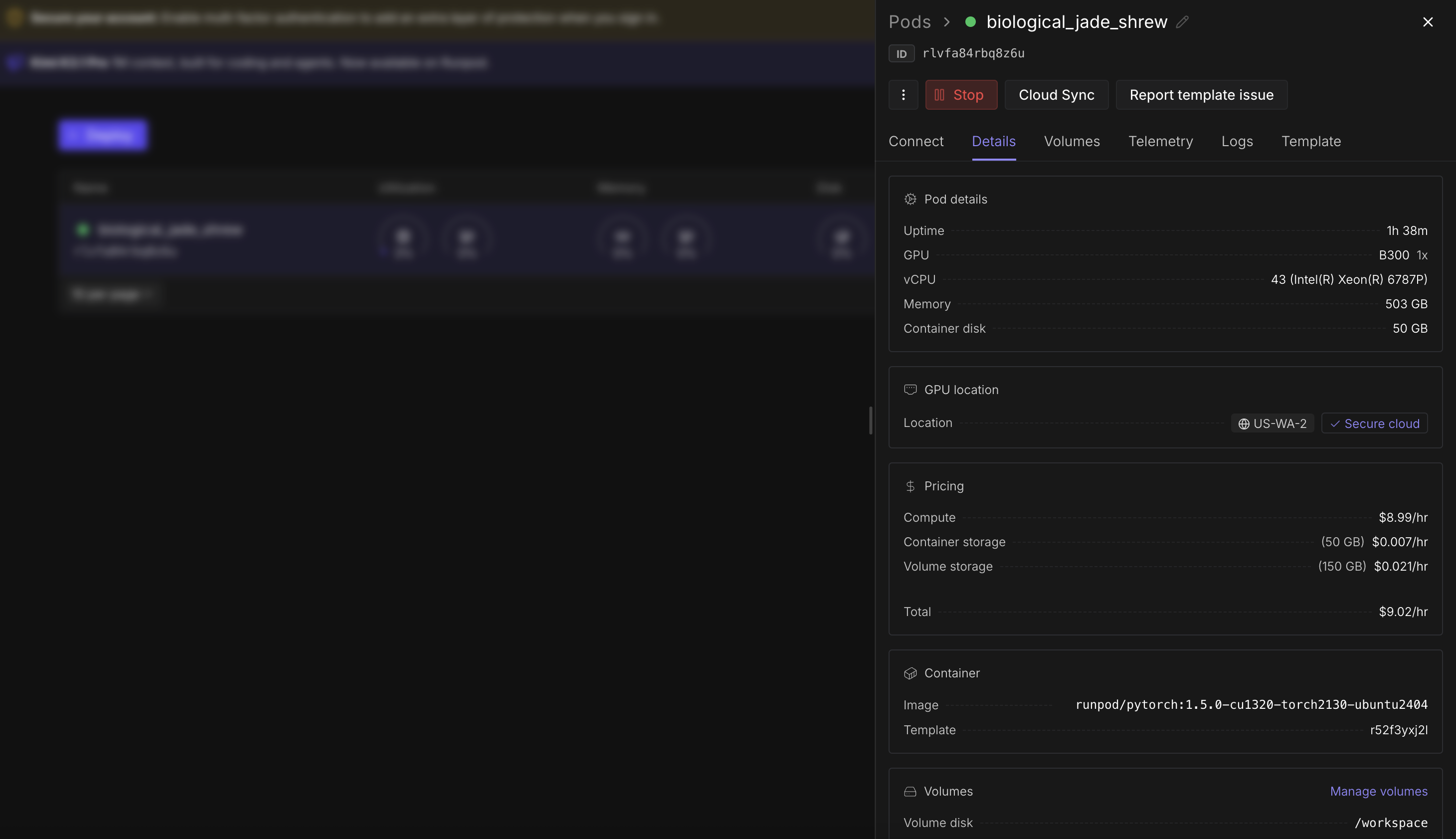
I rented machines through Vast.ai and RunpodReceipts are in Money burned.
| Machine | GPU | CPU | CPUs used | Driver |
|---|---|---|---|---|
| RTX 3090 | RTX 3090 (PCIe 4.0 x16) | Ryzen 7 7800X3D | 8 cores | 615.71.09 |
| RTX 5090 + Xeon | RTX 5090 | 2× Xeon Platinum 8481C | 32 vCPUs | 610.57.04 |
| B300 | B300 SXM6 | 2× Xeon 6787P | 16 vCPUs | 595.91.07 |
| A100 | A100 SXM4 40 GB | AMD EPYC 7003 (Milan, VM) | 32 vCPUs | 615.71.09 |
| RTX 5090 + Core Ultra | RTX 5090 | Core Ultra 9 285K | 24 cores | 615.71.09 |
Microbenchmarks
Let’s see some microbenchmarks for two setups: one with a B300 and another with a 3090
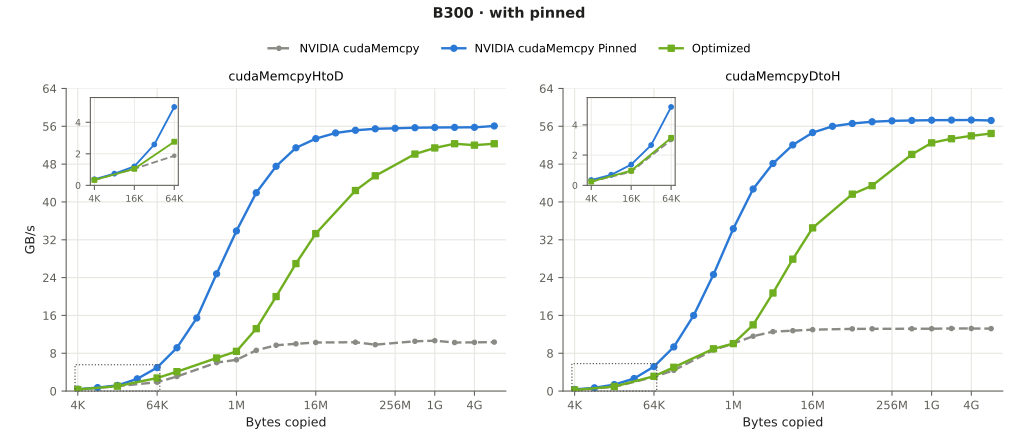
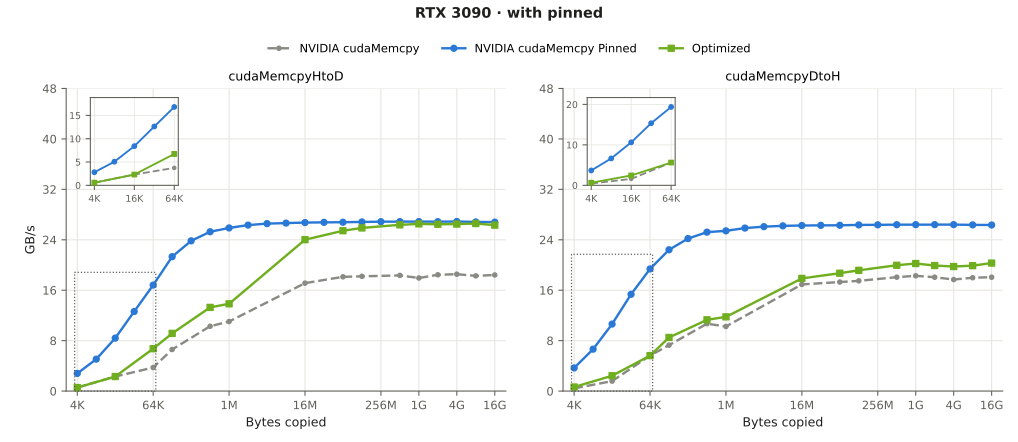
We can see that the optimized version vastly outperforms the default pageable copy (52GB/s vs ~10GB/s at 1GB), catching up to the pinned copies (~56GB/s). You may find the other graphs in the expanded sections or view the benchmarks on a website that I’ve hosted here: cudamemcpy.comFeel free to share your tuned values by sending a PR.
CPU microbenchmarks
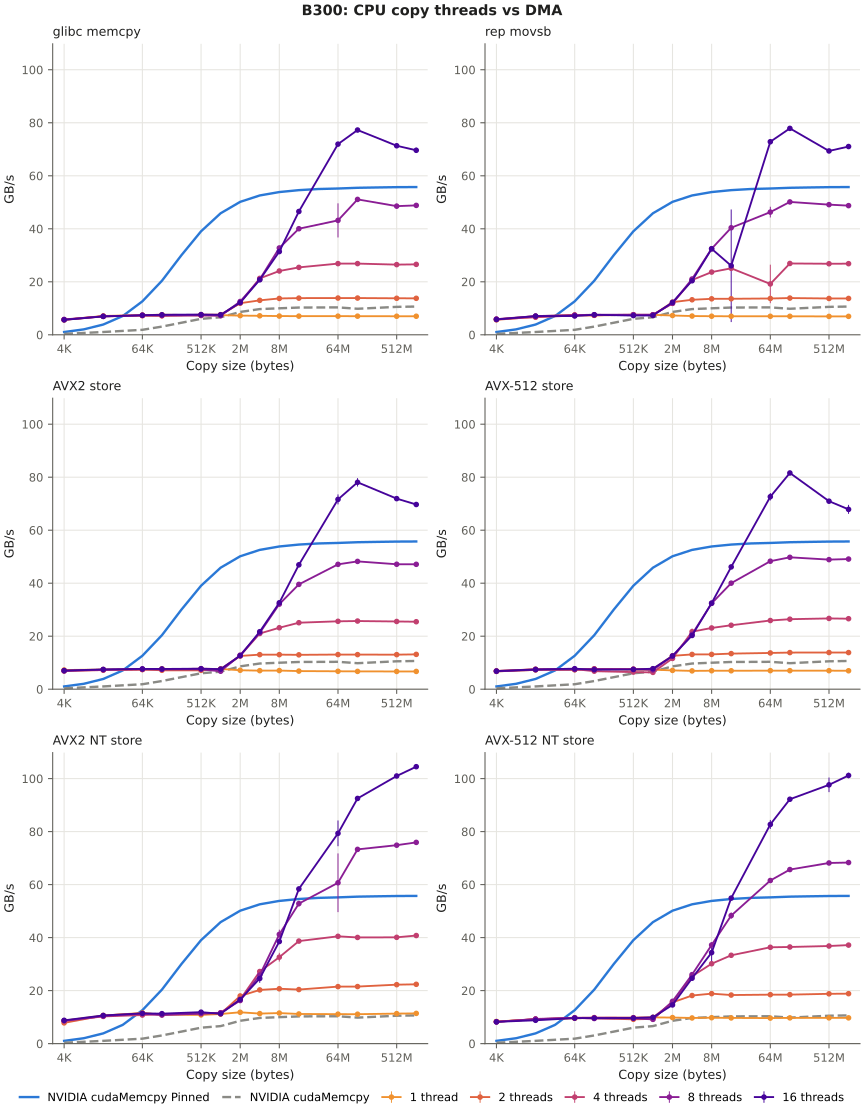
Here are graphs for benchmarking a single core copying speed using various forms of copying on x86. Another graph shows how much the bandwidth improves with scaling.
B300:
3090:
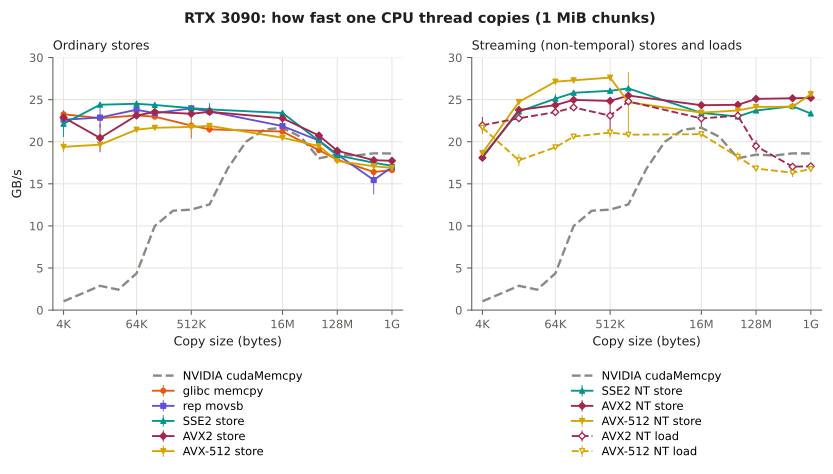
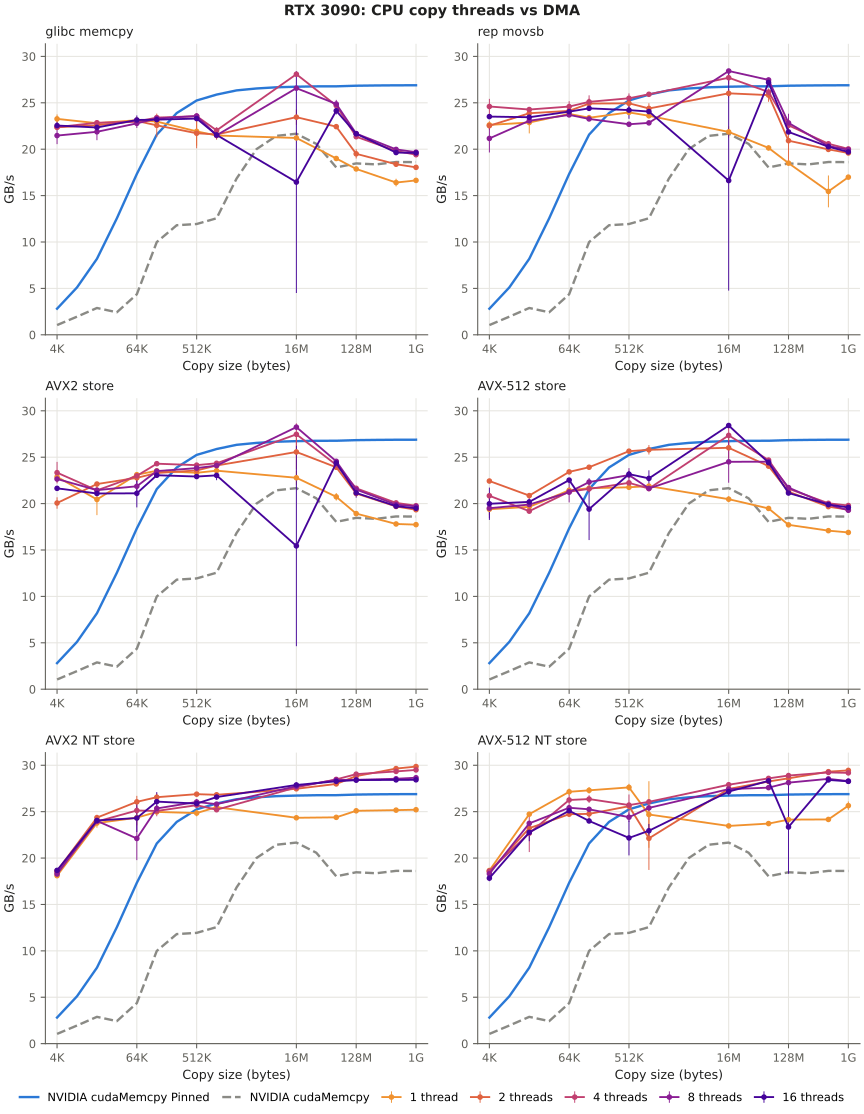
Here we can get an idea of what the copying speeds are like. However, it may not represent the end to end speedup as the real workload performs a copy and then another copy using DMA to the GPU.
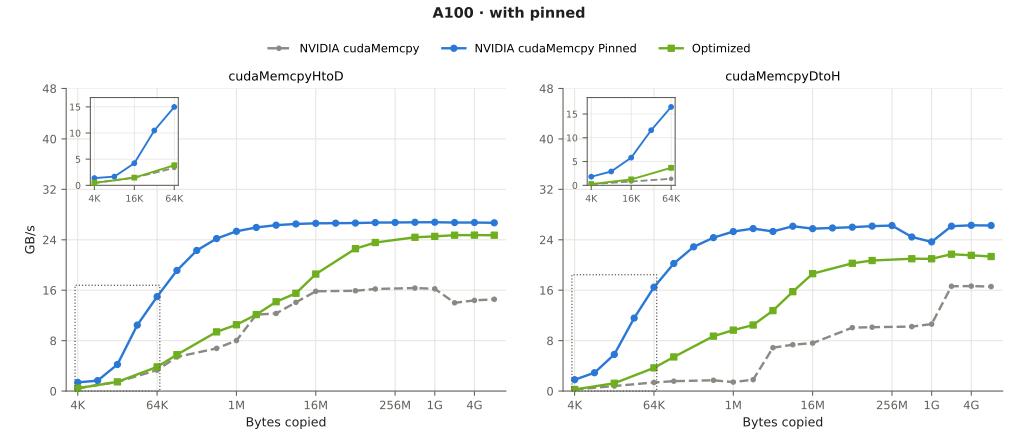
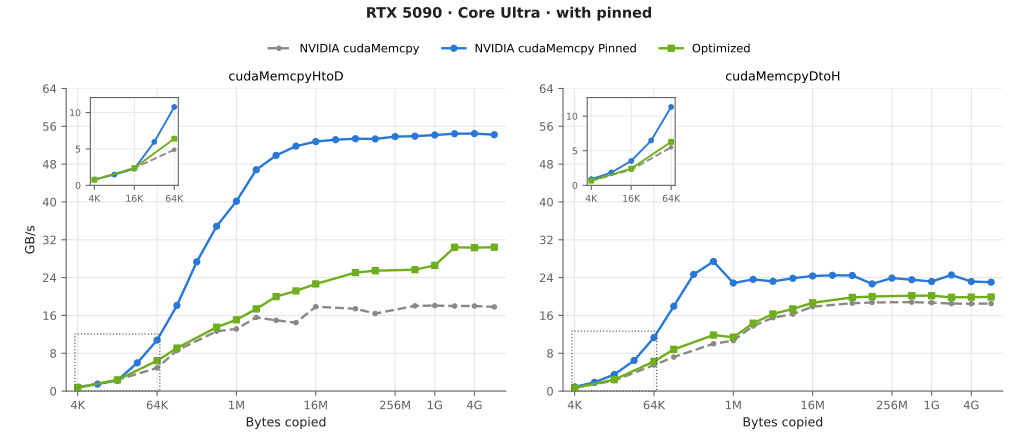
Bandwidth benchmarks for various machines (5090, a100, b300)
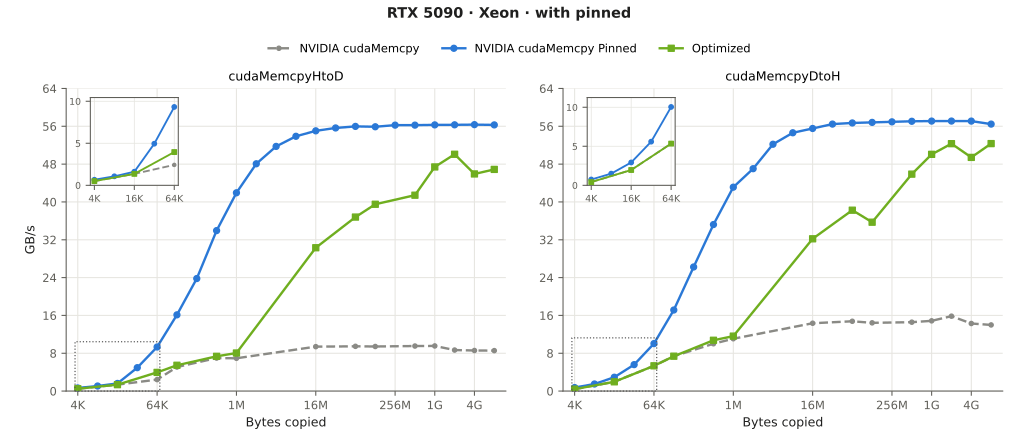
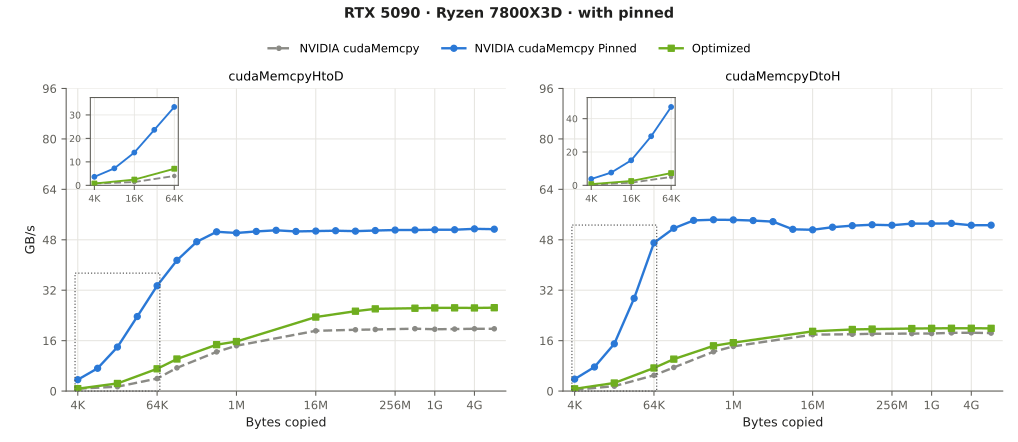
Personal use
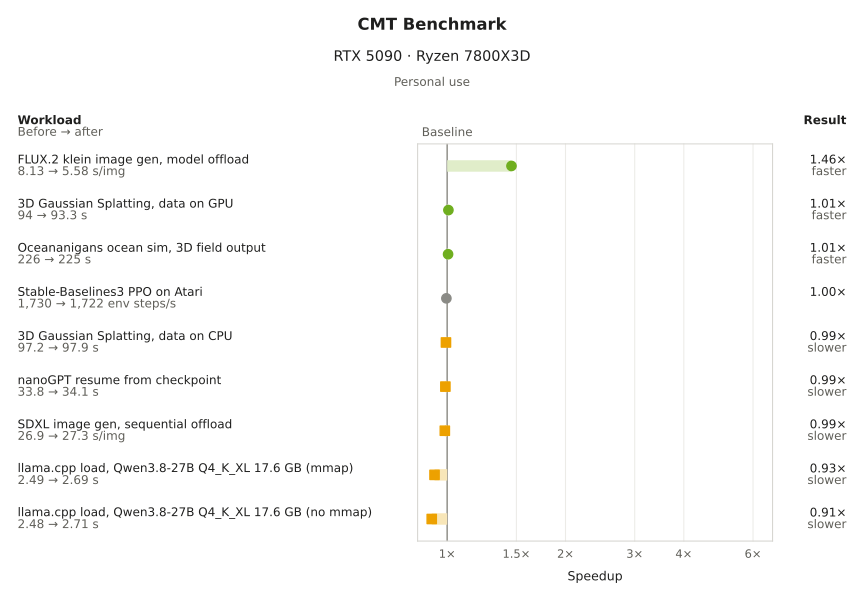
For home desktop setups, many applications are limited by the amount of VRAM. We can see speedups in workloads requiring offloading (from text, image generation) and some improvement in starting up inference engines (llama.cpp, vllm, sglang)
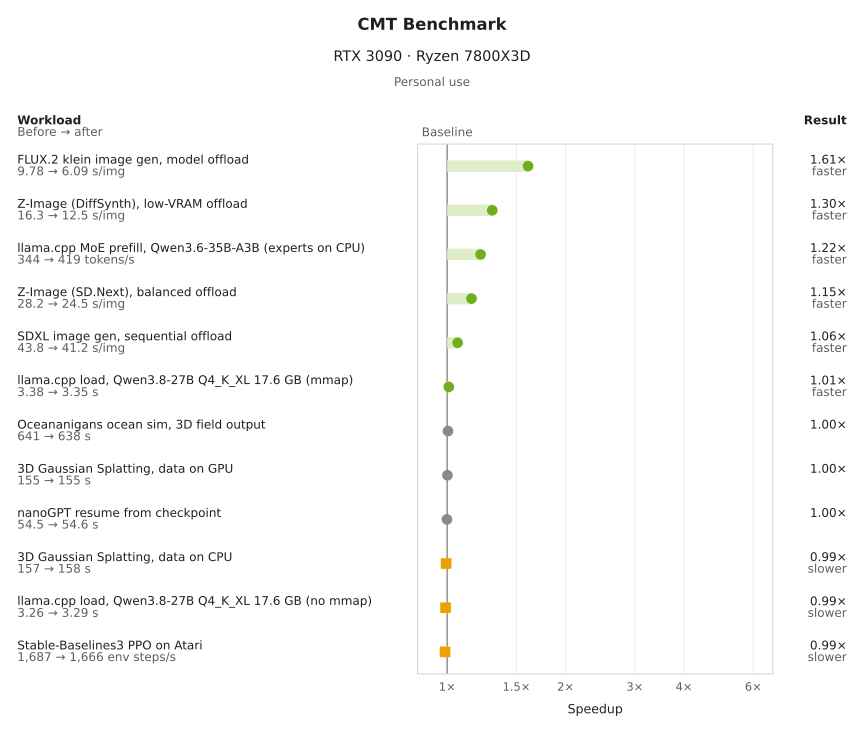
Improvements:
- Low VRAM inference
- text generation - llama.cpp moe offload (can’t fit on machine). prefill improves
- image generation - diffusers, Z-image, SDXL offloading with improved image/second
- Faster startup time
- llama.cpp startup time (just barely with 1.01x!) Didn’t pan out
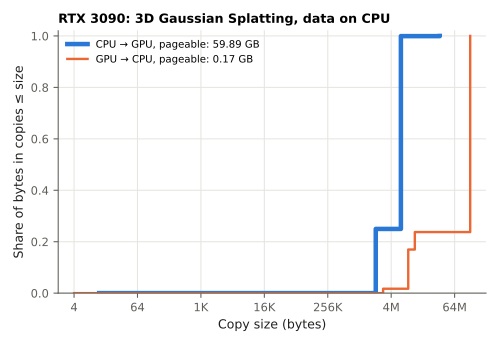
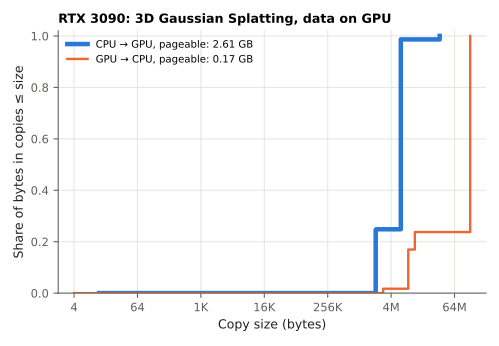
- gaussian-splatting - I had hoped with offloaded improvements to offload splatting.
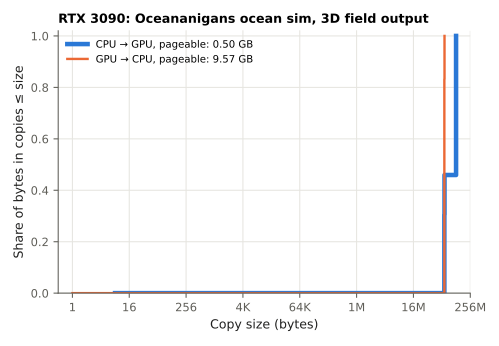
- simulation - Oceananigans, was hoping it could benefit with offloading
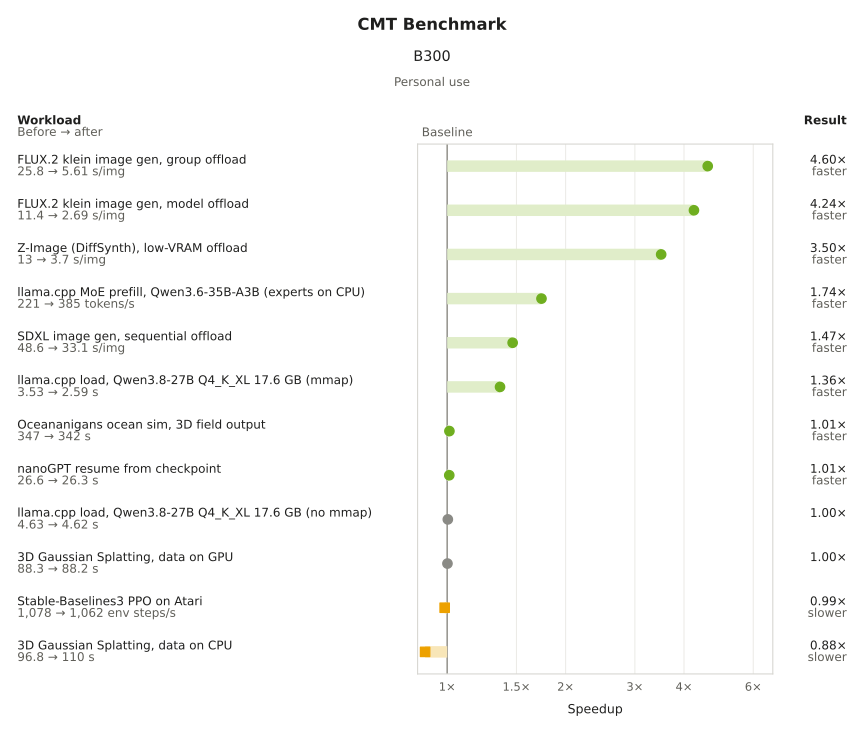
Workloads on other machines (5090, B300)
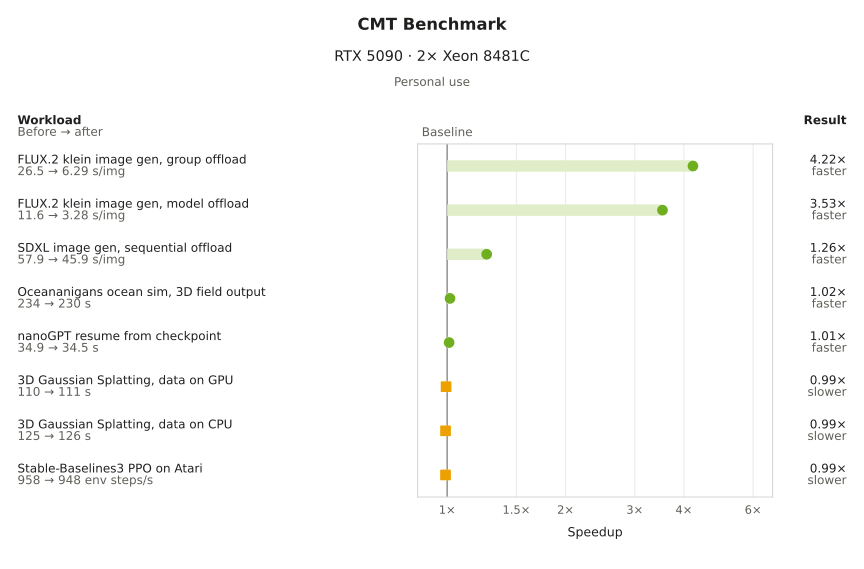
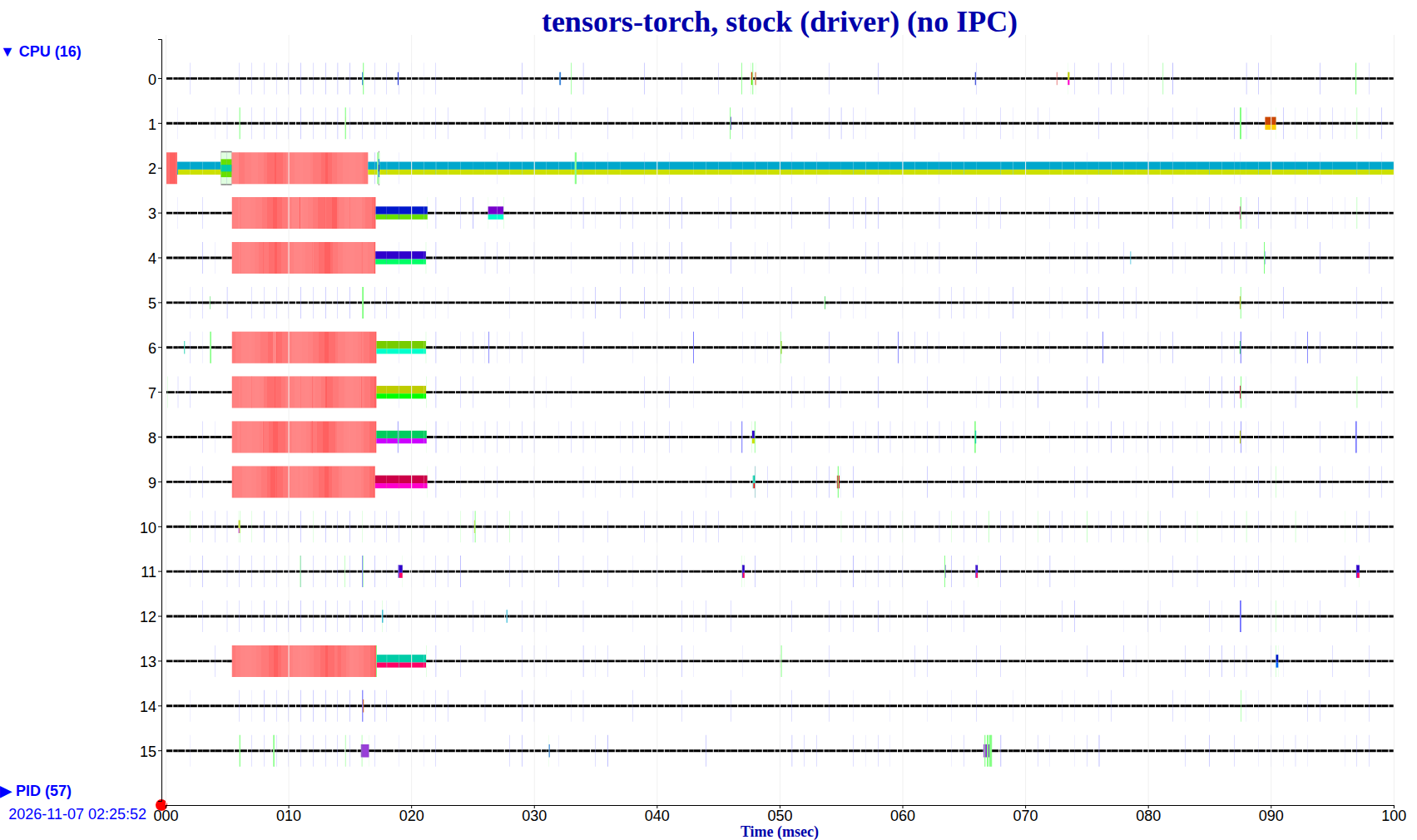
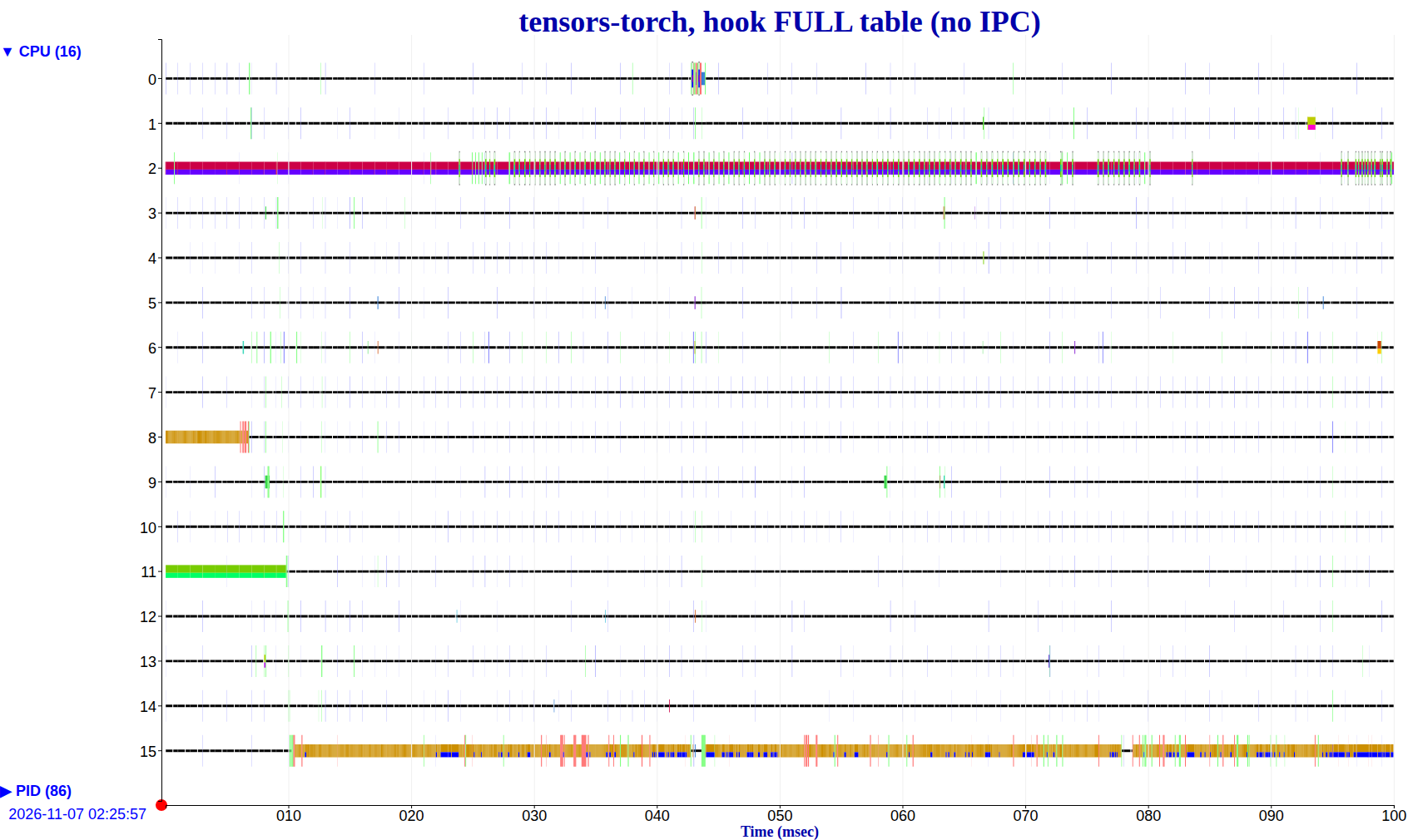
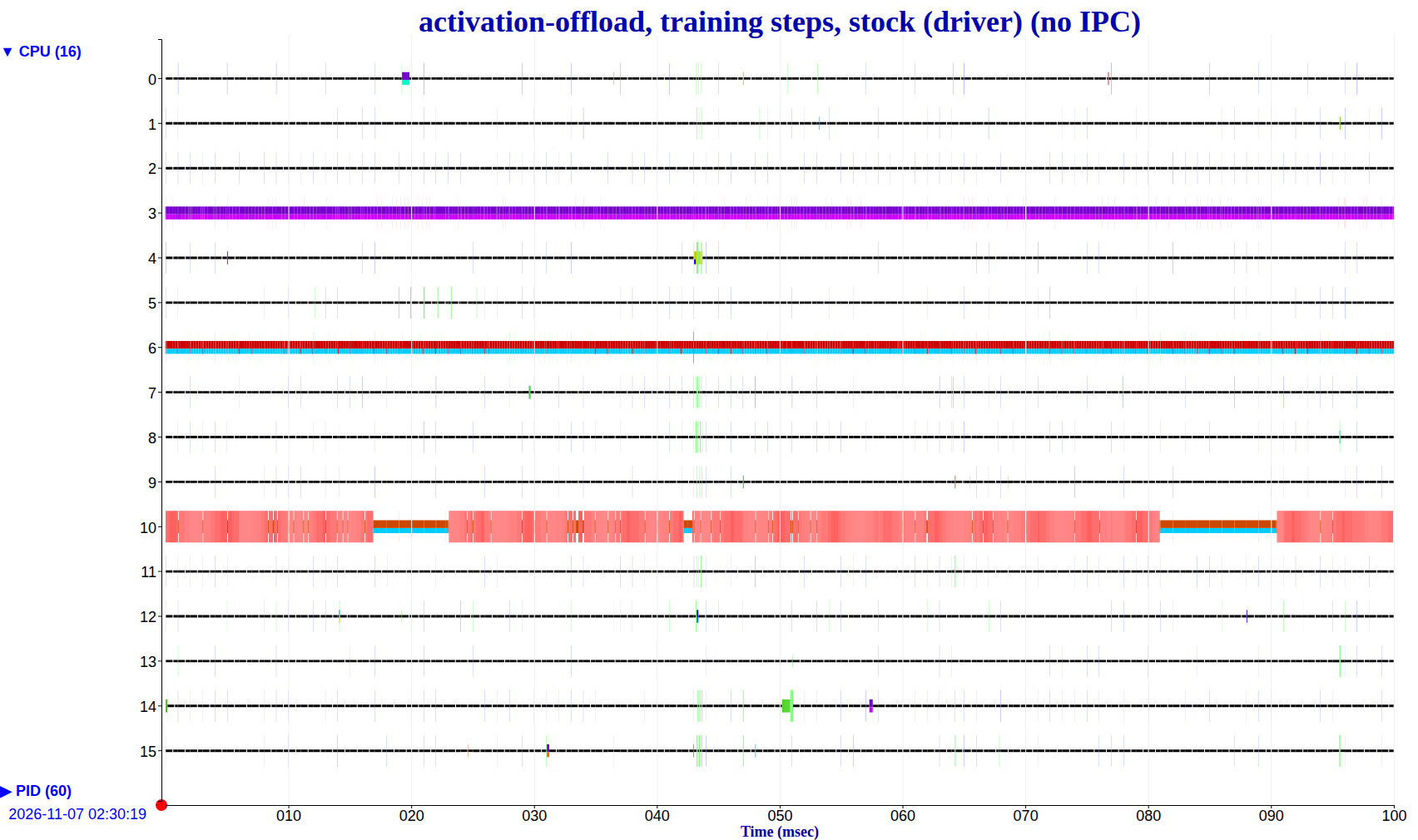
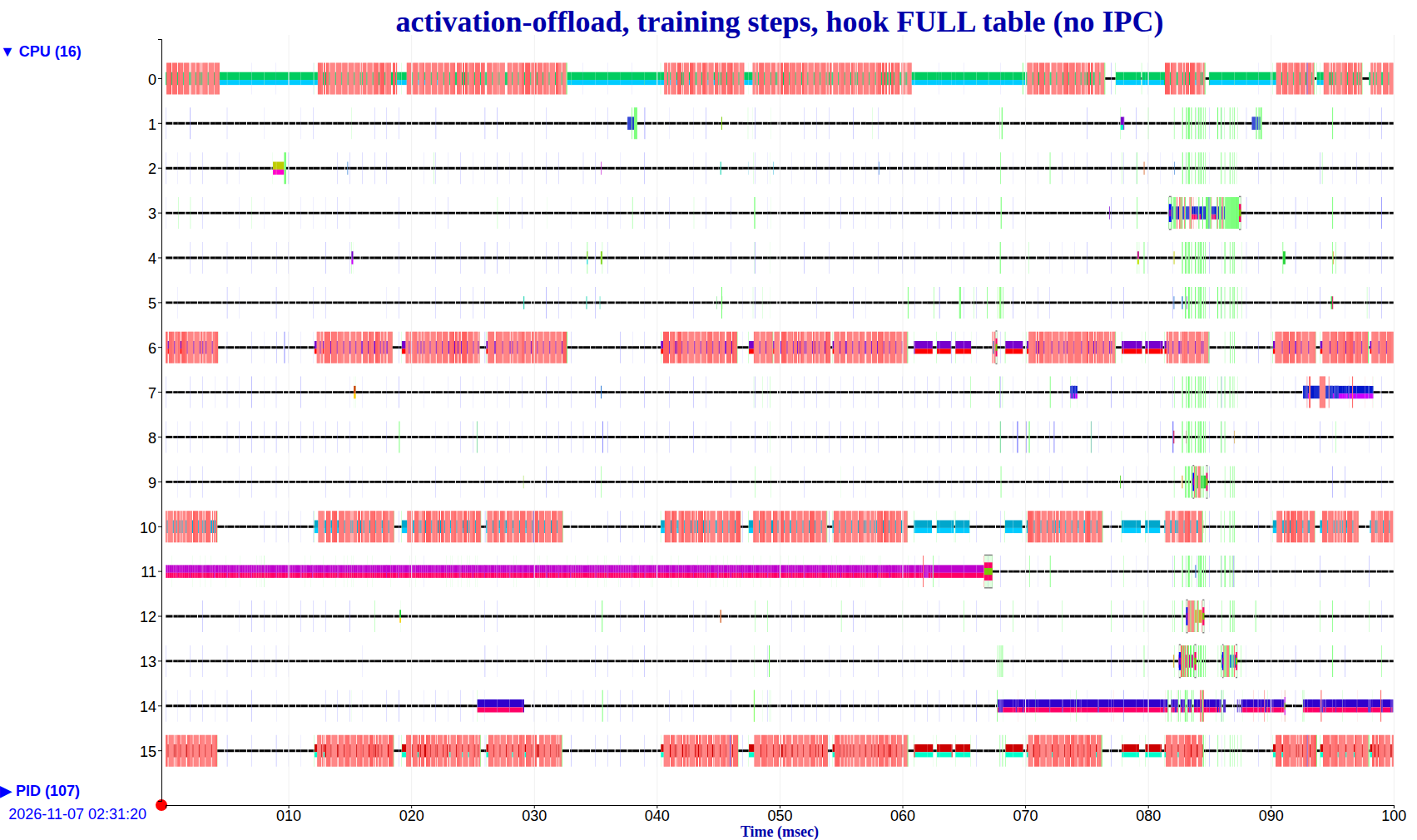
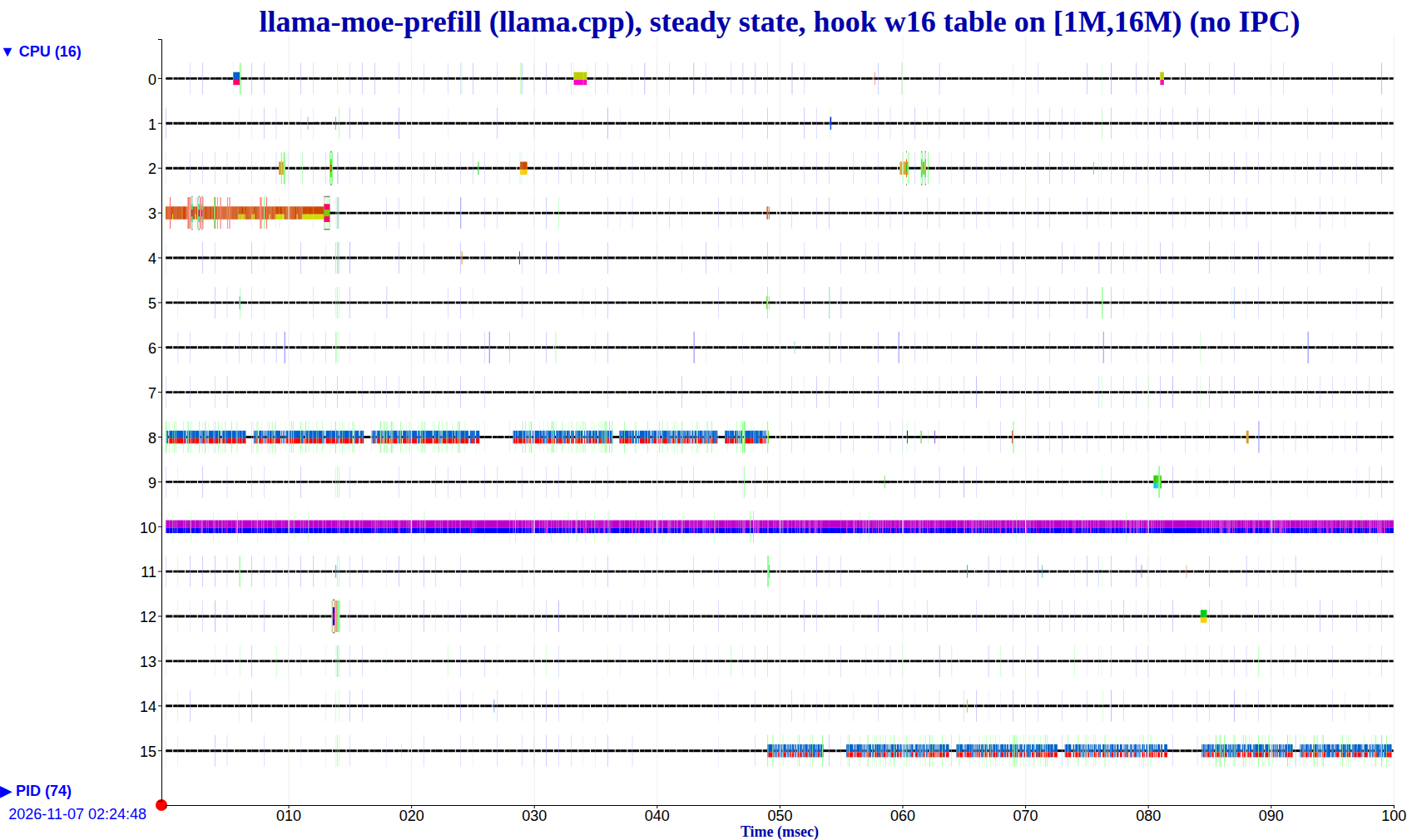
KUTrace runs for workloads
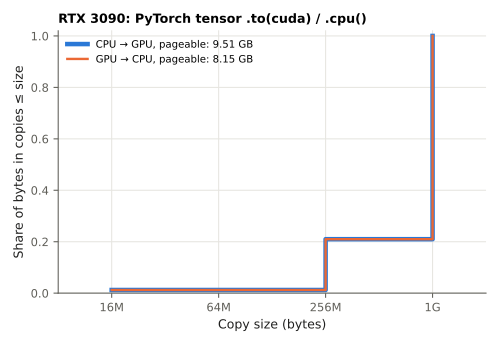
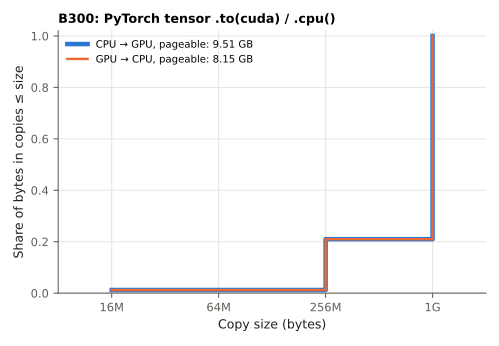
PyTorch tensor .to(cuda) / .cpu()
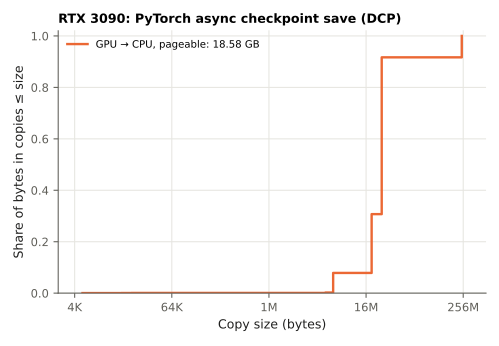
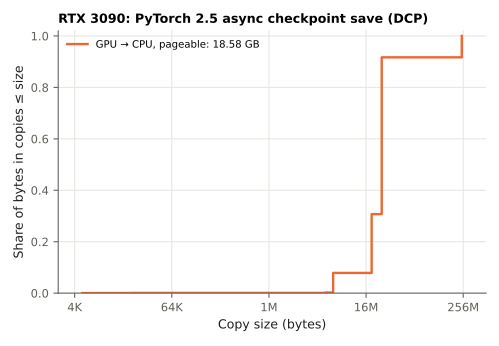
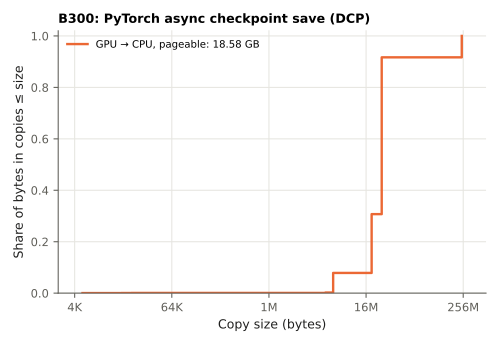
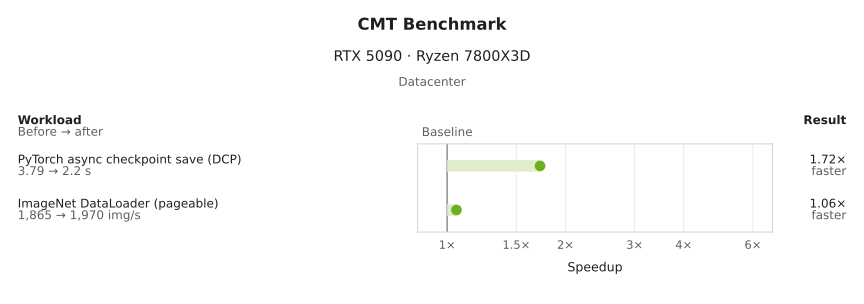
PyTorch async checkpoint save (DCP)
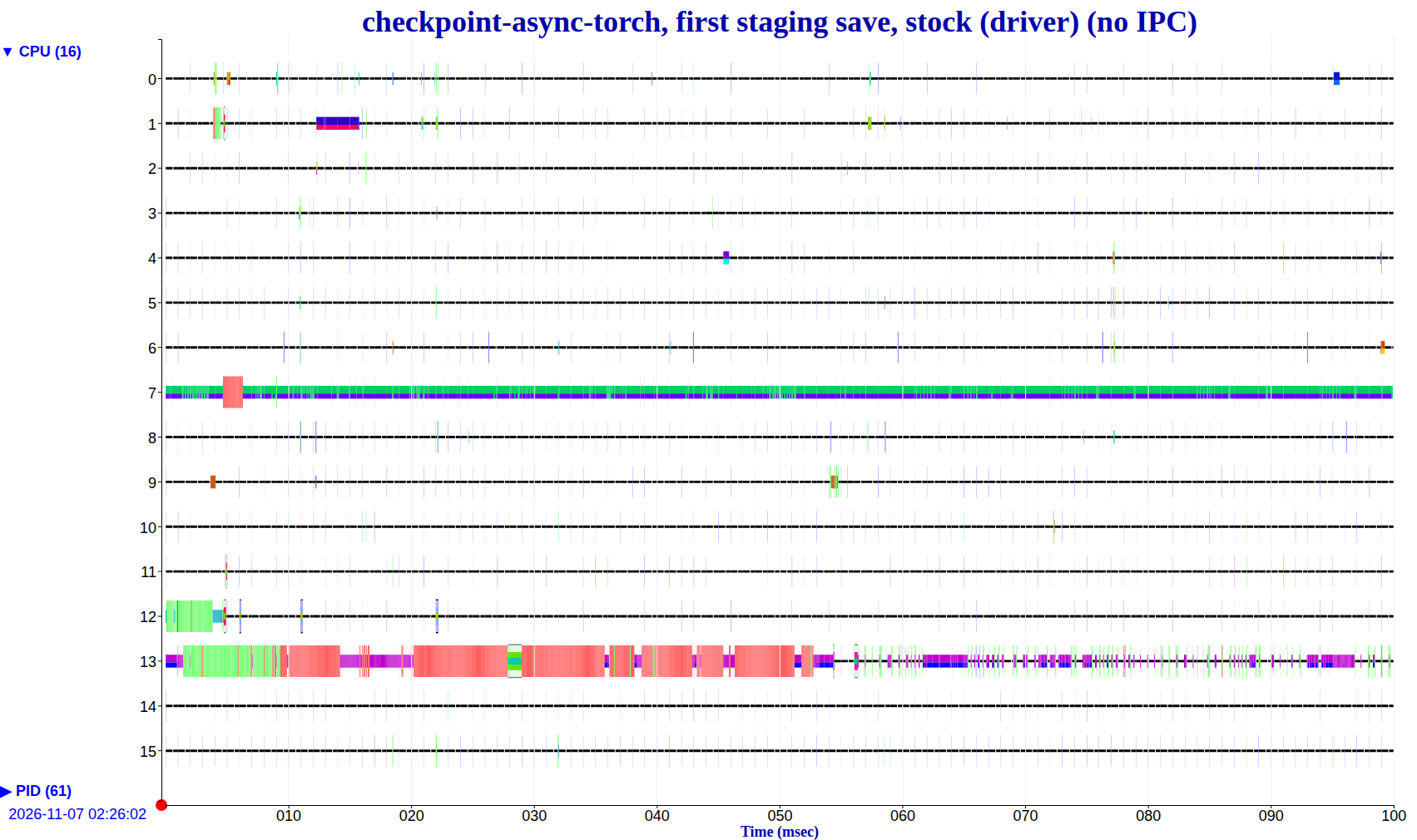
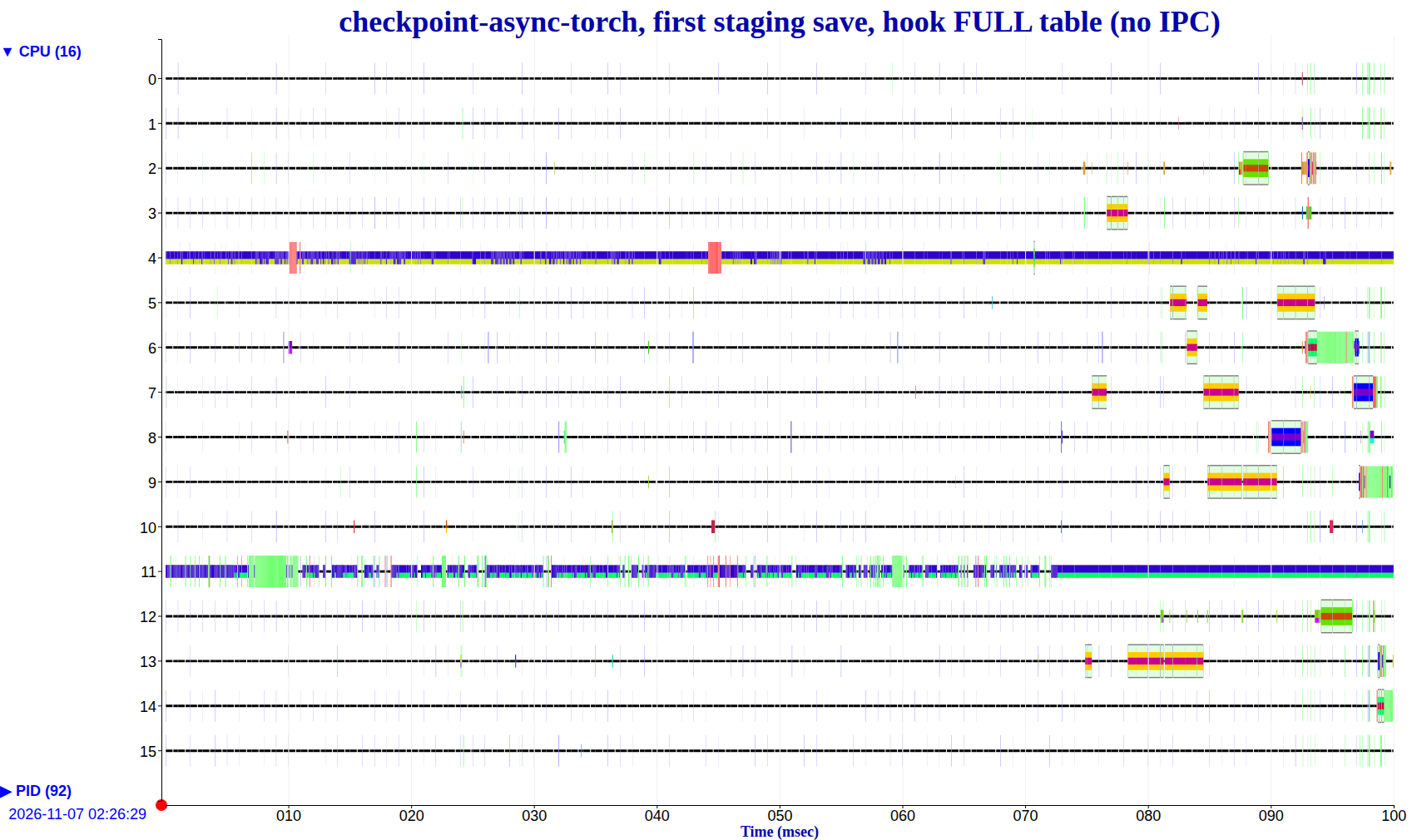
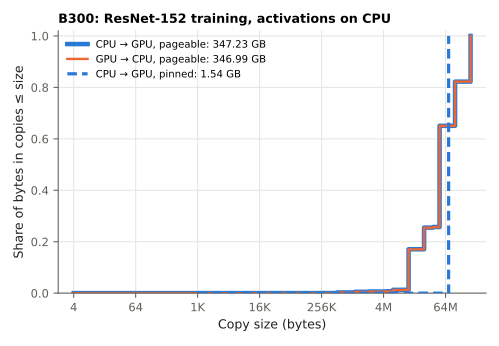
ResNet-152 training, activations on CPU
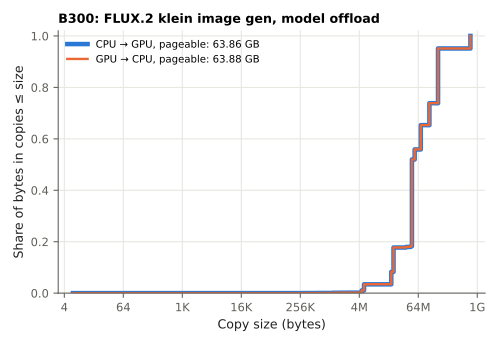
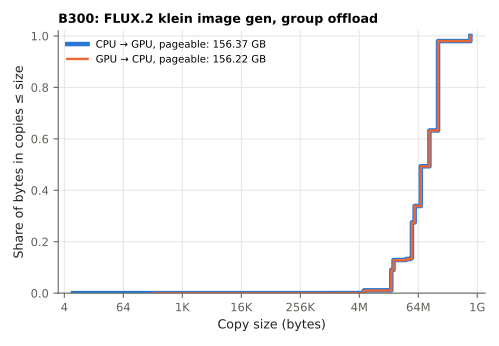
FLUX.2 klein image generation
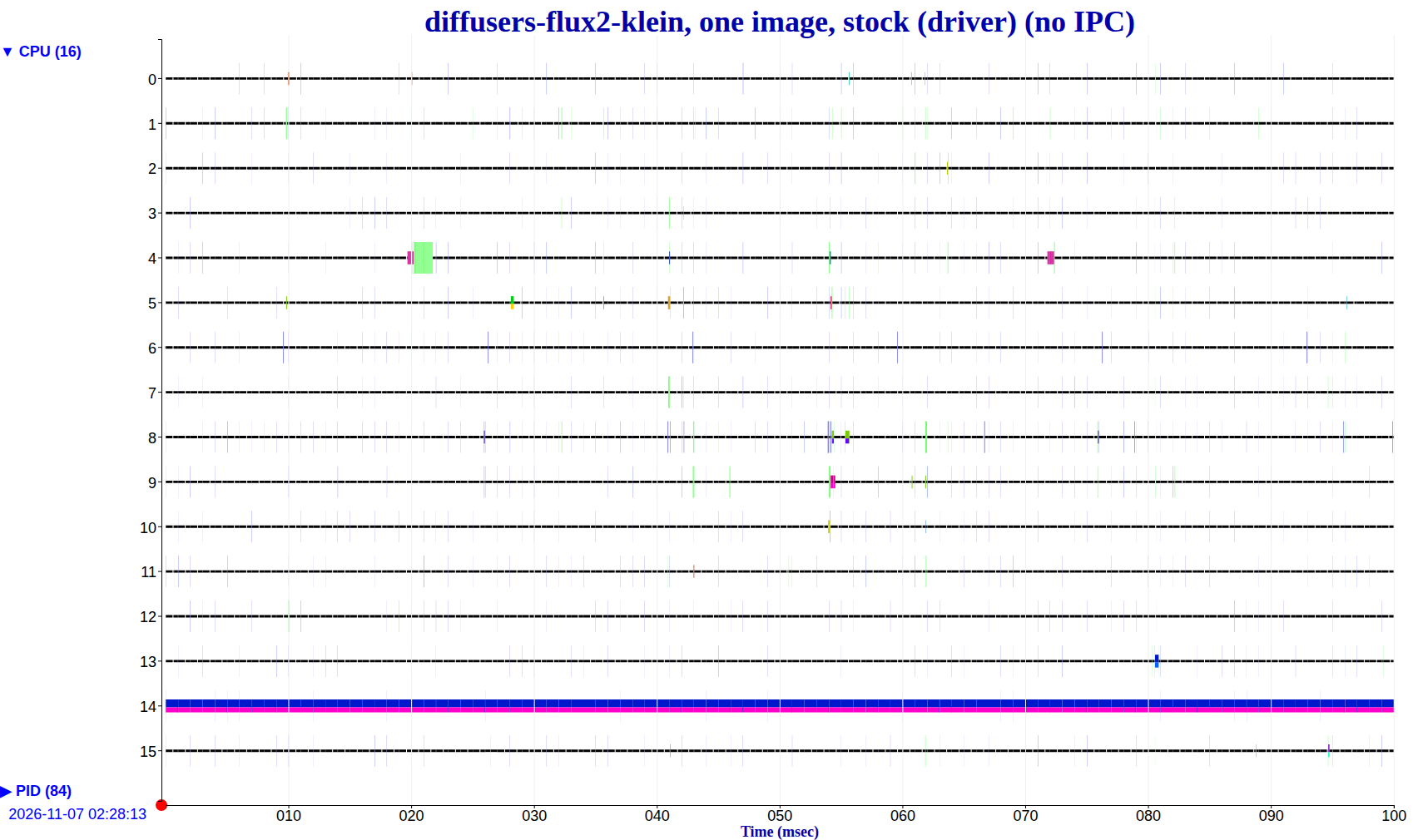
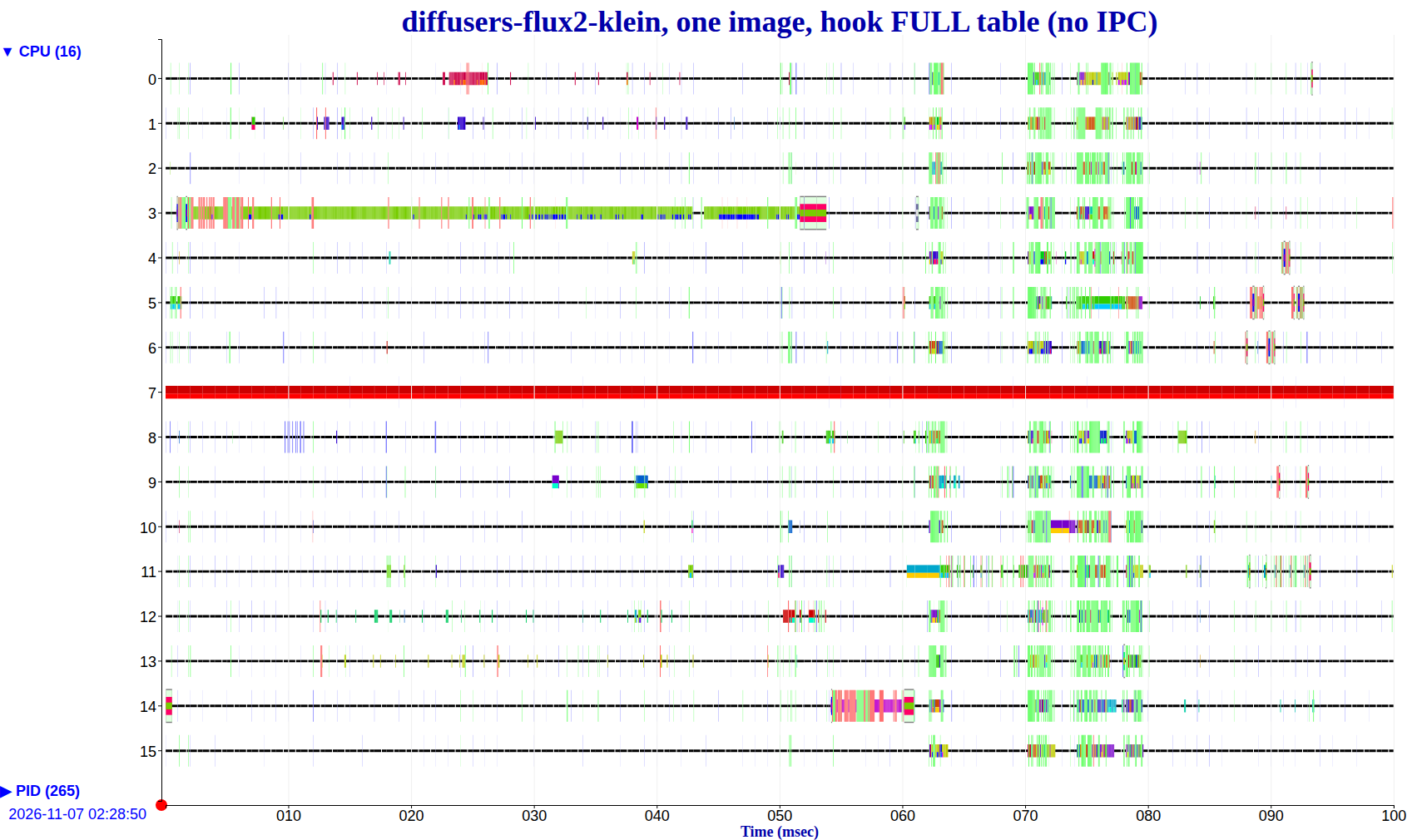
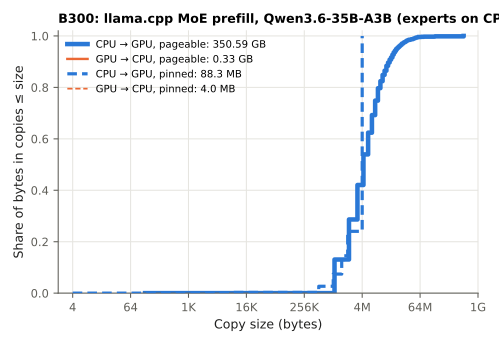
llama.cpp MoE prefill (experts on CPU)
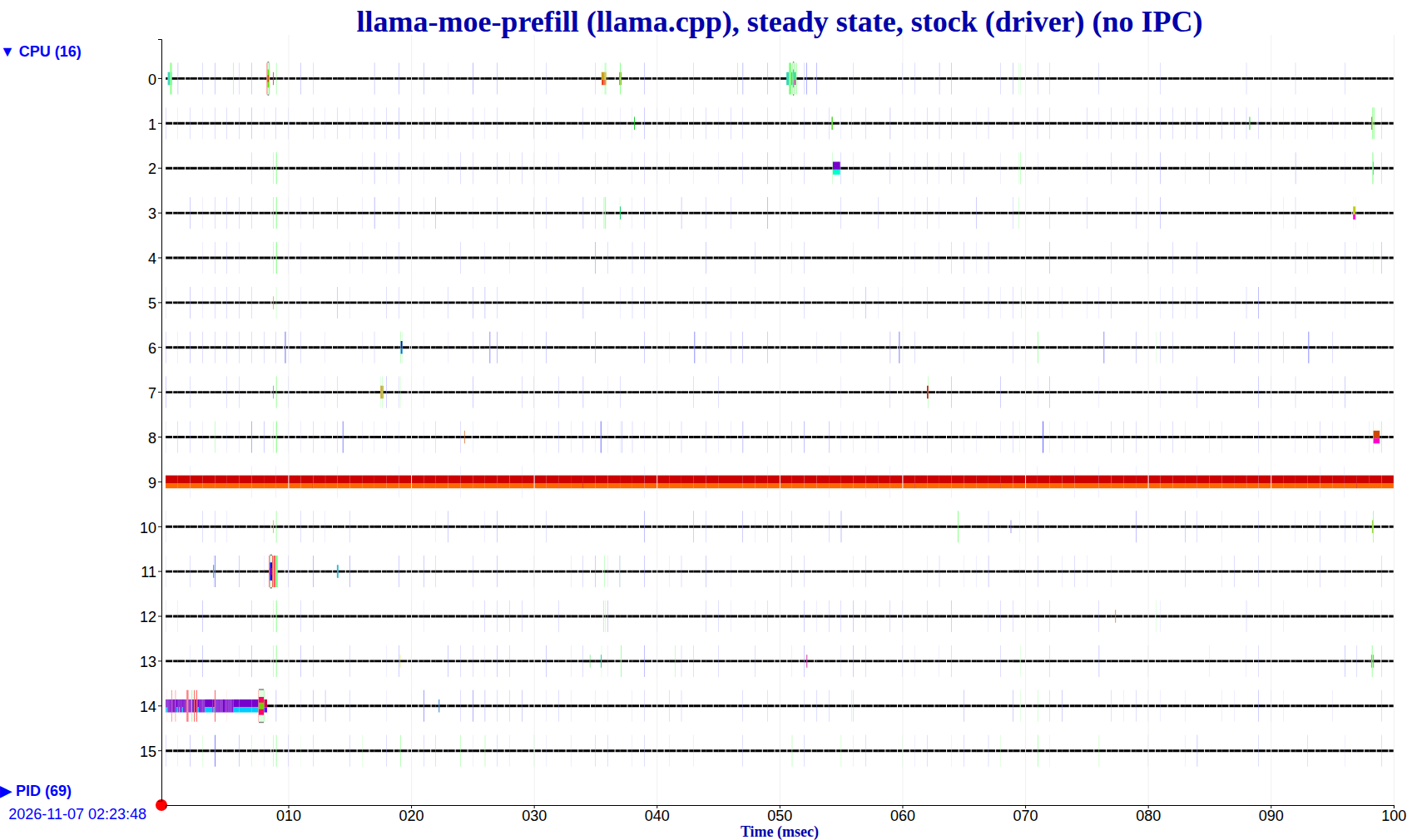
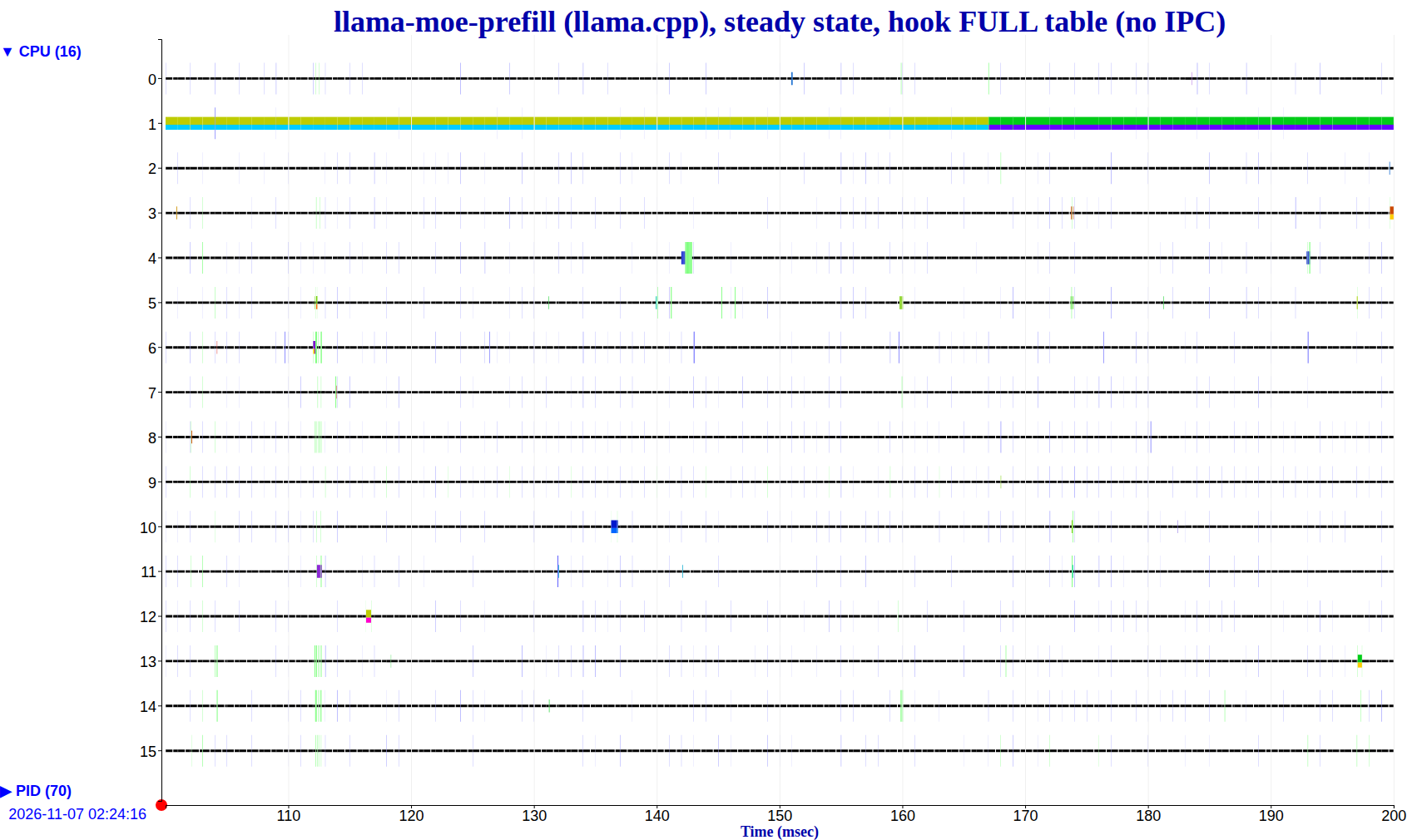
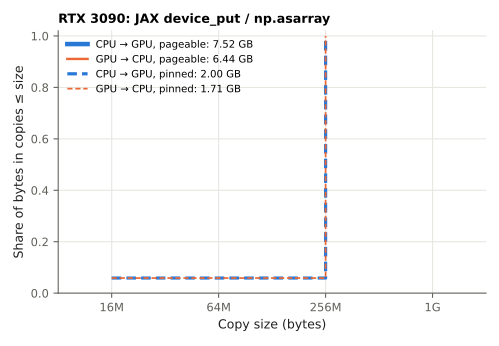
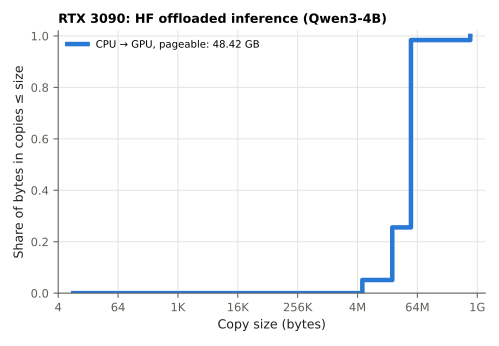
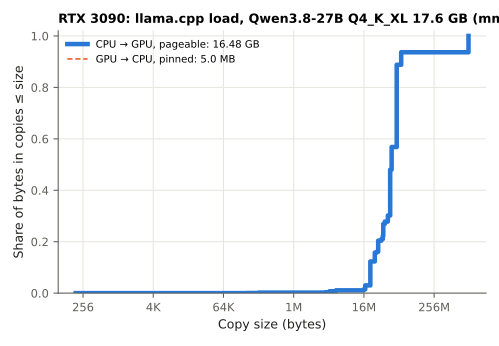
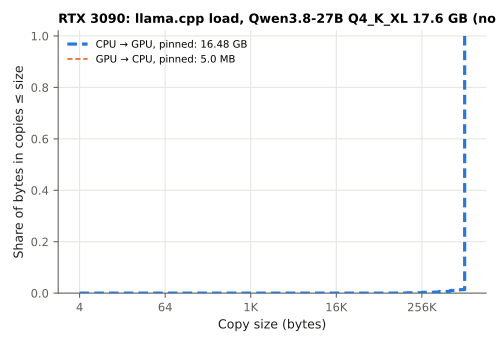
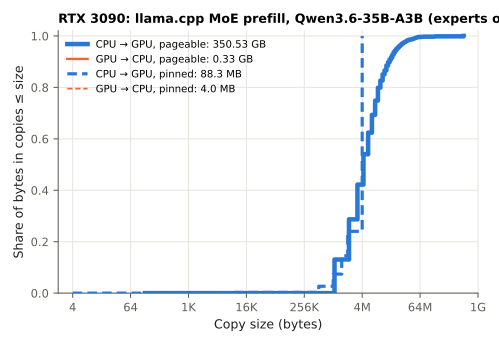
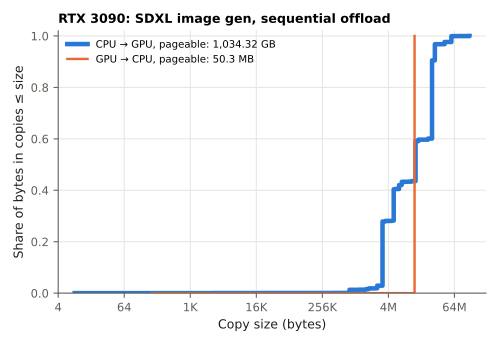
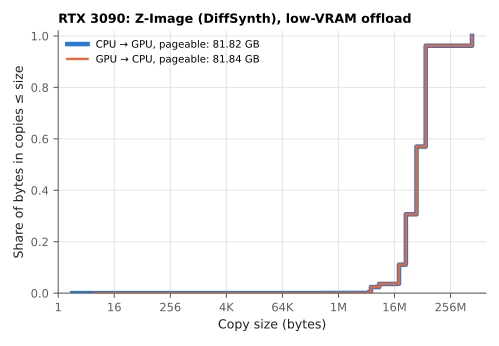
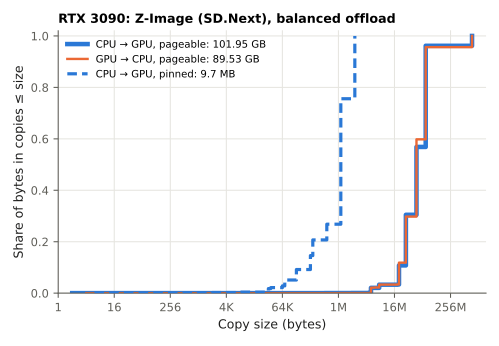
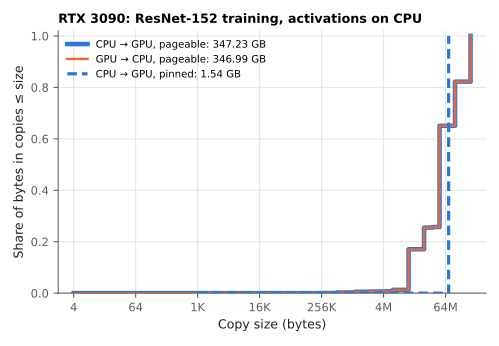
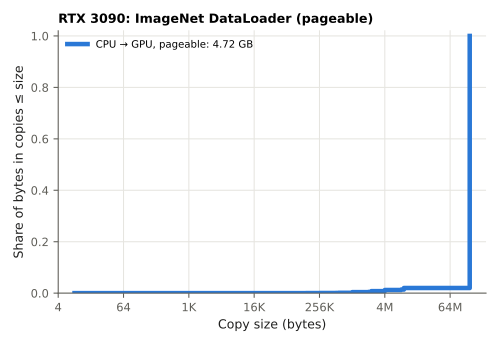
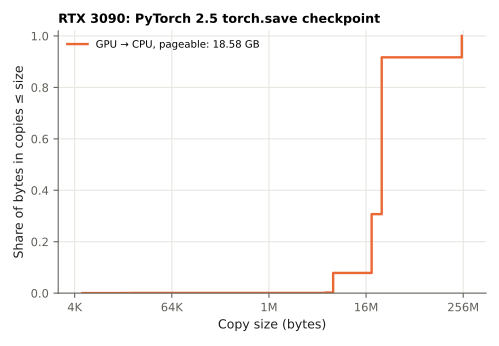
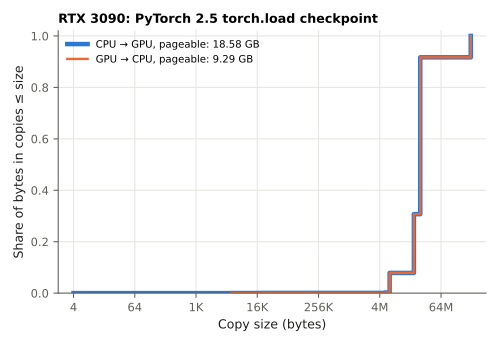
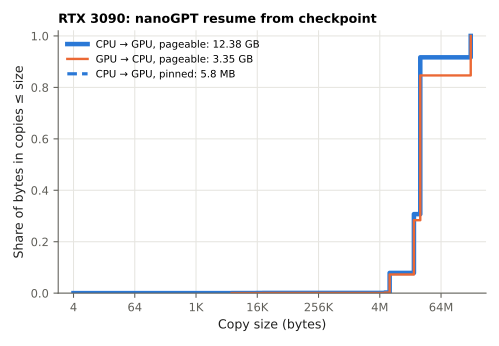
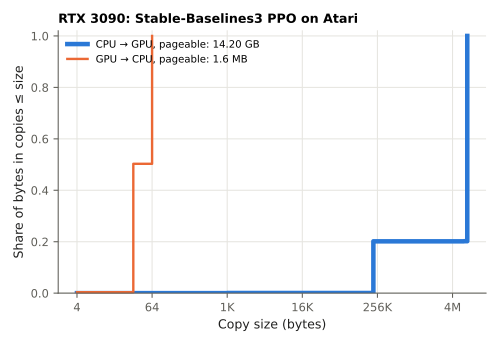
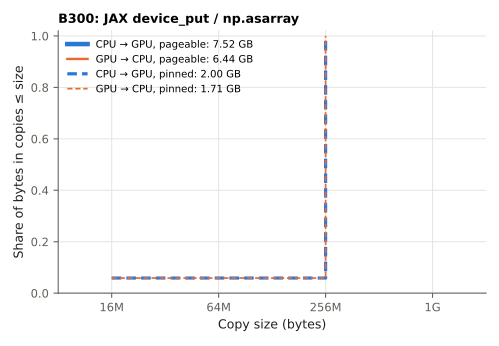
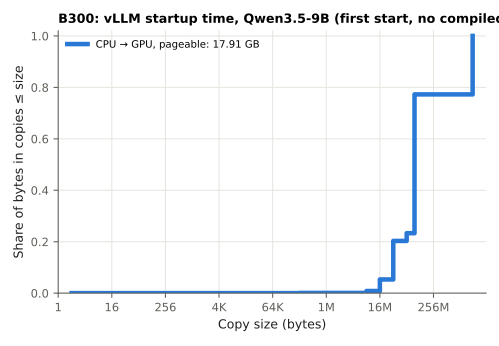
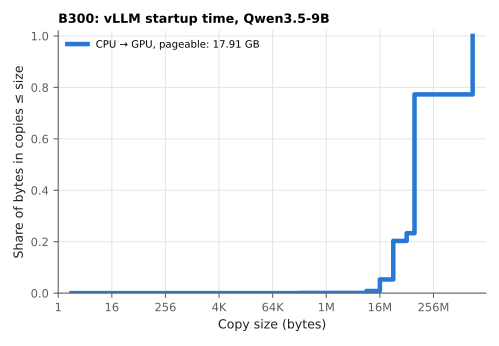
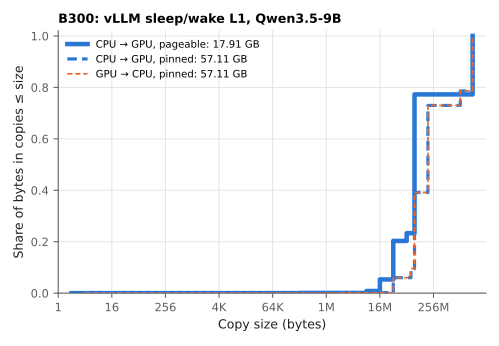
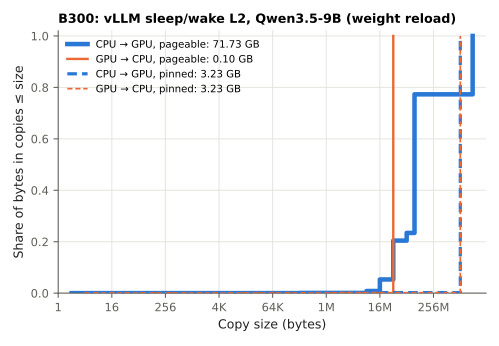
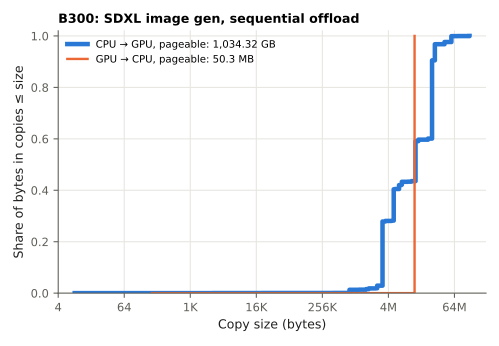
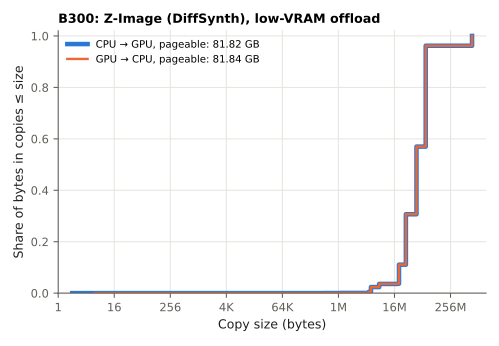
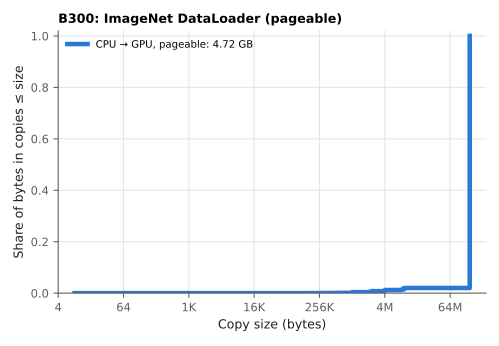
CDF of pageable/memory copies in the workload
RTX 3090
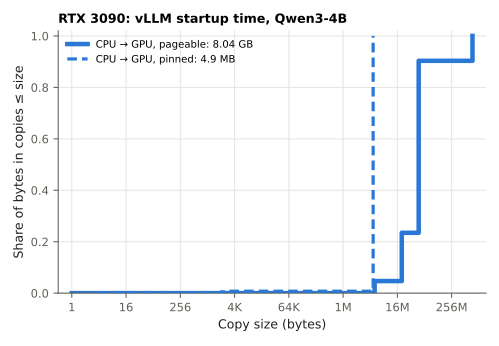
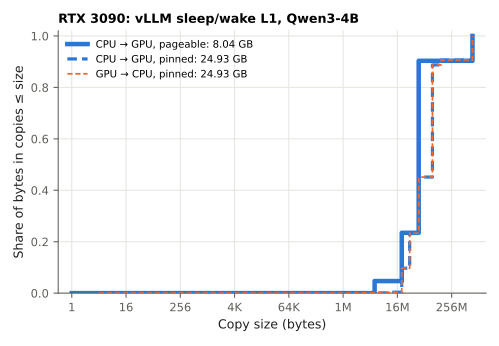
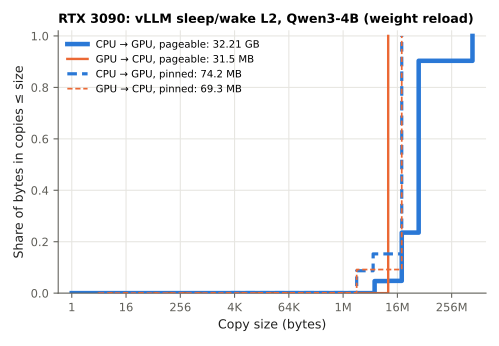
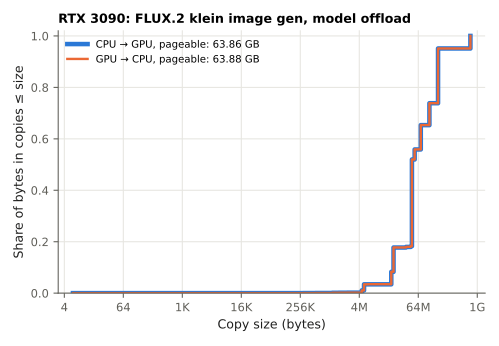
B300
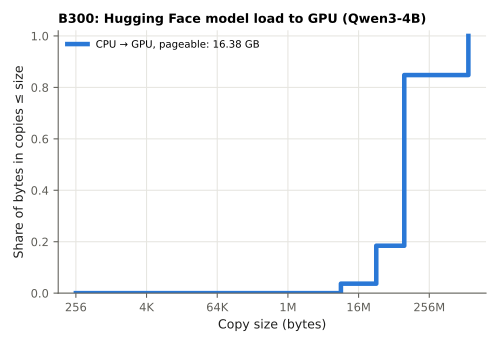
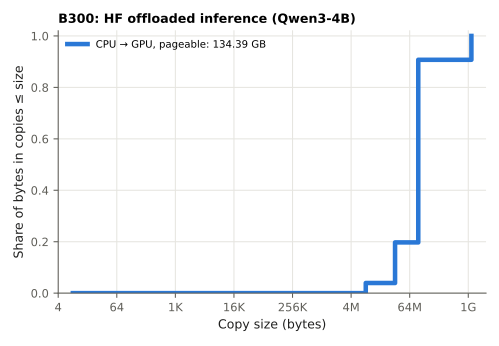
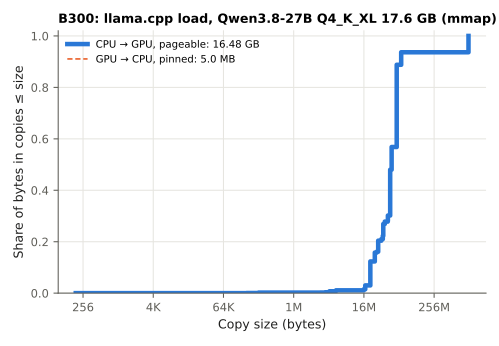
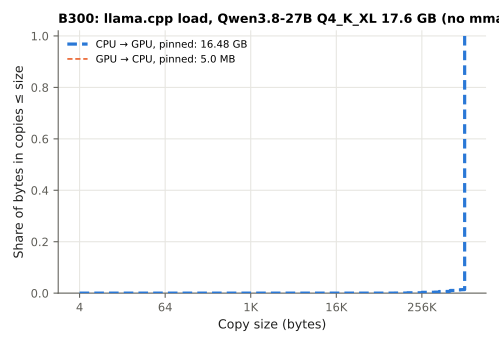
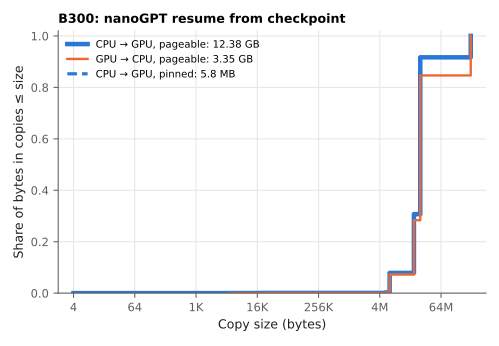
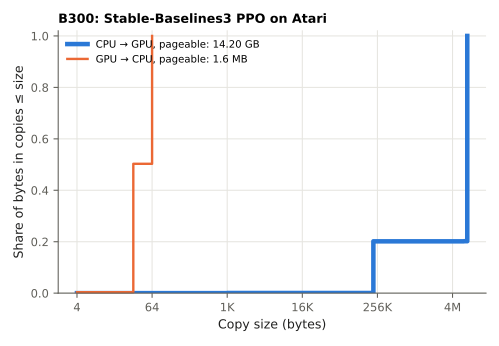
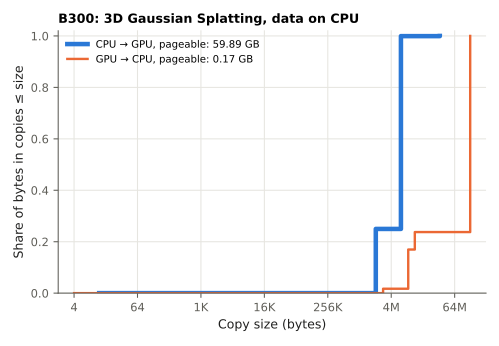
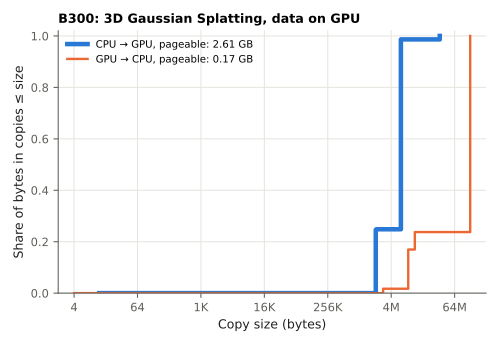
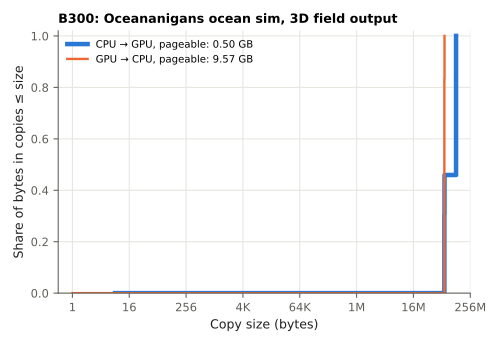
Datacenter
Workloads
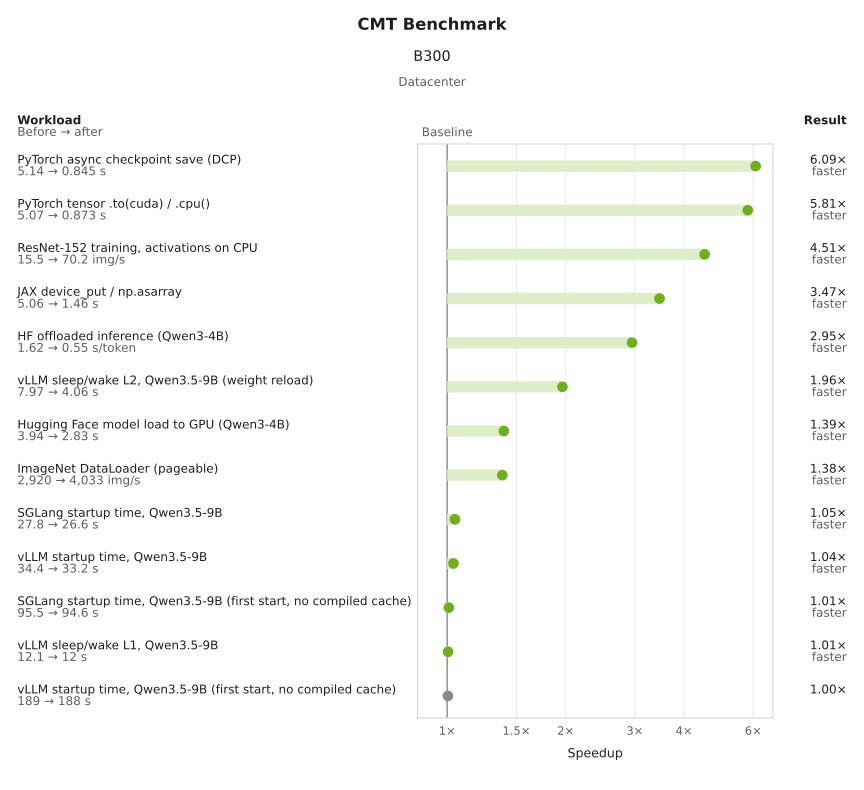
Do note that I’ve used relatively small models (Qwen3-4B, Qwen3.b-9B) for a b300. Copying should take a larger portion with larger models.
Improvements:
- Async checkpointing
- Pytorch async checkpointing improves by 6x
- Activation offloading
- Resnet example with a 4x improvement
- Dataloading
- data tensors (pytorch, jax) copying improves by magnitudes for large 1GB buffers (3x-5x)
- dataloaders (ImageNet dataset) improves (1.36x)
- Sandboxing
- vLLM/Sglang startup time (1.01x - 1.05x)
- vLLM sleep l2 (1.96x)
Other machines (5090, B300)
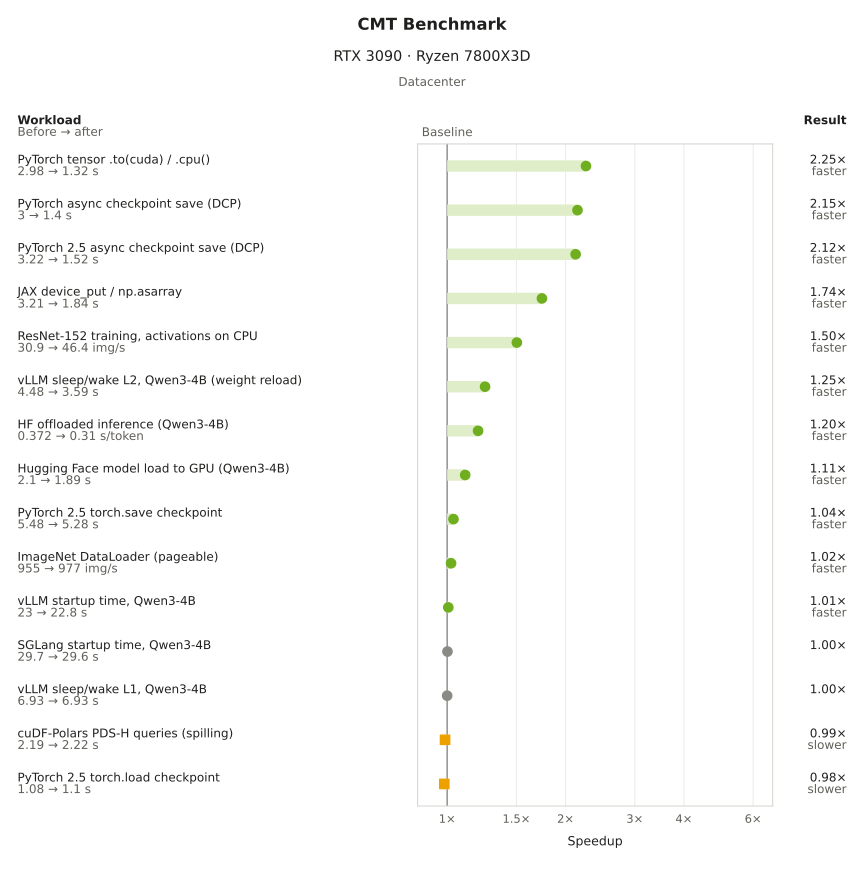
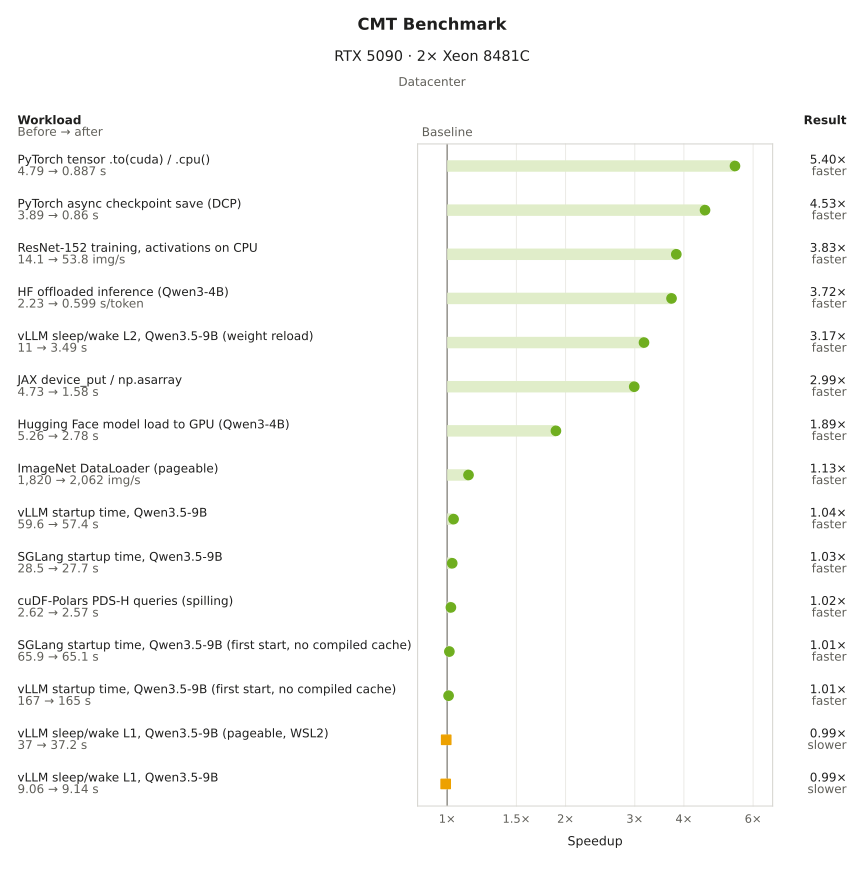
Cost analysis
I’ll present a very very rough estimate of cost savings for a datacenter for inference and RLSomewhat popular workloads at this time of writing (2026). Since GPUs are so expensive, it would be nice to see how this optimization could impact cost.
Let’s pull some base numbers:
- Meta’s Prometheus datacenter with ~1 million GPUs
- Rental price per GPU with B300 ~ $8.99 from RunPod
- CMT benchmark shows 1.39x speedup (3.94 s to 2.83 s with loading a 4B model). Referencing Fergus Finn’s numbers from loading a 122B model on 8x B200 (~117GB) with warm starts, and our speedups, we can assume a 5x speedup with our 5x speedup in copying, reducing the time from 88s to 63.2s (1.39x).
| Event | How often | Cost today per year (32,768 GPUs) | Savings per year (32,768 GPUs) | Cost today per year (1,000,000 GPUs) | Savings per year (1,000,000 GPUs) | Savings % | Source |
|---|---|---|---|---|---|---|---|
| Resuming training after an interruption | Every 1.4 h to 1.6 h for a 32,768-GPU job | $13.5M to $15.5M | $3.8M to $4.3M | $412M to $473M | $115M to $133M | 28% | Meta Prometheus post + model loading |
| Disk based RL weight sync | Once per RL step | $77M | $19M | $2.4B | $573M | 24% | Seer paper + my B300 benchmark |
| Starting an engine on a spot machine | 0.98 per machine per day | $5.7M | $256,000 | $175M | $7.8M | 4.5% | Introl + model loading |
| Resuming from vLLM sleeping (level 2) | 1 to 5 per model per day | $240,000 to $1.2M | $117,000 to $584,000 | $7.3M to $36M | $3.6M to $17.8M | 49% | C2CServe paper + my B300 benchmark |
| Async checkpointing | 1 per hour (my assumption) | $560,000 | $467,000 | $17M | $14M | 84% | PyTorch blog + my B300 benchmark |
| Restarting a serving replica | 0.31 per replica per day | $2.8M | $81,000 | $84M | $2.5M | 2.9% | NVIDIA Dynamo paper + model loading |
Resuming Training After Interruption
From meta’s blog post, it mentions “a 32,768 active-GPU training run” and has “an overall wall-clock mean time between interruptions (MTBI) of ~47k GPU hours” and improved “to more than 54K GPU hours”. This means that an interruption happens on average ~1.4 - ~1.6 hours on the ~32k gpus.
| Meta's Prometheus | Value |
|---|---|
| Time between interruptions of a 32,768-GPU job | 1.4 h to 1.6 h |
| Fleet cost of interrupts, for each second of a restart | 0.017% to 0.019% of the GPU time |
| The same at 1,000,000 GPUs | 1.5M to 1.7M GPU-hours per year |
| Fleet cost per year of each second in those restarts (32,768 GPUs) | $435,000 to $500,000 |
| Fleet cost per year of each second in those restarts (1,000,000 GPUs) | $13M to $15M |
With loading a 117GB model, we can save 0.15-0.17% of the fleet.
| Checkpoint reloaded on each GPU | Fleet | Fleet cost of the reload | Optimization % | Fleet cost savings | GPU-hours per year | Fleet cost savings per year |
|---|---|---|---|---|---|---|
| 117 GB model | 32,768 GPUs | 0.52% to 0.60% | 28% | 0.15% to 0.17% | 0.42M to 0.48M | $3.8M to $4.3M |
| 117 GB model | 1,000,000 GPUs | 0.52% to 0.60% | 28% | 0.15% to 0.17% | 13M to 15M | $115M to $133M |
Disk based RL Weight Sync
In Reinforcement Learning for LLMs, the trainer’s weights need to be synced with the trainer workloads. This means there is a constant one time copy of trainer weights. The Seer paper from Moonshot AI shows a table of weight updates. For example, 3% of the time is spent in updating weights for training Kimi-K2. If the checkpoint is written in a distributed filesystem, disk sync is performed using pageable copies. For example, an RL framework, AReal calls SGLang’s /update_weights_from_disk. Our microbenchmark shows a 1.32x improvement. Moonshot reports 3% of time spent is in weight update syncing for Kimi-K2.
We can see a 0.73% in fleet savings.
| Model synced after each RL step | Fleet | Fleet cost of the sync | Optimization % | Fleet cost savings | GPU-hours per year | Fleet cost savings per year |
|---|---|---|---|---|---|---|
| 1 TB (Kimi-K2) | 32,768 GPUs | 3% | 24% | 0.73% | 2.1M | $19M |
| 1 TB (Kimi-K2) | 1,000,000 GPUs | 3% | 24% | 0.73% | 64M | $573M |
Expand to see the rest
Starting vLLM/Sglang engine for Spot Instances
Introl, shows an interruption rate of 2.3% per hour for A100 and 4.1% per hour for H100 machines using spot instances. Using the same 117GB model loading, we can get a 0.01% in fleet savings, whic isn’t too much.
| Model that starts | Fleet | Fleet cost of the load | Optimization % | Fleet cost savings | GPU-hours per year | Fleet cost savings per year |
|---|---|---|---|---|---|---|
| 117 GB (Qwen3.5-122B-A10B-FP8) | 32,768 GPUs | 0.035% | 28% | 0.0099% | 28,000 | $256,000 |
| 117 GB (Qwen3.5-122B-A10B-FP8) | 1,000,000 GPUs | 0.035% | 28% | 0.0099% | 0.87M | $7.8M |
Resuming from vLLM sleeping
C2CServe paper states that “the median active model is idle for 96% of observed hours”. This means that a model that is active in 4% of hours is active ~1 hour a day. Let’s vary this from 1-5 times per day.
| Wake from vLLM sleep level 2 | Value |
|---|---|
| Wakes per model per day | 1 to 5 |
| Fleet cost of the wakes, for each second of a wake | 0.0012% to 0.0058% of the GPU time |
| The same at 1,000,000 GPUs | 101,000 to 507,000 GPU-hours per year |
| Fleet cost per year of each second in those wakes (1,000,000 GPUs) | $0.9M to $4.6M |
Referencing our speedup of 1.96x for vllm sleep l2, we get a 0.005% to 0.02% reduction in fleet cost.
| Model that wakes | Fleet | Fleet cost of the wake | Fleet cost savings | GPU-hours per year | Fleet cost savings per year |
|---|---|---|---|---|---|
| A 9B model vLLM sleep l2 | 32,768 GPUs | 0.009% to 0.046% of the fleet cost | 0.005% to 0.023% of the fleet cost | 13,000 to 65,000 | $117,000 to $584,000 |
| A 9B model vLLM sleep l2 | 1,000,000 GPUs | 0.009% to 0.046% of the fleet cost | 0.005% to 0.023% of the fleet cost | 0.4M to 2.0M | $3.6M to $17.8M |
Async checkpointing
A PyTorch blog reports a stop of 0.78 s for each checkpoint of Llama3-70B (~140GB). With our optimization of 6.09x for pytorch DCP async checkpointing, let’s say an hour per checkpoint, we can see a 0.018% saving.
| Async checkpoint save | Value |
|---|---|
| Checkpoints per day (my assumption) | 24 |
| Fleet cost of the checkpoints, for each second of a stop | 0.028% of the GPU time |
| The same at 1,000,000 GPUs | 2.4M GPU-hours per year |
| Fleet cost per year of each second in those stops (1,000,000 GPUs) | $22M |
Every second cut from a stop is worth 2.4M GPU-hours a year at this size. This is the breakdown for the stop that the PyTorch blog reports:
| Model that wakes | Fleet | Fleet cost of the wake | Optimization % | Fleet cost savings | GPU-hours per year | Fleet cost savings per year |
|---|---|---|---|---|---|---|
| A 9B model on one GPU (my B300 benchmark) | 32,768 GPUs | 0.009% to 0.046% | 49% | 0.005% to 0.023% | 13,000 to 65,000 | $117,000 to $584,000 |
| A 9B model on one GPU (my B300 benchmark) | 1,000,000 GPUs | 0.009% to 0.046% | 49% | 0.005% to 0.023% | 0.4M to 2.0M | $3.6M to $17.8M |
To conclude
GPUs are incredibly expensive pieces of hardware. I wish I could have ran this on more types of machines, but alas, I’m not made out of money. I hope that other people are interested in this project and are willing to share their results with me through raising it as a git PR, where the results show up on cudamemcpy.com and can be used by other users with a similar setup.
I didn’t run with big models on the single B300 nor did in even run a 8xB300 node. This would haven taken much longer to run and I would have burned way more money. However, this would have been more representative of a dataceneter workload.
Weird things with workloads
Running on vastai and runpod has weird artifacts. At one point, a 5090 was not accepting any CURL commands. A B300 has lower CPU bandwidth because of a noisy neighbor.
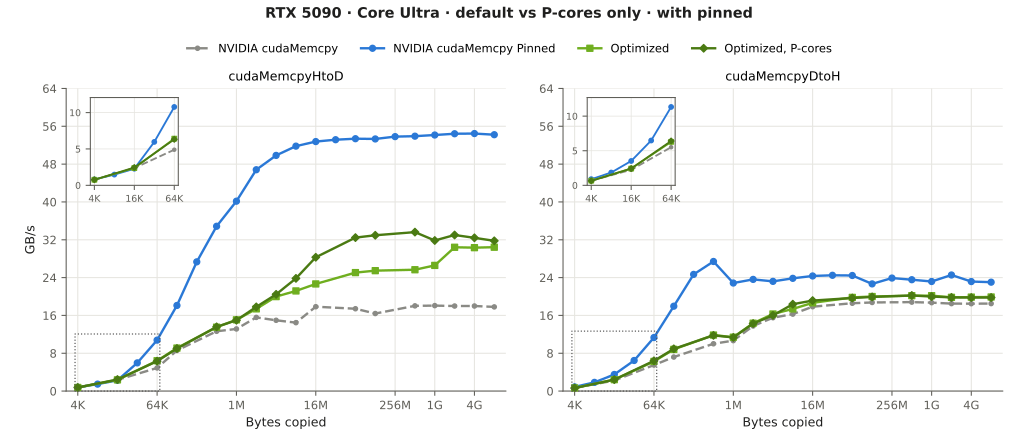
The run with the Core Ultra 9 285K has two interesting results. There’s unmatching HtoD and DtoH pinned copy bandwidth (~54 GB/s HtoD vs ~24 GB/s DtoH). The second is using P cores only could have a ~1.3x - 1.4x improvement (show in this example, with the ranges between 16MB and 1GB).
Other GPU support
AMD can be optimized as well in a similar fashion, I don’t have AMD cards. In their documentation, it states “pinned memory instead of pageable memory on the host can lead to a three times improvement in bandwidth”. I have seen this result in the default NVIDIA cudamemcpy runs.
Here’s the general area of code to change (at this time of writing). DmaBlitManager::hsaCopyStagedOrPinned performs pageable copies.
I would be interested in how copies go through GH200/GB300 machines, where transfers do not go through PCIe.
Multi-GPU
I do not have funds to rent a full 8xB300 node. CPU copying may become a bottleneck.
Money burned
Acknowledgments
Thanks to Chirag Shetty for giving valuable feedback.
Citation
To cite this article:
@article{zhu2026cudamemcpytuner,
  title = {cudamemcpy-tuner: cudaMemcpying 5x faster on a B300},
  author = {Zhu, Henry},
  journal = {maknee.github.io},
  year = {2026},
  month = {November},
  url = "https://maknee.github.io/blog/2026/CudaMemcpy/"
}
Enjoy Reading This Article?
Here are some more articles you might like to read next: